
티스토리 뷰
이 포스팅은 Cloud@net의 기시다님의 온라인 강좌 내용을 정리한 스터디 요약 자료입니다.
실습환경은 하이퍼바이저로 오픈스택을 활용하여 실습하였기에 실제 스터디 환경과 다르나 Ansible 설치 및 운영하는 실습은 동일함.
Ansible 개념
Ansible은 서버 관리를 자동화하는 Configuration Management 도구로서 여러 시스템의 설정을 코드 기반으로 작성하여 여러 환경에 동일하게 적용될 수 있게 하는 IaC(Infra as a Code) 자동화 도구입니다.
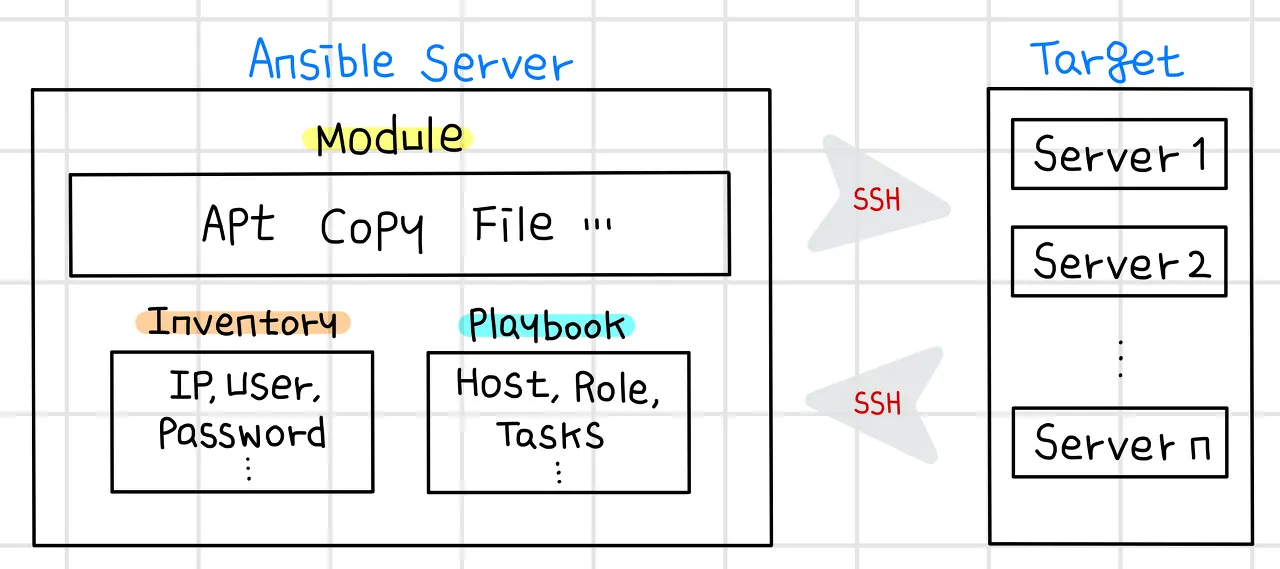
Ansible 특징
- 앤서블은 리눅스, MacOS, BSC 계열 유닉스, WSL을 지원하는 원도우에 파이썬과 앤서블 코어만 설치하면 어디에서나 플레이북(YAML 형식의 작업들은 순서대로 작성해 놓은 파일)을 작성하고 이를 실행시킬 수 있습니다.
- 앤서블은 이렇게 앤서블 코어가 설치되고 플레이북을 작성하여 실행할 수 있는 제어 노드 Control Node와 플레이북이 실행되어 애플리케이션 설치나 클라우드 시스템의 가상 서버 생성과 같은 작업이 수행되는 관리 노드 Managed Node로 구성됩니다.
- 물론 앤서블은 제어 노드에만 설치되고 관리 노드에는 설치되지 않습니다.
- 제어 노드에는 앤서블 코어가 설치되며, 사용자에 의해 정의된 플레이북과 관리 노드를 정의해놓은 인벤토리 파일에 의해 SSH 프로토콜을 사용하여 다양한 환경의 관리 노드 업무 자동화를 수행할 수 있습니다.
- No! 에이전트(Agentless)
- 기존 자동화 도구인 퍼펫 Puppet이나 셰프 Chef는 자동화 관리 대상 서버에 별도의 에이전트를 설치하고 이를 통해 자동화 업무를 수행합니다.
- 이러한 데몬 형식의 에이전트에 기반한 자동화 도구는 관리를 위한 복잡한 추가 작업이나 운영체제 버전에 따라 추가 패키지나 모듈을 설치하는 등의 작업이 발생합니다.
- 그러나 앤서블은 에이전트 설치 없이 SSH로 접속하여 쉽게 대상 서버들을 관리할 수 있습니다. 이것이 앤서블의 가장 큰 특징이자 장점입니다.
- 멱등성 Idempotent
- 멱등성은 동일한 연산을 여러 번 적용하더라도 결과가 달라지지 않는 성질로, 멱등법칙의 개념은 추상대수학과 함수형 프로그래밍의 여러 부분에서 사용하고 있습니다.
- 앤서블은 이러한 멱등성과 함께 시스템을 원하는 상태로 표현하여 유지하도록 설계되어 있어, 동일한 운영 작업을 여러 번 실행해도 같은 결과를 냅니다.
- 쉬운 사용법과 다양한 모듈 제공
- 다른 자동화 도구에 비해 복잡하지 않아 자동화 절차 및 과정을 이해하기 쉽습니다.
- 자동화 단계는 에디터만 있으면 YAML 문법을 사용하여 쉽게 작성하고 읽을 수 있습니다.
- 또한 파일 복사와 같은 일반 시스템 관리 모듈부터 다양한 환경의 퍼블릭 클라우드 관련 모듈 및 컬렉션까지 제공하므로, 쉽게 플레이북 예제를 찾아보고 자동화를 수행할 수 있습니다.
Ansible 분류
- 커뮤니티 앤서블 : 오픈소스 형태로 운영체제가 리눅스라면 어디에나 설치하여 사용할 수 있음레드햇 앤서블
- 오토메이션 플랫폼 : 레드햇 서브스크립션을 통해 사용
커뮤니티 앤서블 아키텍처 : 제어 노드 + 관리 노드
앤서블 안에는 다양한 모듈과 플러그인이 함께 설치되어 있으며, 앤서블이 관리하는 노드 정보를 저장하고 있는 인벤토리와 관리 노드에서 수행될 작업 절차가 작성되어 있는 플레이북이 존재합니다.
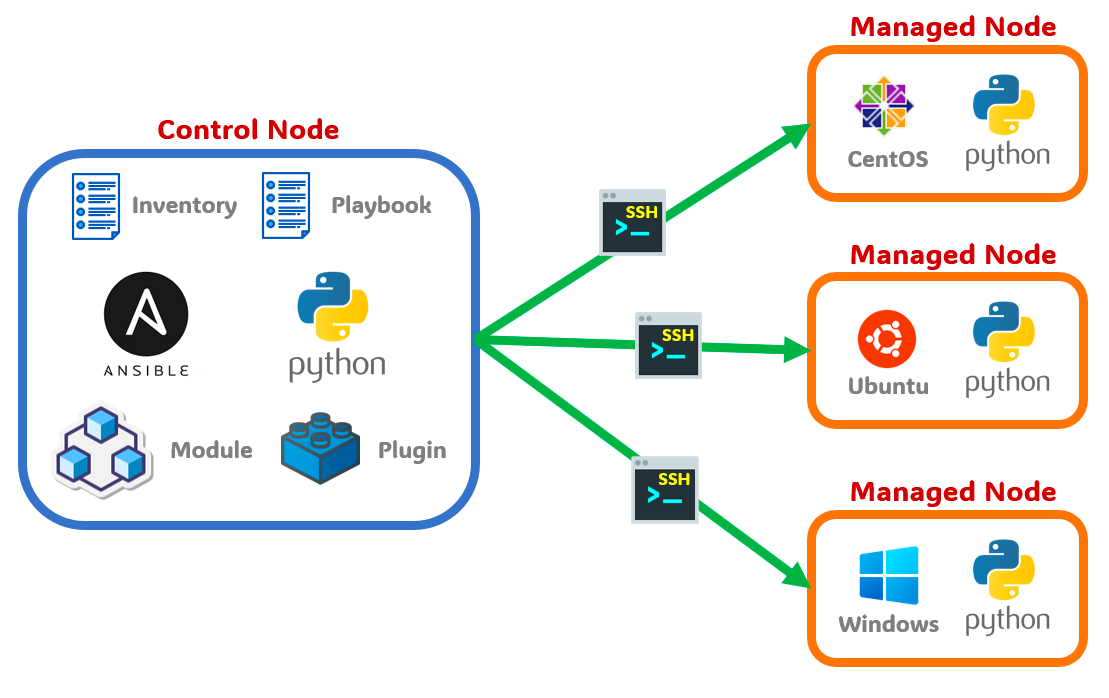
- 제어 노드 Control Node
- 앤서블이 설치되는 노드로 운영체제가 리눅스라면 제어 노드가 될 수 있습니다.
- 앤서블은 파이썬 모듈을 이용하므로 앤서블을 설치하고 실행하려면 파이썬이 함꼐 설치되어 있어야 합니다.
- 관리 노드 Managed Node
- 관리 노드는 앤서블이 제어하는 원격 시스템 또는 호스트를 의미합니다.
- 관리 노드는 [그림 2-1]처럼 리눅스 or 윈도우가 설치된 노드일 수 있습니다.
- 앤서블은 별도의 에이전트를 설치하지 않으므로 관리 노드는 제어 노드와 SSH 통신이 가능해야 하며, 파이썬이 설치되어 있어야 합니다.
- 인벤토리 Inventory
- 제어 노드가 제어하는 관리 노드의 목록을 나열해놓은 파일입니다.
- 앤서블은 인벤토리에 사전에 정의되어 있는 관리 노드에만 접근할 수 있습니다.
- 또한 인벤토리 목록은 관리 노드의 성격별로 다음과 같이 그룹핑할 수 있습니다.
$ vi inventory
192.168.10.101

[WebServer]
web1.example.com
web2.example.com

[DBServer]
db1.example.com
db2.example.com
- 모듈 Modules
- 앤서블은 관리 노드의 작업을 수행할 때 SSH를 통해 연결한 후 ‘앤서블 모듈 Modules’이라는 스크립트를 푸시하여 작동합니다.
- 대부분의 모듈은 원하는 시스템 상태를 설명하는 매개 변수를 허용하며, 모듈 실행이 완료되면 제거됩니다.
- 플러그인 Plugins
- 픞러그인은 앤서블의 핵심 기능을 강화합니다. 모듈이 대상 시스템에서 별도의 프로세스로 실행되는 동안 플러그인은 제어 노드에서 실행됩니다.
- 플로그인은 앤서블의 핵심 기능(데이터 변환, 로그 출력, 인벤토리 연결 등)에 대한 옵션 및 확장 기능을 제공합니다.
- 플레이북 Playbook
- 플레이북은 관리 노드에서 수행할 작업들을 YAML 문법을 이용해 순서대로 작성해놓은 파일입니다.
- 엔서블은 이렇게 작성된 플레이북을 활용하여 관리 노드에 SSH로 접근해 작업을 수행합니다.
- 따라서 플레이북은 자동화를 완성하는 가장 중요한 파일이며 사용자가 직접 작성합니다.
---
- hosts: webservers
  serial: 5  # 한 번에 5대의 머신을 업데이트하라는 의미
  roles:
  - common
  - webapp

- hosts: content_servers
  roles:
  - common
  - content
Ansible 아키텍처
- 엔서블은 제어부 노드(Control-node)와 관리부(managed-node)로 분리되어 코드를 통해 실행되는 구조입니다.
- 제어부(Control-node) 는 ssh 프로토콜을 사용하여 관리부(Managed-node)에 ansible 모듈을 복사합니다.
- 관리부(Managed-node)는 전달받은 ansible모듈을 파이썬으로 실행합니다.
Ansible 실습환경(by OPENSTACK)
오픈스택 가상 머신 구성
- 하이퍼바이저 : OPENSTACK 7.1.4 (버전: 2023.2 Antelope)
☞ 실제 Production Private 클라우드를 구성하고자 OPENSTACK에 인스턴스를 생성
| 노드 | OS | 커널 | vCPU | Mem | Disk | NIC IP | 관리자계정 | 일반계정 |
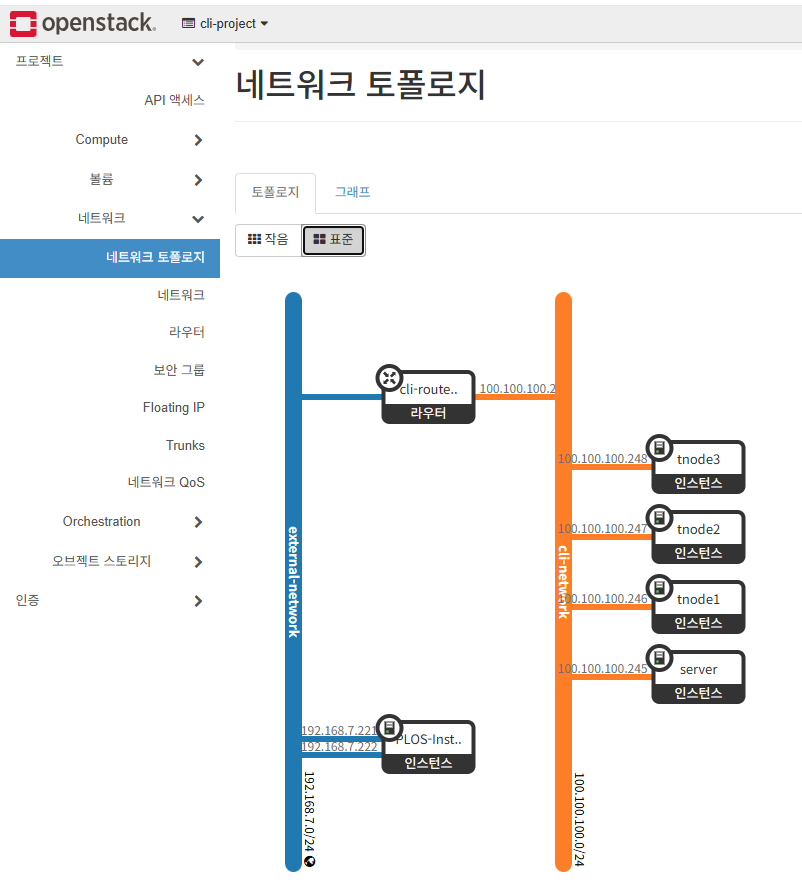
| server | Ubuntu 24.04 | 6.8.0 | 2 | 2 GB | 30GB | 192.168.7.245 | root / qwe123 | ansible / qwe123 |
| tnode1 | 상동 | 상동 | 2 | 2 GB | 30GB | 192.168.7.246 | root / qwe123 | ansible / qwe123 |
| tnode2 | 상동 | 상동 | 2 | 2 GB | 30GB | 192.168.7.247 | root / qwe123 | ansible / qwe123 |
| tnode3 | Rocky Linux 9 | 5.14.0 | 2 | 2 GB | 60GB | 192.168.7.248 | root / qwe123 | ansible / qwe123 |

실습환경 네트워크 구성도
실습 환경 배포
Private 클라우드로 가장 보편적으로 사용되고 있는 OPENSTACK 에 실습용 인스턴스를 생성하여 Ansible 설치 실습을 진행하고자 함. Vagrant는 개발환경에서 많이 사용되나 실제 프러덕션 환경인 OPENSTACK 에는 적합하지 않으므로 인스턴스 생성 및 초기 구성은 OPENSTACK 에서 제공하는 Orchestratioin Stack을 활용하여 실습환경을 구성하였음
Rocky linux 9 & Ubuntu 24.02 LTS 인스턴스 배포
☞ OPENSTACK 오케스트레이션 STACK을 활용하여 실습 환경 구성
; 오케스트레이션 STACK 은 OPENSTACK에서 가상머신을 구성하고 설치하는 작업을 도와주는 IaC 도구입니다.
오케스트레이션 Stack 스크립트
heat_template_version: "2018-08-31"

description: >
  내부망(100.100.100.0/24)과 외부망 Floating IP(192.168.7.x)를 사용하는 4대 노드 구성 템플릿입니다.

parameters:
  key_name:
    type: string
    default: "cli-key"
  flavor:
    type: string
    default: "m1.small"
  private_net:
    type: string
    default: "cli-network"
  private_subnet:
    type: string
    default: "cli-subnet"
  public_net:
    type: string
    description: Floating IP를 할당받을 외부 네트워크 이름 (예: public)
    default: "public"

resources:
  # [1] Server Node: Ubuntu 24.04
  server_node:
    type: OS::Nova::Server
    properties:
      name: server
      image: ubuntu24
      flavor: { get_param: flavor }
      key_name: { get_param: key_name }
      networks: [{ subnet: { get_param: private_subnet }, fixed_ip: 100.100.100.245 }]
      user_data_format: RAW
      user_data: &ubuntu_script |
        #!/bin/bash
        # [TASK 1-4: 기존 설정과 동일]
        echo 'alias vi=vim' >> /etc/profile
        echo "sudo su -" >> /home/vagrant/.bashrc
        ln -sf /usr/share/zoneinfo/Asia/Seoul /etc/localtime
        systemctl stop ufw && systemctl disable ufw >/dev/null 2>&1
        apt update -qq && apt install tree sshpass unzip -y -qq >/dev/null 2>&1
        echo 'vagrant:qwe123' | chpasswd
        echo 'root:qwe123' | chpasswd
        sed -i "s/^#PasswordAuthentication yes/PasswordAuthentication yes/g" /etc/ssh/sshd_config
        echo "PermitRootLogin yes" >> /etc/ssh/sshd_config
        systemctl restart ssh
        # [TASK 5] 내부망 IP 기반 호스트 설정
        cat << EOF >> /etc/hosts
        100.100.100.245 server
        100.100.100.246 tnode1
        100.100.100.247 tnode2
        100.100.100.248 tnode3
        EOF

  # [Floating IP 할당 및 연결 - Server용]
  server_fip:
    type: OS::Neutron::FloatingIP
    properties:
      floating_network: { get_param: public_net }

  server_fip_assoc:
    type: OS::Nova::FloatingIPAssociation
    properties:
      floating_ip: { get_resource: server_fip }
      server_id: { get_resource: server_node }

  # [2] tnode1
  tnode1:
    type: OS::Nova::Server
    properties:
      name: tnode1
      image: ubuntu24
      flavor: { get_param: flavor }
      key_name: { get_param: key_name }
      networks: [{ subnet: { get_param: private_subnet }, fixed_ip: 100.100.100.246 }]
      user_data_format: RAW
      user_data: *ubuntu_script

  # [3] tnode2
  tnode2:
    type: OS::Nova::Server
    properties:
      name: tnode2
      image: ubuntu24
      flavor: { get_param: flavor }
      key_name: { get_param: key_name }
      networks: [{ subnet: { get_param: private_subnet }, fixed_ip: 100.100.100.247 }]
      user_data_format: RAW
      user_data: *ubuntu_script

  # [4] tnode3: Rocky Linux 9
  tnode3:
    type: OS::Nova::Server
    properties:
      name: tnode3
      flavor: { get_param: flavor }
      key_name: { get_param: key_name }
      networks: [{ subnet: { get_param: private_subnet }, fixed_ip: 100.100.100.248 }]
      block_device_mapping_v2: [{ boot_index: 0, image: rocky9, volume_size: 60, delete_on_termination: true }]
      user_data_format: RAW
      user_data: |
        #!/bin/bash
        ln -sf /usr/share/zoneinfo/Asia/Seoul /etc/localtime
        systemctl stop firewalld && systemctl disable firewalld >/dev/null 2>&1
        setenforce 0
        dnf install -y yum sshpass jq git tree >/dev/null 2>&1
        echo 'vagrant:qwe123' | chpasswd
        echo 'root:qwe123' | chpasswd
        sed -i "s/^#PasswordAuthentication yes/PasswordAuthentication yes/g" /etc/ssh/sshd_config
        echo "PermitRootLogin yes" >> /etc/ssh/sshd_config
        systemctl restart sshd
        cat << EOF >> /etc/hosts
        100.100.100.245 server
        100.100.100.246 tnode1
        100.100.100.247 tnode2
        100.100.100.248 tnode3
        EOF

outputs:
  server_public_ip:
    description: Floating IP of the Server Node
    value: { get_attr: [server_fip, floating_ip_address] }
☞ init_cfg 설정 (ubuntu24)
#!/usr/bin/env bash

echo ">>>> Ubuntu Initial Config Start <<<<"

# [TASK 0] ansible 유저 체크 및 생성 (홈 디렉토리 보장)
if ! id "ansible" &>/dev/null; then
    echo "[TASK 0] Creating ansible user..."
    useradd -m -s /bin/bash ansible
else
    echo "[TASK 0] ansible user exists. Checking home directory..."
    if [ ! -d "/home/ansible" ]; then
        mkdir -p /home/ansible
        cp -r /etc/skel/. /home/ansible/
        chown -R ansible:ansible /home/ansible
        echo "Home directory created for existing ansible user."
    fi
fi

echo "[TASK 1] Setting Profile & Change Timezone"
echo 'alias vi=vim' >> /etc/profile
echo "sudo su -" >> /home/ansible/.bashrc
ln -sf /usr/share/zoneinfo/Asia/Seoul /etc/localtime

echo "[TASK 2] Disable AppArmor & UFW"
systemctl stop ufw && systemctl disable ufw >/dev/null 2>&1
systemctl stop apparmor && systemctl disable apparmor >/dev/null 2>&1

echo "[TASK 3] Install Packages"
apt update -qq >/dev/null 2>&1
apt-get install tree sshpass unzip -y -qq >/dev/null 2>&1

echo "[TASK 4] Config account & ssh config"
echo 'ansible:qwe123' | chpasswd
echo 'root:qwe123' | chpasswd
echo "ansible ALL=(ALL) NOPASSWD:ALL" > /etc/sudoers.d/ansible

sed -i "s/^#PasswordAuthentication yes/PasswordAuthentication yes/g" /etc/ssh/sshd_config
sed -i "s/^#PermitRootLogin prohibit-password/PermitRootLogin yes/g" /etc/ssh/sshd_config
systemctl restart ssh

echo "[TASK 5] Setting Local DNS Using Hosts file"
sed -i '/^127\.0\.\(1\|2\)\.1/d' /etc/hosts
cat << EOF >> /etc/hosts
100.100.100.245 server
100.100.100.246 tnode1
100.100.100.247 tnode2
100.100.100.248 tnode3
EOF

echo ">>>> Ubuntu Initial Config End <<<<"
☞ init_cfg2.sh 설정(rocky9)
#!/usr/bin/env bash

echo ">>>> Rocky Linux Initial Config Start <<<<"

# [TASK 0] ansible 유저 체크 및 생성 (홈 디렉토리 보장)
if ! id "ansible" &>/dev/null; then
    echo "[TASK 0] Creating ansible user..."
    useradd -m -s /bin/bash ansible
else
    echo "[TASK 0] ansible user exists. Checking home directory..."
    if [ ! -d "/home/ansible" ]; then
        mkdir -p /home/ansible
        cp -r /etc/skel/. /home/ansible/
        chown -R ansible:ansible /home/ansible
        echo "Home directory created for existing ansible user."
    fi
fi

echo "[TASK 1] Setting Profile & Change Timezone"
echo 'alias vi=vim' >> /etc/profile
echo "sudo su -" >> /home/ansible/.bashrc
ln -sf /usr/share/zoneinfo/Asia/Seoul /etc/localtime

echo "[TASK 2] Disable Firewall & SELinux"
systemctl stop firewalld && systemctl disable firewalld >/dev/null 2>&1
setenforce 0
sed -i 's/^SELINUX=enforcing/SELINUX=disabled/' /etc/selinux/config

echo "[TASK 3] Install Packages"
dnf install -y epel-release -q >/dev/null 2>&1
dnf install -y tree sshpass unzip vim-enhanced -q >/dev/null 2>&1

echo "[TASK 4] Config account & ssh config"
echo 'ansible:qwe123' | chpasswd
echo 'root:qwe123' | chpasswd
echo "ansible ALL=(ALL) NOPASSWD:ALL" > /etc/sudoers.d/ansible

# SSH 설정 (Rocky는 PermitRootLogin이 아예 없는 경우가 있어 강제 추가 로직 포함)
sed -i "s/^#PasswordAuthentication yes/PasswordAuthentication yes/g" /etc/ssh/sshd_config
sed -i "s/^#PermitRootLogin prohibit-password/PermitRootLogin yes/g" /etc/ssh/sshd_config
grep -q "^PermitRootLogin yes" /etc/ssh/sshd_config || echo "PermitRootLogin yes" >> /etc/ssh/sshd_config
systemctl restart sshd

echo "[TASK 5] Setting Local DNS Using Hosts file"
sed -i '/^127\.0\.0\.1/! s/^127\..*//' /etc/hosts
cat << EOF >> /etc/hosts
100.100.100.245 server
100.100.100.246 tnode1
100.100.100.247 tnode2
100.100.100.248 tnode3
EOF

echo ">>>> Rocky Linux Initial Config End <<<<"
☞ 기본 정보 확인
# 계정 정보 확인
whoami
id

# Kernel, CPU, Mem, Disk, NIC 확인
uname -r
hostnamectl
htop
free -h
lsblk
df -hT /
ip -c addr

# /etc/hosts 확인
cat /etc/hosts

# 노드간 통신 확인
for i in {1..3}; do ping -c 1 tnode$i; done
root@server:~# uname -r
6.8.0-87-generic
root@server:~#
root@server:~#
root@server:~# hostnamectl
Static hostname: server
Icon name: computer-vm
Chassis: vm 🖴
Machine ID: cf3c7fb2966a4477b3d35107055b5f15
Boot ID: 42addd2b3c164cbdaa81d89e727ba914
Virtualization: kvm
Operating System: Ubuntu 24.04.3 LTS
Kernel: Linux 6.8.0-87-generic
Architecture: x86-64
Hardware Vendor: RDO
Hardware Model: OpenStack Compute
Firmware Version: 1.16.3-4.el9
Firmware Date: Tue 2014-04-01
Firmware Age: 11y 9month 2w
root@server:~#
root@server:~#
root@server:~# htop
root@server:~#
root@server:~#
root@server:~#
root@server:~# free -h
total used free shared buff/cache available
Mem: 1.9Gi 393Mi 661Mi 5.4Mi 1.1Gi 1.5Gi
Swap: 0B 0B 0B
root@server:~#
root@server:~#
root@server:~#
root@server:~#
root@server:~# lsblk
NAME MAJ:MIN RM SIZE RO TYPE MOUNTPOINTS
vda 253:0 0 20G 0 disk
├─vda1 253:1 0 19G 0 part /
├─vda14 253:14 0 4M 0 part
├─vda15 253:15 0 106M 0 part /boot/efi
└─vda16 259:0 0 913M 0 part /boot
root@server:~#
root@server:~#
root@server:~#
root@server:~# df -hT
Filesystem Type Size Used Avail Use% Mounted on
tmpfs tmpfs 197M 1.1M 196M 1% /run
/dev/vda1 ext4 19G 2.2G 17G 12% /
tmpfs tmpfs 984M 0 984M 0% /dev/shm
tmpfs tmpfs 5.0M 0 5.0M 0% /run/lock
/dev/vda16 ext4 881M 117M 703M 15% /boot
/dev/vda15 vfat 105M 6.2M 99M 6% /boot/efi
tmpfs tmpfs 197M 12K 197M 1% /run/user/1000
root@server:~#
root@server:~#
root@server:~#
root@server:~# ip -c addr
1: lo: <LOOPBACK,UP,LOWER_UP> mtu 65536 qdisc noqueue state UNKNOWN group default qlen 1000
link/loopback 00:00:00:00:00:00 brd 00:00:00:00:00:00
inet 127.0.0.1/8 scope host lo
valid_lft forever preferred_lft forever
inet6 ::1/128 scope host noprefixroute
valid_lft forever preferred_lft forever
2: ens3: <BROADCAST,MULTICAST,UP,LOWER_UP> mtu 1450 qdisc fq_codel state UP group default qlen 1000
link/ether fa:16:3e:2e:f6:44 brd ff:ff:ff:ff:ff:ff
altname enp0s3
inet 100.100.100.245/24 metric 100 brd 100.100.100.255 scope global dynamic ens3
valid_lft 83335sec preferred_lft 83335sec
inet6 fe80::f816:3eff:fe2e:f644/64 scope link
valid_lft forever preferred_lft forever
root@server:~#
root@server:~#
root@server:~# cat /etc/hosts
127.0.0.1 localhost
# The following lines are desirable for IPv6 capable hosts
::1 ip6-localhost ip6-loopback
fe00::0 ip6-localnet
ff00::0 ip6-mcastprefix
ff02::1 ip6-allnodes
ff02::2 ip6-allrouters
ff02::3 ip6-allhosts
100.100.100.245 server
100.100.100.246 tnode1
100.100.100.247 tnode2
100.100.100.248 tnode3
root@server:~#
root@server:~#
root@server:~#
root@server:~# for i in {1..3}; do ping -c 1 tnode$i; done
PING tnode1 (100.100.100.246) 56(84) bytes of data.
64 bytes from tnode1 (100.100.100.246): icmp_seq=1 ttl=64 time=1.73 ms
--- tnode1 ping statistics ---
1 packets transmitted, 1 received, 0% packet loss, time 0ms
rtt min/avg/max/mdev = 1.730/1.730/1.730/0.000 ms
PING tnode2 (100.100.100.247) 56(84) bytes of data.
64 bytes from tnode2 (100.100.100.247): icmp_seq=1 ttl=64 time=1.59 ms
--- tnode2 ping statistics ---
1 packets transmitted, 1 received, 0% packet loss, time 0ms
rtt min/avg/max/mdev = 1.590/1.590/1.590/0.000 ms
PING tnode3 (100.100.100.248) 56(84) bytes of data.
64 bytes from tnode3 (100.100.100.248): icmp_seq=1 ttl=64 time=1.70 ms
--- tnode3 ping statistics ---
1 packets transmitted, 1 received, 0% packet loss, time 0ms
rtt min/avg/max/mdev = 1.699/1.699/1.699/0.000 msAnsible 설치
ansible-server 설치(우분투 기준)
# 작업 기본 디렉터리 확인
whoami
pwd

# 파이썬 버전 확인
python3 --version

# 설치
apt install software-properties-common -y
add-apt-repository --yes --update ppa:ansible/ansible
apt install ansible -y

# 확인
ansible --version
ansible [core 2.19.5]
  config file = /etc/ansible/ansible.cfg
  configured module search path = ['/root/.ansible/plugins/modules', '/usr/share/ansible/plugins/modules']
  ansible python module location = /usr/lib/python3/dist-packages/ansible
  ansible collection location = /root/.ansible/collections:/usr/share/ansible/collections
  executable location = /usr/bin/ansible
  python version = 3.12.3 (main, Aug 14 2025, 17:47:21) [GCC 13.3.0] (/usr/bin/python3)
  jinja version = 3.1.2
  pyyaml version = 6.0.1 (with libyaml v0.2.5)

cat /etc/ansible/ansible.cfg
ansible-config list
which ansible

# 작업 디렉터리 생성
mkdir my-ansible
cd my-ansible
앤서블 접근을 위한 SSH 인증 구성
앤서블은 로컬 사용자에게 개인 SSH 키가 있거나 관리 호스트에서 원격 사용자임을 인증 가능한 키가 구성된 경우 자동으로 로그인됩니다.
▶ ssh-keygen 명령어를 이용하여 SSH 키를 생성
# 모니터링
tree ~/.ssh
watch -d 'tree ~/.ssh'

# Create SSH Keypair
ssh-keygen -t rsa -N "" -f /root/.ssh/id_rsa

# 기본 cloud-init 파일 제거
# ubuntu 24.02
cat /etc/ssh/sshd_config.d/
sudo rm -rf /etc/ssh/sshd_config.d/60-cloudimg-settings.conf
sudo systemctl restart ssh

# rocky linux 9
cat /etc/ssh/sshd_config.d/50-cloud-init.conf
sudo rm -rf /etc/ssh/sshd_config.d/50-cloud-init.conf
sudo systemctl restart sshd
▶ 공개 키를 관리 노드에 복사
# 공개 키를 관리 노드에 복사
for i in {1..3}; do sshpass -p 'qwe123' ssh-copy-id -o StrictHostKeyChecking=no root@tnode$i; done

# 복사 확인
for i in {1..3}; do echo ">> tnode$i <<"; ssh tnode$i cat ~/.ssh/authorized_keys; echo; done

# ssh 접속 테스트
for i in {1..3}; do echo ">> tnode$i <<"; ssh tnode$i hostname; echo; done

# python 정보 확인
for i in {1..3}; do echo ">> tnode$i <<"; ssh tnode$i python3 -V; echo; done
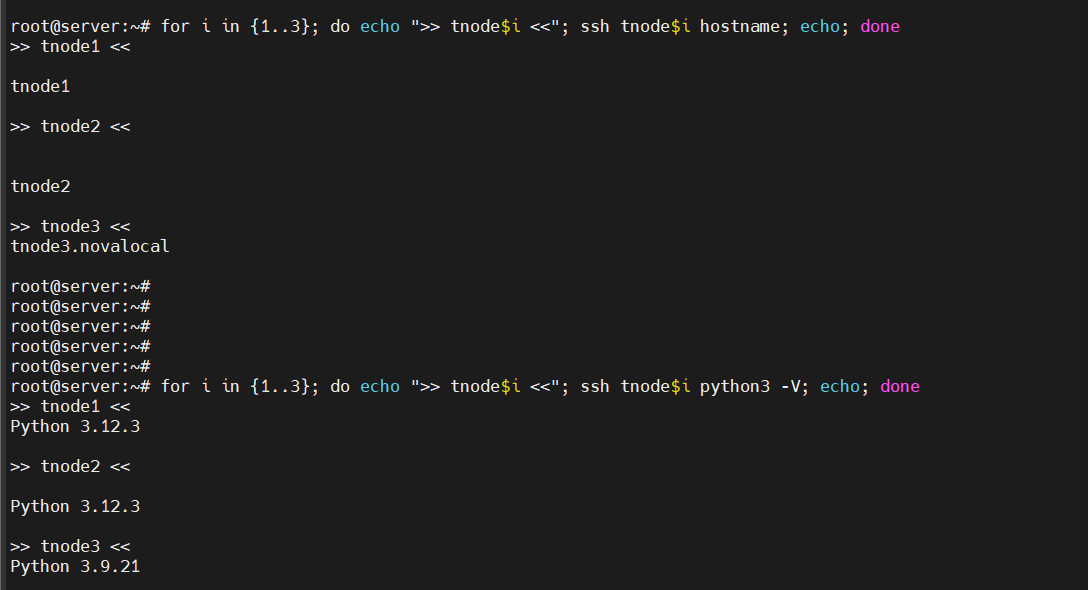
호스트 선정
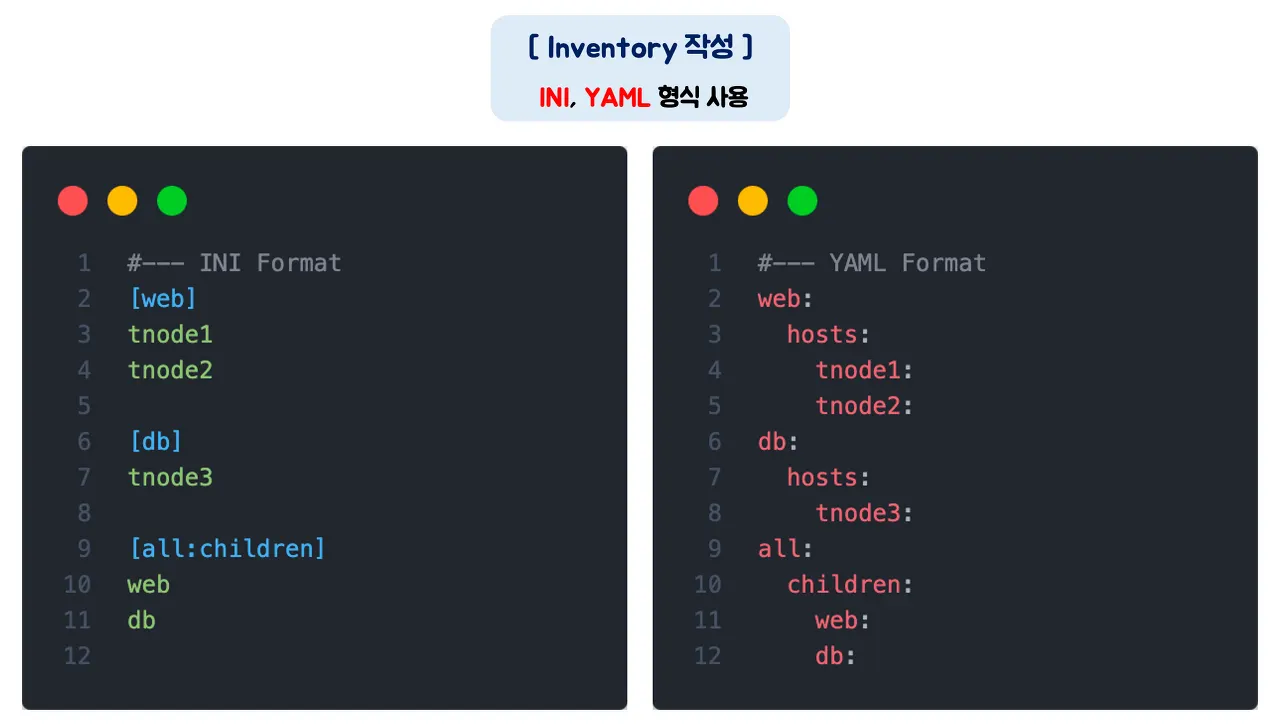
▶ 인벤토리를 이용한 자동화 대상 호스트 설정
인벤토리 파일은 텍스트 파일이며, 앤서블이 자동화 대상으로 하는 관리 호스트를 지정합니다.
▶ IP를 이용한 인벤토리 파일 생성
my-ansible/inventory
# inventory 파일 생성
cat <<EOT > inventory
100.100.100.246
100.100.100.247
100.100.100.247
EOT

# inventory 검증 : -i 특정 인벤토리 지정
ansible-inventory -i ./inventory --list | jq

▶ 호스트명을 이용한 인벤토리 파일 생성
# /etc/hosts 파일 확인
cat /etc/hosts

# inventory 파일 생성
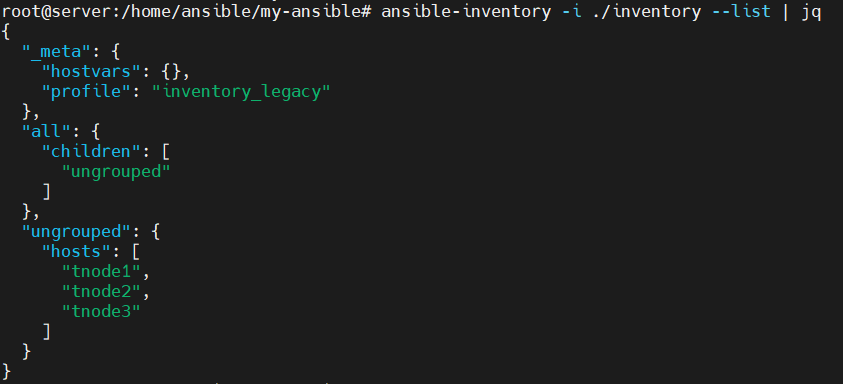
cat <<EOT > inventory
tnode1
tnode2
tnode3
EOT

# inventory 검증
ansible-inventory -i ./inventory --list | jq
▶ 역할에 따른 호스트 그룹 설정
호스트별로 롤 Role(역할)을 주고 롤별로 특정 작업을 수행해야 하는 경우가 종종 발생합니다.
# 참고 파일
cat /etc/ansible/hosts
▶ 그룹별 호스트 설정
- 그룹별로 호스트를 설정하여 사용하면 앤서블 플레이북 실행 시 그룹별로 작업을 처리할 수 있어서 좀 더 효과적입니다.
- 이 경우 다음과 같이 그룹명을 대괄화 ([]) 내에 작성하고 해당 그룹에 속하는 호스트명이나 IP를 한 줄에 하나씩 나열합니다.
- 아래 인벤토리는 두 개의 호스트 그룹인 webservers와 db-servers를 정의한 것입니다.
[webservers]
web1.example.com
web2.example.com

[db-servers]
db01.example.com
db02.example.com
- 또는 호스트는 여러 그룹에 있을 수 있습니다. 실제 호스트를 여러 그룹으로 구성하면 호스트의 역할, 실제 위치, 프로덕션 여부 등에 따라 다양한 방식으로 구성할 수 있습니다. 그러면 특성, 용도 또는 위치에 따라 특정 호스트 집합에 앤서블 플레이를 쉽게 적용할 수 있습니다.
[webservers]
web1.example.com
web2.example.com
192.0.2.42

[db-servers]
db01.example.com
db02.example.com

[east-datacenter]
web1.example.com
db01.example.com

[west-datacenter]
web2.example.com
db02.example.com

[production]
web1.example.com
web2.example.com
db01.example.com
db02.example.com

[development]
192.168.0.42
▶ 중첩 그룹 정의
- 앤서블 인벤토리는 호스트 그룹에 기존에 정의한 호스트 그룹을 포함할 수도 있습니다.
- 이 경우 호스트 그룹 이름 생성 시 :children 이라는 접미사를 추가하면 됩니다.
- 다음은 webservers 및 db-servers 그룹의 모든 호스트를 포함하는 datacenter 그룹을 생성하는 예입니다.
[webservers]
web1.example.com
web2.example.com

[db-servers]
db01.example.com
db02.example.com

[datacenter:children]
webservers
dbservers
▶ 범위를 사용한 호스트 사양 간소화
- 인벤토리의 호스트 이름 또는 IP 주소를 설정할 때 범위를 지정하여 호스트 인벤토리를 간소화 할 수 있습니다.
- 숫자 또는 영문자로 범위를 지정할 수 있으며, 대괄호 사이에 시작 구문과 종료 구문을 포함합니다.
[start:end]
- 다음과 같이 webservers는 대괄호 사이에 [1:2]로 범위를 지정했으며, db-servers는 [01:02]로 범위를 지정했습니다.
- 이렇게 지정하면 webservers의 경우 web1.example.com , web2.example.com 에 해당하는 호스트에 앤서블 플레이북 작업들이,
- db-servers의 경우 db01.example.com , db02.example.com 에 해당하는 호스트에 앤서블 플레이북 작업들이 실행됩니다.
[webservers]
web[1:2].example.com

[db-servers]
db[01:02].example.com
이 외에도 IP 주소 범위를 표현할 때나 여러 호스트의 호스트명을 지정할 때, 혹은 DNS와 같이 호스트의 어미 부분을 범위로 지정하면 IPv6의 범위 설정에도 사용할 수 있습니다.
# IP 범위 설정 : 192.168.4.0 ~ 192.168.4.255 사이의 IP 범위를 표현
[defaults]
192.168.4.[0:255]

# 호스트명 범위 설정 : com01.example.com ~ com20.example.com 의 범위를 표현
[compute]
com[01:20].example.com

# DNS 범위 설정 : a.dns.example.com , b.dns.example.com , c.dns.example.com 을 의미함
[dns]
[a:c].dns.example.com

# IPv6 범위 설정 : 2001:db08::a ~ 2001:db08::f 사이의 IPv6 범위를 표현
[ipv6]
2001:db8::[a:f]
Ansible Configuration Settings
▶ 실습을 위한 인벤토리 그룹 구성 & ansible config 적용 우선순위
# inventory 그룹 구성
cat <<EOT > inventory
[web]
tnode1
tnode2

[db]
tnode3

[all:children]
web
db
EOT

# inventory 검증
ansible-inventory -i ./inventory --list | jq
ansible-inventory -i ./inventory --graph
현재 프로젝트 디렉터리 내에 ansible.cfg 라는 앤서블 환경 설정 파일을 구성 시, -i 옵션을 사용하지 않아도 ansible.cfg 설정 파일에 정의된 인벤토리의 호스트 정보를 확인할 수 있습니다
# ansible.cfg 파일 생성
cat <<EOT > ansible.cfg
[defaults]
inventory = ./inventory
EOT

# inventory 목록 확인
ansible-inventory --list | jq


# ansible config 적용 우선 순위 확인
echo $ANSIBLE_CONFIG
cat $PWD/ansible.cfg   # kubespary 실행 시, 디렉터리 위치 고정 이유
ls ~/.ansible.cfg
tree ~/.ansible
cat /etc/ansible/ansible.cfg

#
ansible-config dump
ansible-config list
(참고) ansible config 적용 우선 순위 - Link
- ANSIBLE_CONFIG (environment variable if set)
- ansible.cfg (in the current directory)
- ~/.ansible.cfg (in the home directory)
- /etc/ansible/ansible.cfg
플레이북 작성
▶ 플레이북 환경 설정 (엔서블 환경 설정)
- 앤서블 프로젝트 디렉터리에 ansible.cfg 파일을 생성하면 다양한 앤서블 설정을 적용할 수 있습니다.
- 앤서블 환경 설정 파일에는 각 섹션에 키-값 쌍으로 정의된 설정이 포함되며, 여러개의 섹션으로 구성됩니다.
- 섹션 제목은 대괄호로 묶여 있으며, 기본적인 실행을 위해 다음 예제와 같이 [defaults]와 [privilege_escalation] 두 개의 섹션으로 구성합니다.
[defaults]
inventory = ./inventory
remote_user = root
ask_pass = false

[privilege_escalation]
become = true
become_method = sudo
become_user = root
become_ask_pass = false
[defaults] 섹션 : 앤서블 작업을 위한 기본값 설정
| 매개 변수 | 설명 |
| inventory | 인벤토리 파일의 경로를 지정함. |
| remote_user | 앤서블이 관리 호스트에 연결할 때 사용하는 사용자 이름을 지정함. 이때, 사용자 이름을 지정하지 않으면 현재 사용자 이름으로 지정됨. |
| ask_pass | SSH 암호를 묻는 메시지 표시 여부를 지정함. SSH 공개 키 인증을 사용하는 경우 기본값은 false임. |
[privilege_escalation] 섹션 : 보안/감사로 인해 원격 호스트에 권한 없는 사용자 연결 후 관리 액세스 권한을 에스컬레이션하여 루트 사용자로 가여올 때
| 매개 변수 | 설명 |
| become | 기본적으로 권한 에스컬레이션을 활성화할 때 사용하며, 연결 후 관리 호스트에서 자동으로 사용자를 전환할지 여부를 지정함. 일반적으로 root로 전환되며, 플레이북에서도 지정할 수 있음. |
| become_method | 권한을 에스컬레이션하는 사용자 전환 방식을 의미함. 일반적으로 기본값은 sudo를 사용하며, su는 옵션으로 설정할 수 있음. |
| become_user | 관리 호스트에서 전환할 사용자를 지정함. 일반적으로 기본값은 root임. |
| become_ask_pass | become_method 매개 변수에 대한 암호를 묻는 메시지 표시 여부를 지정함. 기본값은 false임. 권한을 에스컬레이션하기 위해 사용자가 암호를 입력해야 하는 경우, 구성 파일에 become_ask_pass = true 매개 변수를 설정하면 됨. |
- 앤서블은 리눅스에서 기본적으로 SSH 프로토콜을 사용하여 관리 호스트에 연결합니다.
- 앤서블에서 관리 호스트에 연결하는 방법을 제어하는 가장 중요한 매개 변수는 [defaults] 섹션에 설정되어 있습니다.
- 또한, 별도로 설정되어 있지 않으면 앤서블은 실행 시 로컬 사용자와 같은 사용자 이름을 사용하여 관리 호스트에 연결합니다.
- 이때 다른 사용자를 지정하려면 remote_user 매개 변수를 사용하여 해당 사용자 이름으로 설정할 수 있습니다.
실습을 위한 엔서블 환경 설정
my-ansible/ansible.cfg
cat <<EOT > ansible.cfg
[defaults]
inventory = ./inventory
remote_user = root
ask_pass = false

[privilege_escalation]
become = true
become_method = sudo
become_user = root
become_ask_pass = false
EOT
[ad-hoc] ansible ping 모듈 - https://docs.ansible.com/archive/ansible/2.3/ping_module.html
1. ping 모듈을 이용하여 web 그룹의 호스트로 정상 연결(pong반환)이면 ‘SUCCESS’ 출력 ← icmp(ping) 아니며, python 테스트 모듈
#
ansible -m ping web

# Ansible이 '지금은 잘 동작하지만 미래에 예기치 않게 Python 인터프리터가 바뀔 수 있다'는 점을 알려주는 예방용 경고
# 암묵적 Python 자동 선택을 지양하고, 명시적 설정을 권장 : 기본값(ansible_python_interpreter=auto)

# inventory 그룹 구성
cat <<EOT > inventory
[web]
tnode1 ansible_python_interpreter=/usr/bin/python3
tnode2 ansible_python_interpreter=/usr/bin/python3

[db]
tnode3 ansible_python_interpreter=/usr/bin/python3

[all:children]
web
db
EOT
ansible-inventory -i ./inventory --list | jq

#
ansible -i ./inventory web -m ping

#
ansible -i ./inventory db -m ping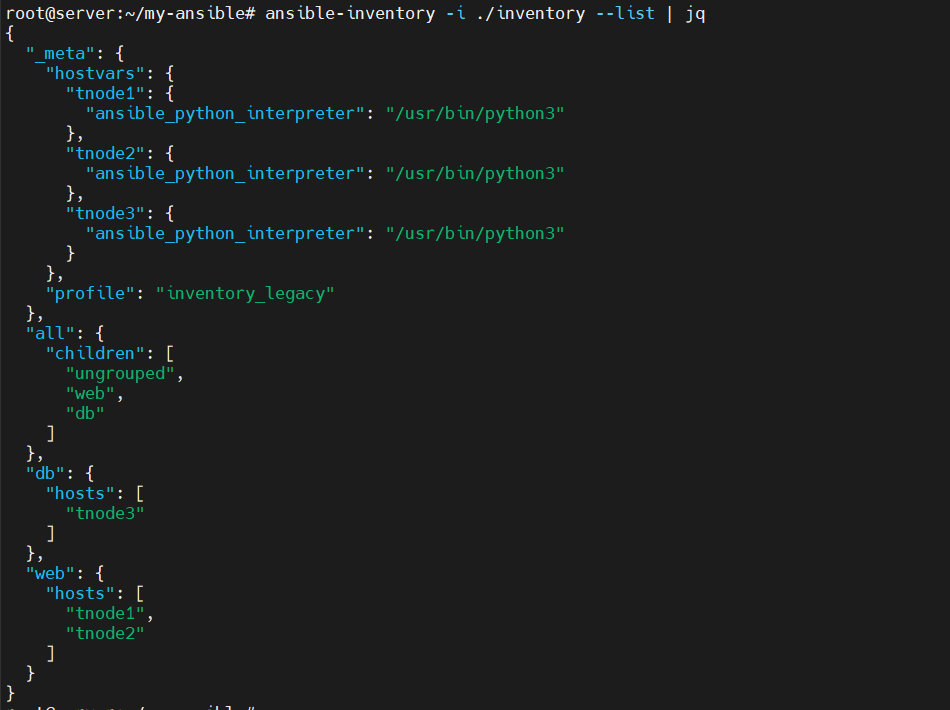
2. 옵션 설정으로 암호 입력 후 실행 확인
# 암호 입력 후 실행
ansible -i ./inventory web -m ping --ask-pass
SSH password: <암호입력>
3. 다른 사용자 계정으로 실행 확인
- User ID : ansible
# 배포 서버(root@server)에서 실행
# tnode1, 2, 3 모두에게 ansible 유저 생성 및 비밀번호 'qwe123' 설정
for i in {1..3}; do
    echo ">>> tnode$i 작업 중..."
    ssh root@tnode$i "useradd -m ansible && echo 'ansible:qwe123' | chpasswd"
    ssh root@tnode$i "echo 'ansible ALL=(ALL) NOPASSWD:ALL' > /etc/sudoers.d/ansible"
done


# 배포 서버에서 현재 사용자의 키를 ansible 계정으로 복사
for i in {1..3}; do
    sshpass -p 'qwe123' ssh-copy-id -o StrictHostKeyChecking=no ansible@tnode$i
done


# ansible.cfg 확인
[defaults]
inventory = ./inventory
remote_user = ansible
host_key_checking = False

# 접속 확인
ansible web -m ping -u ansible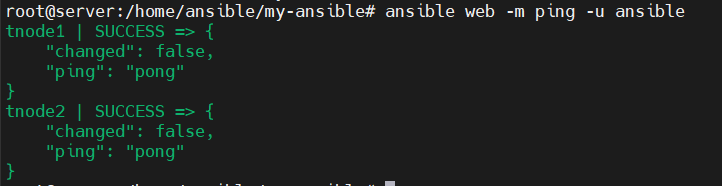
[ad-hoc] ansible shell 모듈 - https://docs.ansible.com/ansible/2.8/modules/shell_module.html
- shell은 노드들에 명령 구문을 전달하고 해당 결과를 반환하는 모듈
#
ansible -m shell -a uptime db

#
ansible -m shell -a "free -h" web

#
ansible -m shell -a "tail -n 3 /etc/passwd" all
첫 번째 플레이북 작성하기 - https://docs.ansible.com/ansible/latest/getting_started/get_started_playbook.html
- 플레이북은 YAML 포맷으로 작성된 텍스트 파일이며, 일반적으로 .yml이라는 확장자를 사용하여 저장됩니다.
- 플레이북은 대상 호스트나 호스트 집합에 수행할 작업을 정의하고 이를 실행합니다. 이때 특정 작업 단위를 수행하기 위해 모듈을 적용합니다.
- 용어 - Docs
1. 플레이북 작성하기 : debug 모듈을 이용하여 문자열을 출력
my-ansible/first-playbook.yml
---
- hosts: all
  tasks:
    - name: Print message
      debug:
        msg: Hello CloudNet@ Ansible Study
my-ansible/first-playbook-with-error.yml
---
- hosts: all
  tasks:
    - name: Print message
      debug:
      msg: Hello CloudNet@ Ansible Study
2. 플레이북 문법 체크하기 : 자체 문법 체크 옵션 제공
# 문법 체크 : 문법 오류 확인
ansible-playbook --syntax-check first-playbook.yml
ansible-playbook --syntax-check first-playbook-with-error.yml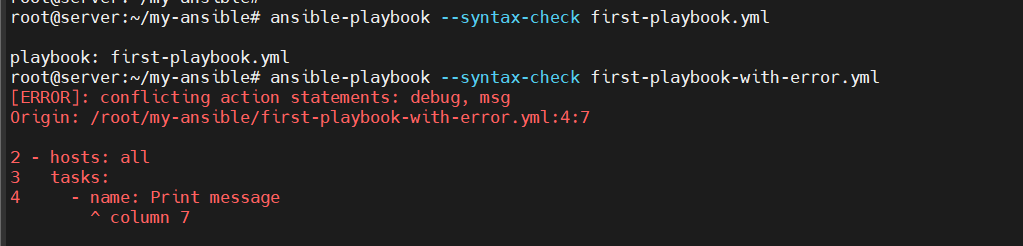
# 문법 오류 수정
---
- hosts: all
  tasks:
    - name: Print message
      debug:
        msg: "Hello Ansible World!"   # 들여쓰기 2칸 이동
3. 플레이북 실행하기
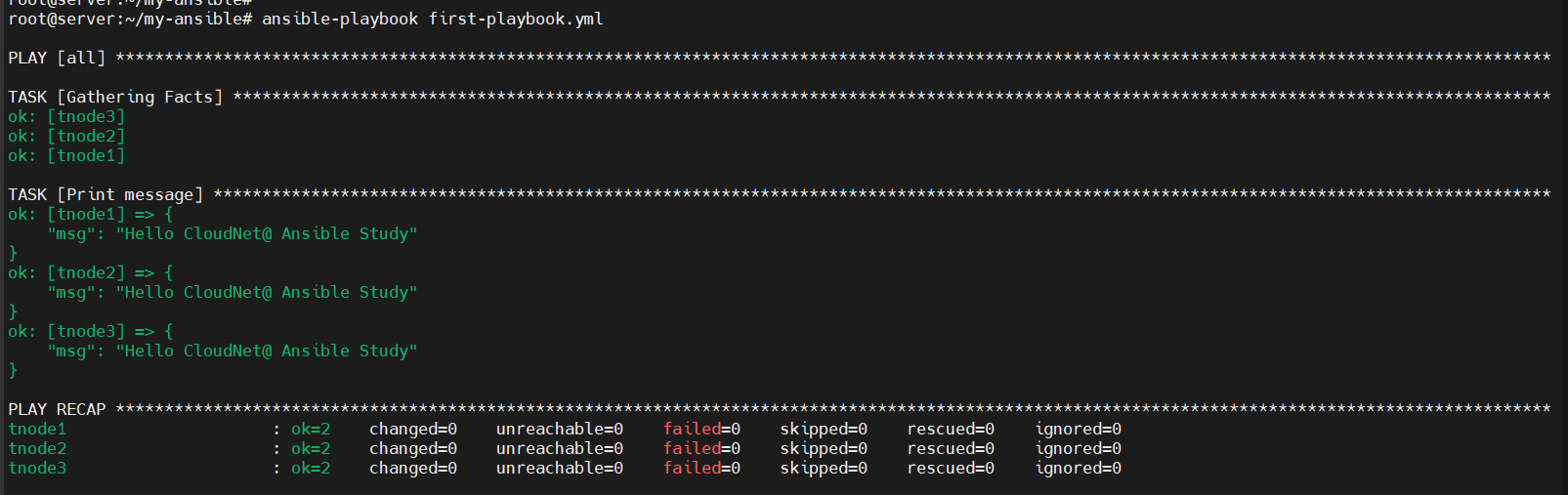
- 플레이북을 실행할 때는 ansible-playbook 명령어를 이용합니다. 환경 설정 파일인 ansible.cfg가 존재하는 프로젝트 디렉터리 내에서 실행할 경우에는 ansible-playbook 명령어와 함께 실행하고자 하는 플레이북 파일명을 입력하면 됩니다.
4. 서비스 재시작하는 플레이북 작성
my-ansible/restart-service.yml
---
- hosts: all
  tasks:
    - name: Restart sshd service
      ansible.builtin.service:
        name: ssh # sshd
        state: restarted
- state - https://docs.ansible.com/ansible/latest/collections/ansible/builtin/service_module.html#parameter-state
- started : Start service httpd, if not started
- stooped : Stop service httpd, if started
- restarted : Restart service httpd, in all cases
- reloaded : Reload service httpd, in all cases
5. 플레이북 실행
# (신규터미널) 모니터링 : 서비스 재시작 실행 여부 확인
ssh tnode1 tail -f /var/log/syslog

# 실행 전 check 옵션으로 플레이북의 실행 상태를 미리 점검 가능 : 출력 중 changed=1 확인
ansible-playbook --check restart-service.yml


# 플레이북 실제 실행
ansible-playbook restart-service.yml
...

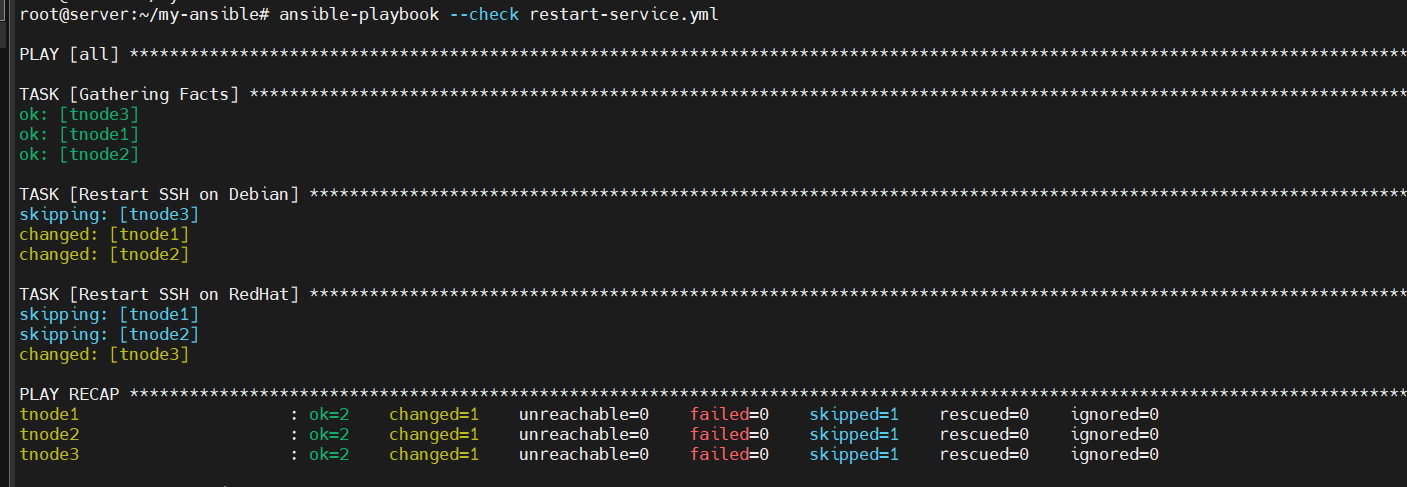
☞ tnode3의 경우 OS 가 rocky linux 9 이어서 restart-service.yml 을 실행할 경우 ssh 서비스명이 sshd 이므로 오류가 발생한다. 그러므로 OS 별 조건 분리를 통해 Debian 계열과 Redhat 계열을 분리하여 설정을 작성해야 한다.
6. OS 별 조건 분리
- hosts: all
  tasks:
    - name: Restart SSH on Debian
      ansible.builtin.service:
        name: ssh
        state: restarted
      when: ansible_facts['os_family'] == 'Debian'

    - name: Restart SSH on RedHat
      ansible.builtin.service:
        name: sshd
        state: restarted
      when: ansible_facts['os_family'] == 'RedHat'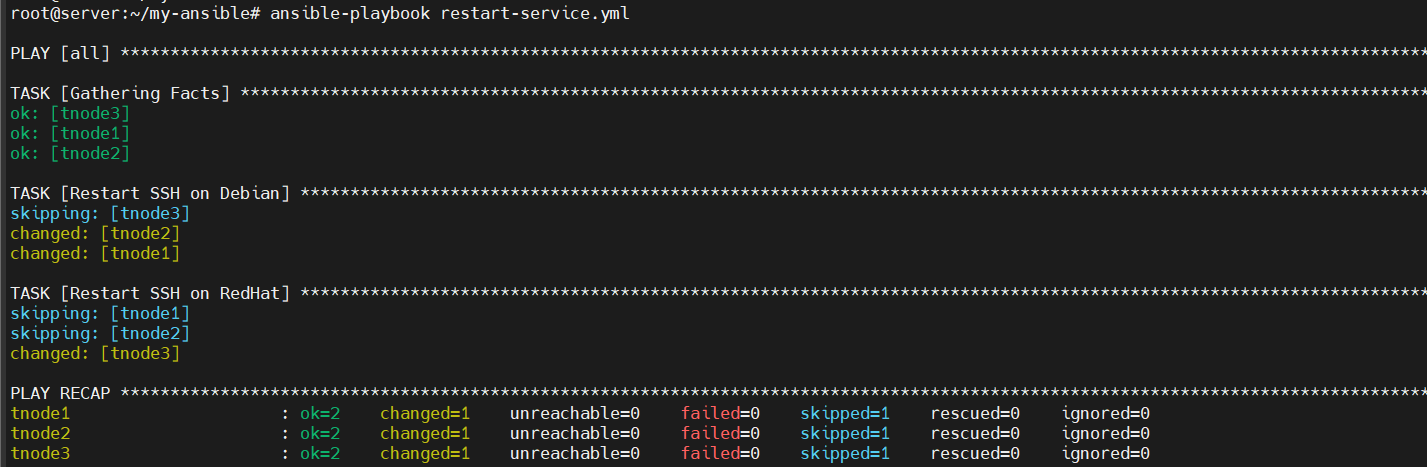
# you can see the ‘raw’ information for any host in your inventory by running this ad-hoc ansible command at the command line:
ansible tnode1 -m ansible.builtin.setup | grep -iE 'os_family|ansible_distribution'
        "ansible_distribution": "Ubuntu",
        "ansible_distribution_file_parsed": true,
        "ansible_distribution_file_path": "/etc/os-release",
        "ansible_distribution_file_variety": "Debian",
        "ansible_distribution_major_version": "24",
        "ansible_distribution_release": "noble",
        "ansible_distribution_version": "24.04",
        "ansible_os_family": "Debian",

ansible tnode3 -m ansible.builtin.setup | grep -iE 'os_family|ansible_distribution'
        "ansible_distribution": "Rocky",
        "ansible_distribution_file_parsed": true,
        "ansible_distribution_file_path": "/etc/redhat-release",
        "ansible_distribution_file_variety": "RedHat",
        "ansible_distribution_major_version": "9",
        "ansible_distribution_release": "Blue Onyx",
        "ansible_distribution_version": "9.6",
        "ansible_os_family": "RedHat",


# 실행 전 check 옵션으로 플레이북의 실행 상태를 미리 점검
ansible-playbook --check restart-service.yml


# 플레이북 실제 실행
ansible-playbook restart-service.yml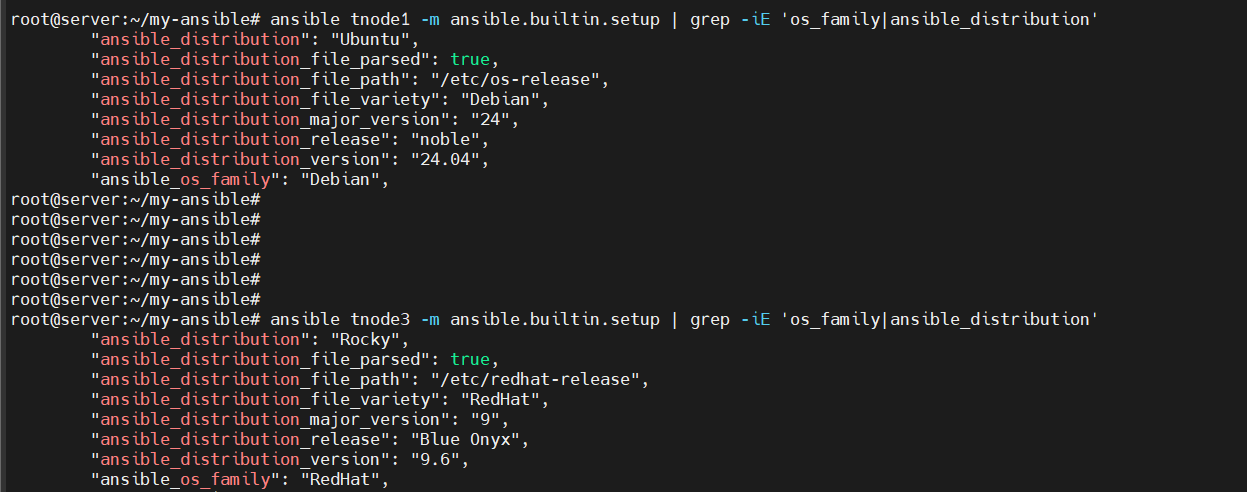

7. 실습 완료 후 작성한 yml 파일 삭제
rm -r *.yml
변수
앤서블은 변수를 사용하여 사용자, 설치하고자 하는 패키지, 재시작할 서비스, 생성 또는 삭제할 파일명 등 시스템 작업 시 사용되는 다양한 값을 저장할 수 있습니다. 이런 변수를 활용하면 얼마든지 플레이북을 재사용할 수 있으며, 사용자로부터 받은 값도 쉽게 적용할 수 있습니다. 앤서블에서 사용되는 변수는 그룹 변수, 호스트 변수, 플레이 변수, 추가 변수가 있으며 플레이 결과를 저장하기 위한 작업 변수도 있습니다.
그룹 변수 : 인벤토리에 정의된 호스트 그룹에 적용하는 변수
그룹 변수는 인벤토리에 정의된 호스트 그룹에 적용하는 변수를 의미합니다. 따라서 인벤토리에 선언해야 하고, 선언하고자 하는 그룹명과 함께 :vars 라는 문자열을 추가해 변수를 선언한다는 것을 알려줍니다.
[ansible-server]의 my-ansible 디렉터리에 있는 inventory 파일 하단에 [all:vars] 섹션을 선언하고 해당 섹션 아래에 user=ansible 이라는 변수와 값을 선언합니다. 이렇게 하면 all이라는 그룹에서 user라는 변수를 사용할 수 있습니다.
다음 예제에서 all 그룹에는 web 그룹과 db 그룹이, web 그룹에는 tnode1-ubuntu.local, tnode2-ubuntu.local이 포함되며, db그룹에는 tnode3 호스트가 포함됩니다.
my-ansible/inventory
[web]
tnode1 ansible_python_interpreter=/usr/bin/python3
tnode2 ansible_python_interpreter=/usr/bin/python3

[db]
tnode3 ansible_python_interpreter=/usr/bin/python3

[all:children]
web
db

[all:vars]
user=testuser
이번에는 create-user.yml 이라는 파일을 생성합니다. 해당 파일은 사용자를 생성하는 태스크를 포함합니다. 앤서블에서 시스템 사용자(account)를 생성하기 위해서는 ansible.builtin.user라는 모듈을 사용합니다. 그리고 인벤토리에서 선언한 user라는 변수를 겹중괄호 사이에 넣어주면, 해당 변수를 플레이북에서 사용할 수 있습니다. 이때 겹 중괄호와 변수명 사이는 항상 한 칸씩 띄워주어야 합니다.
---

- hosts: all
  tasks:
  - name: Create User {{ user }}
    ansible.builtin.user:
      name: "{{ user }}"
      state: present
앞에서 생성한 플레이북을 ansible-playbook 명령어와 함께 실행합니다. 그러면 태스트명으로 “Create User {{ user }}” 라고 변수를 사용한 부분에 해당 변수의 값인 ansible 이라는 문자열이 보이는 것을 확인할 수 있습니다.
# (터미널2) 모니터링
watch -d "ssh tnode1 tail -n 3 /etc/passwd"

# 실행
ansible-playbook create-user.yml
...
TASK [Create User ansible] *********
...

# 한번 더 실행 : 멱등성 확인
ansible-playbook create-user.yml
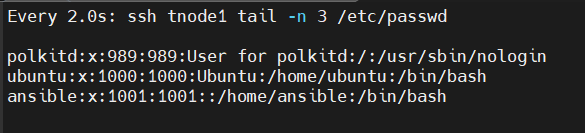
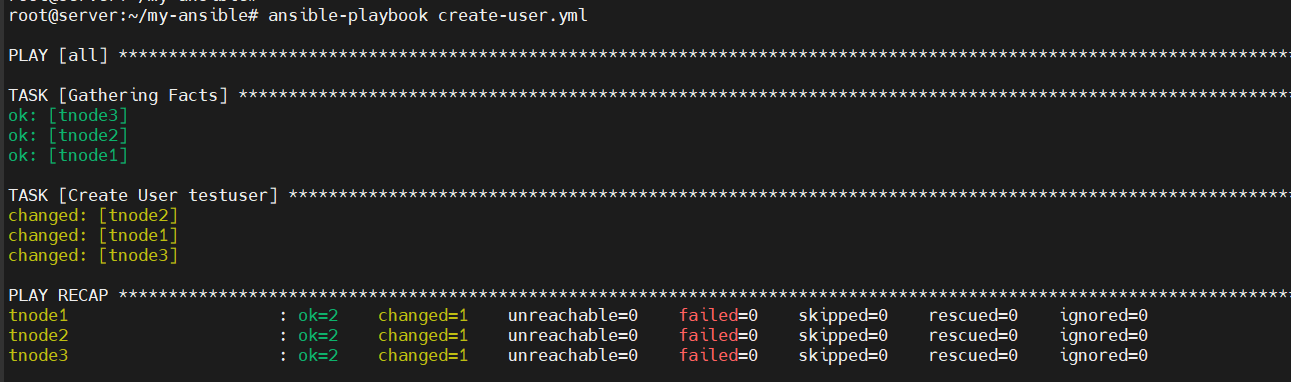

실제 대상 호스트에서 ansible 사용자 생성 확인합니다.
# tnode1~3에서 ansible 사용자 생성 확인
#ssh tnode1 tail -n 3 /etc/passwd
#ssh tnode1 ls -l /home
for i in {1..3}; do echo ">> tnode$i <<"; ssh tnode$i tail -n 3 /etc/passwd; echo; done
for i in {1..3}; do echo ">> tnode$i <<"; ssh tnode$i ls -l /home; echo; done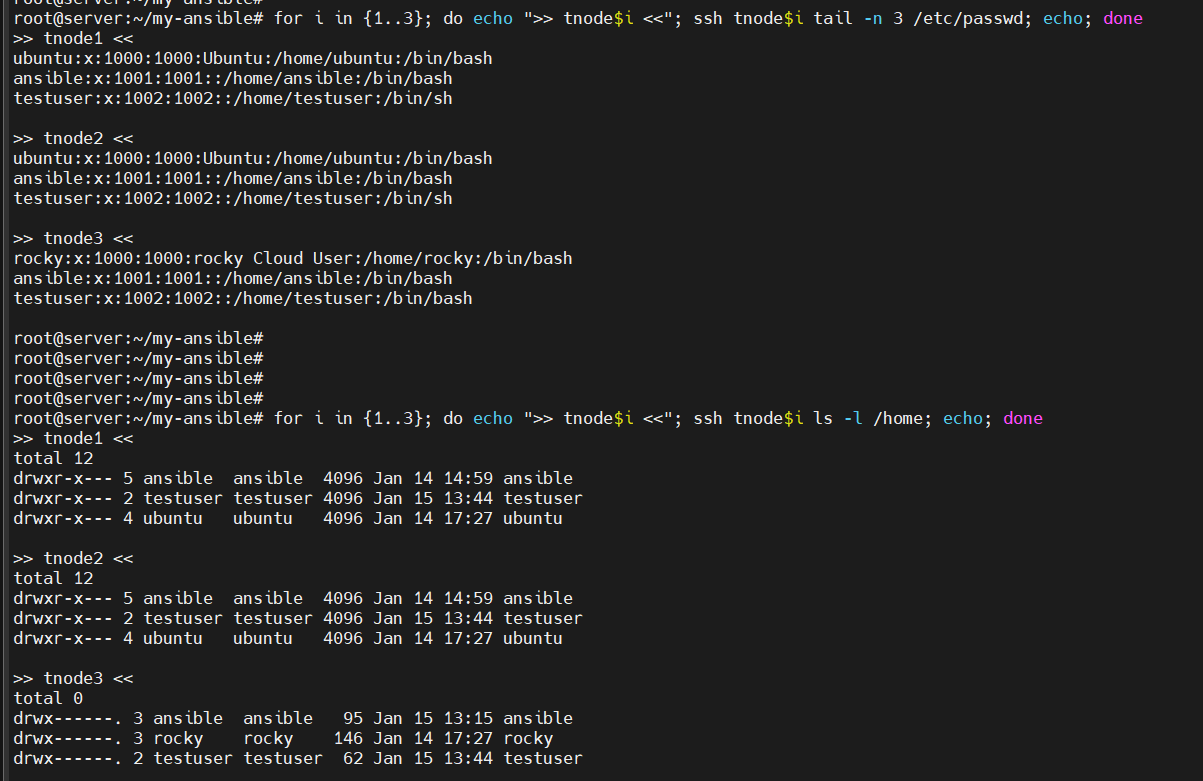
수동으로 tnode1 에 testuser 사용자 삭제 후 다시 플레이북 실행 확인
# tnode1 에 ansible 사용자 삭제 후 확인
ssh tnode1 userdel -r ansible
ssh tnode1 tail -n 2 /etc/passwd

# 실행
ansible-playbook create-user.yml
호스트 변수 : 말 그대로 해당 호스트에서만 사용할 수 있음
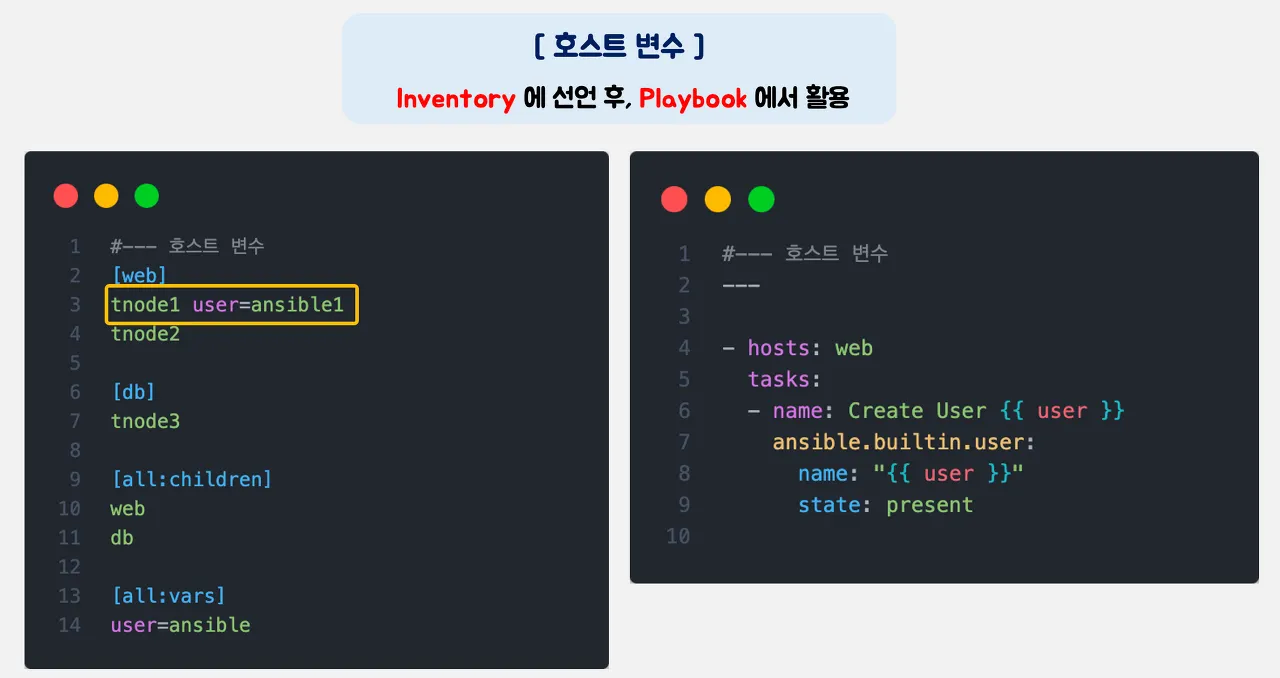
1. 인벤토리 파일을 열고 db 그룹의 tnode-3 호스트 옆에 변수를 선언
[web]
tnode1 ansible_python_interpreter=/usr/bin/python3
tnode2 ansible_python_interpreter=/usr/bin/python3

[db]
tnode3 ansible_python_interpreter=/usr/bin/python3 user=ansible1

[all:children]
web
db

[all:vars]
user=ansible
2. 플레이북 파일 작성 : hosts 를 all → db
---

- hosts: db
  tasks:
  - name: Create User {{ user }}
    ansible.builtin.user:
      name: "{{ user }}"
      state: present
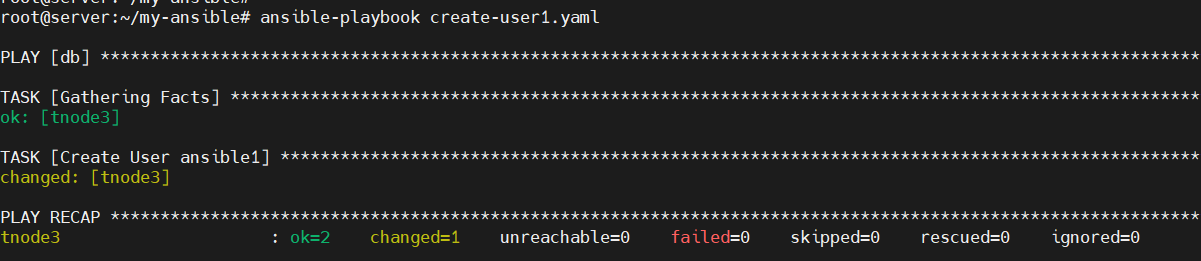
3. 플레이북 실행 확인. user 명 확인 → 호스트 변수와 그룹 변수의 우선순위 확인
# (터미널2) 모니터링
watch -d "ssh tnode3 tail -n 3 /etc/passwd"

# 실행
ansible-playbook create-user1.yml
...
TASK [Create User ansible1] *********
...

# 확인
for i in {1..3}; do echo ">> tnode$i <<"; ssh tnode$i tail -n 3 /etc/passwd; echo; done


플레이 변수 : 플레이북 내에서 선언되는 변수, 별도 파일 분리
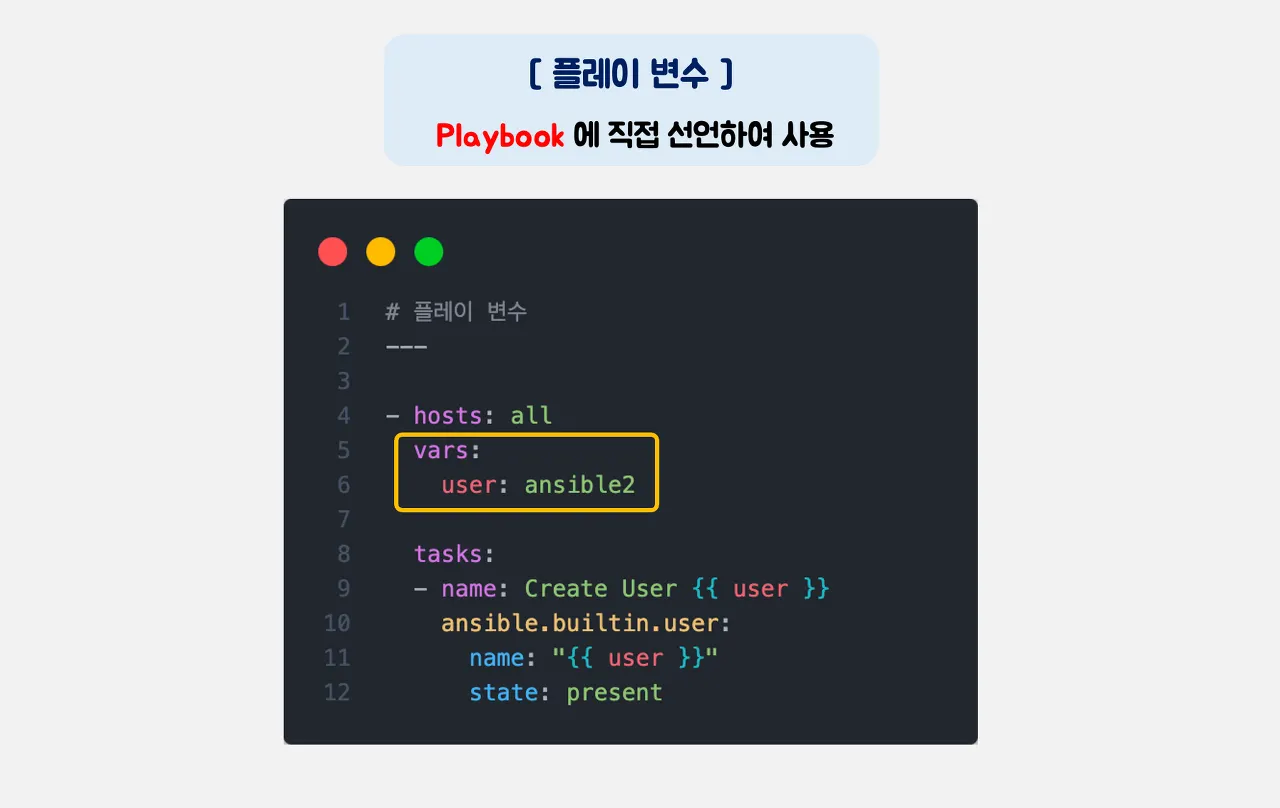
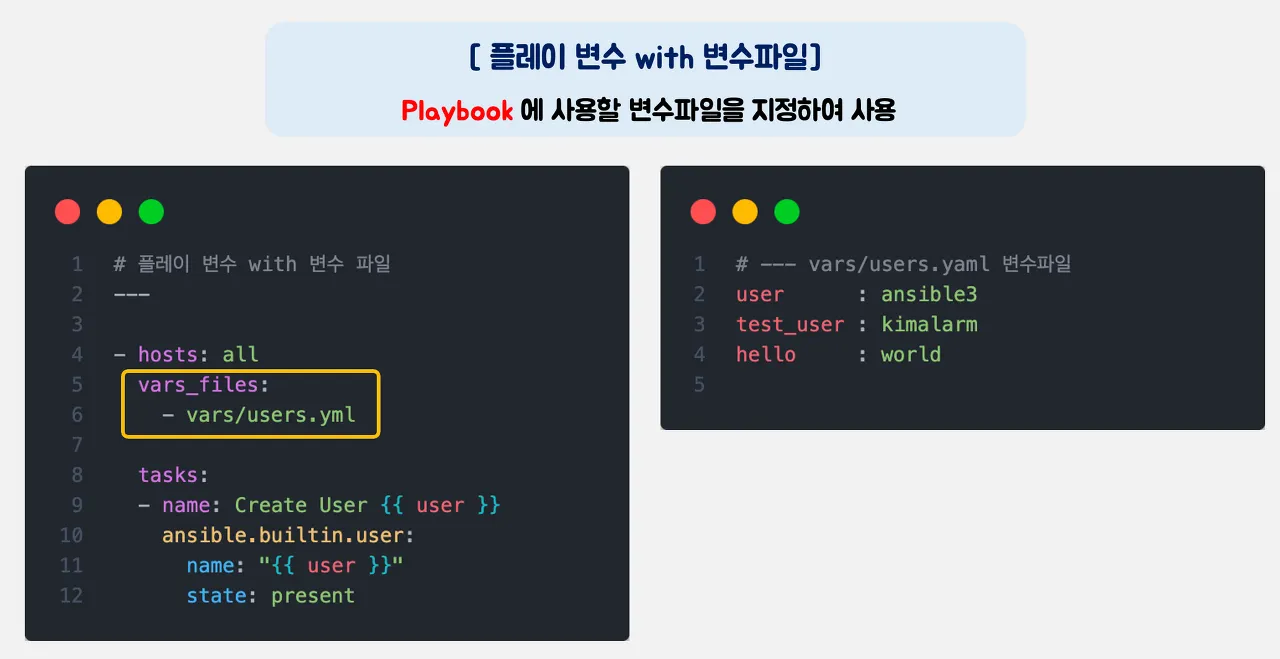
1. 플레이북 작성 : hosts 아래에 vars: 를 추가하고 그 아래에 다시 user: ansible2 라는 변수와 값을 추가
my-ansible/create-user2.yml
---

- hosts: all
  vars:
    user: ansible2

  tasks:
  - name: Create User {{ user }}
    ansible.builtin.user:
      name: "{{ user }}"
      state: present
2. 플레이북 실행 확인. 인벤토리에 선언한 그룹 변수 vs 호스트 변수 vs 플레이 변수 우선 순위 확인.
# (터미널2) 모니터링
watch -d "ssh tnode3 tail -n 3 /etc/passwd"

#  인벤토리에 선언한 그룹 변수와 호스트 변수 확인
cat inventory

# 실행
ansible-playbook create-user2.yml
...
TASK [Create User ansible2] *********
...

# 확인
for i in {1..3}; do echo ">> tnode$i <<"; ssh tnode$i tail -n 3 /etc/passwd; echo; done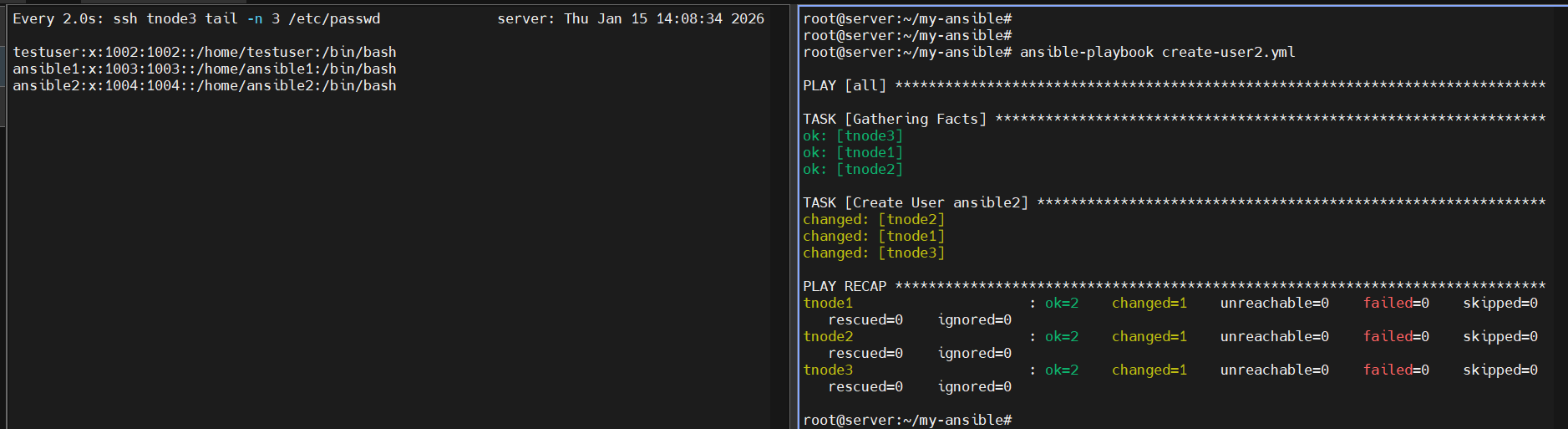

☞ 플레이변수가 적용된 플레이북을 실행하여 ansible2 라는 계정이 신규로 생성됨
3. 플레이 변수를 별도의 파일로 분리하여 정의한 후 이를 플레이북에서 선언하는 방법으로 변수를 사용해보기
my-ansible/vars/users.yml
mkdir vars
echo "user: ansible3" > vars/users.yml
my-ansible/create-user3.yml
---

- hosts: all
  vars_files:
    - vars/users.yml

  tasks:
  - name: Create User {{ user }}
    ansible.builtin.user:
      name: "{{ user }}"
      state: present
4. 플레이북 실행
# (터미널2) 모니터링
watch -d "ssh tnode3 tail -n 3 /etc/passwd"

# 플레이 변수 파일 확인
cat vars/users.yml

# 실행
ansible-playbook create-user3.yml
...
TASK [Create User ansible3] *********
...

# 확인
for i in {1..3}; do echo ">> tnode$i <<"; ssh tnode$i tail -n 4 /etc/passwd; echo; done

추가 변수 : 외부에서 ansible-playbook를 실행 할 때 함께 파라미터로 넘겨주는 변수를 의미. 앞에 변수 중 우선순위가 가장 높음.
1. 실행 시 -e(extra_vars 약자) 옵션으로 추가 변수 선언
my-ansible/create-user3.yml ← 바로 위 플레이 변수에서 작성한 플레이북임
# (터미널2) 모니터링
watch -d "ssh tnode3 tail -n 3 /etc/passwd"

# 실행
ansible-playbook -e user=ansible4 create-user3.yml
...
TASK [Create User ansible4] *********
...

# 확인
for i in {1..3}; do echo ">> tnode$i <<"; ssh tnode$i tail -n 5 /etc/passwd; echo; done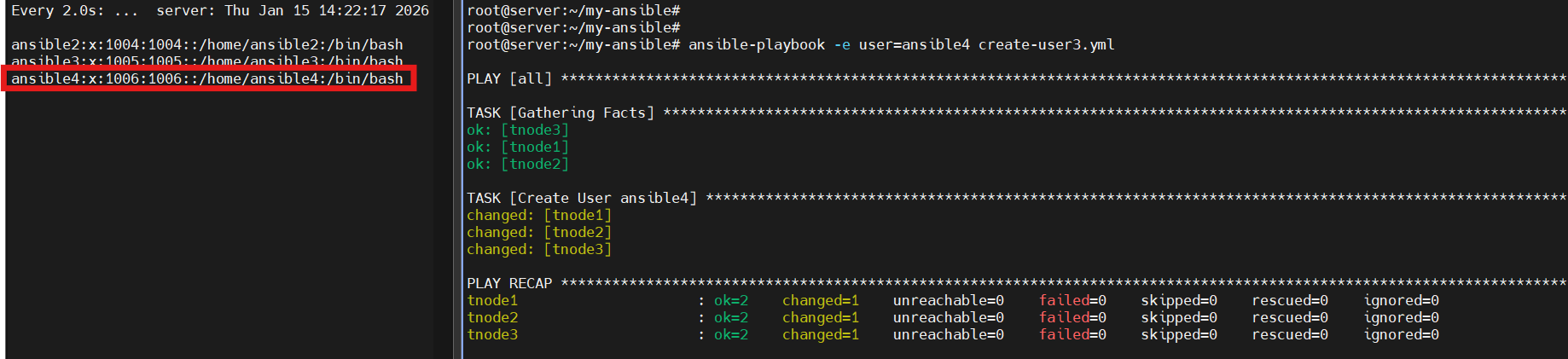

♣ 변수 우선 순위 : 추가변수(실행 시 파라미터) > 플레이 변수 > 호스트 변수 > 그룹 변수
작업 변수 : 플레이북의 수행 결과를 저장. 특정 작업 수행 후 그 결과를 후속 작업에서 사용할 때 주로 사용됨
- 파일 복사 후 수정, Create User 태스트에 register: result 라는 문구를 추가.
- register를 선언하면 태스트를 실행한 결과를 register 다음에 나오는 result라는 변수에 저장하겠다는 의미가 됩니다.
- 그리고 result라는 변수에 저장한 결과를 debug 모듈을 통해 출력합니다.
my-ansible/create-user4.yml
---

- hosts: db
  tasks:
  - name: Create User {{ user }}
    ansible.builtin.user:
      name: "{{ user }}"
      state: present
    register: result

  - ansible.builtin.debug:
      var: result
2. 추가 변수와 함께 플레이북 실행 확인

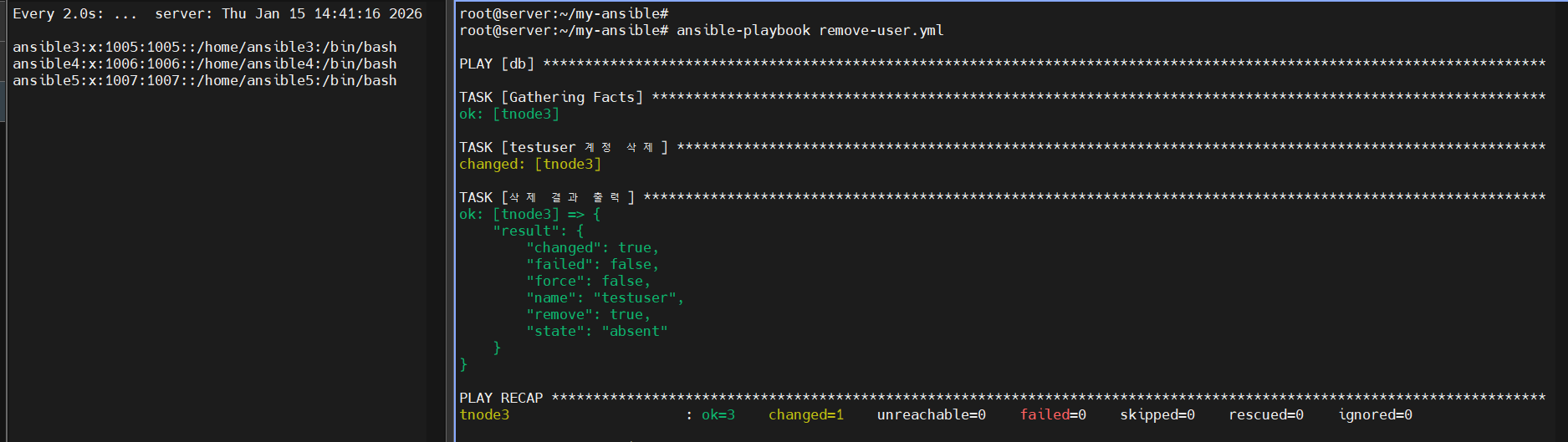
[도전과제 1] 생성된 user : testuser 를 ansible.builtin.user 모듈을 통해서 제거
---
- hosts: db
  tasks:
    - name: "testuser 계정 삭제"
      ansible.builtin.user:
        name: testuser
        state: absent
        remove: yes  # 홈 디렉토리와 메일함도 함께 삭제하려면 추가
      register: result

    - name: 삭제 결과 출력
      ansible.builtin.debug:
        var: result
[도전관제1 - 결과]
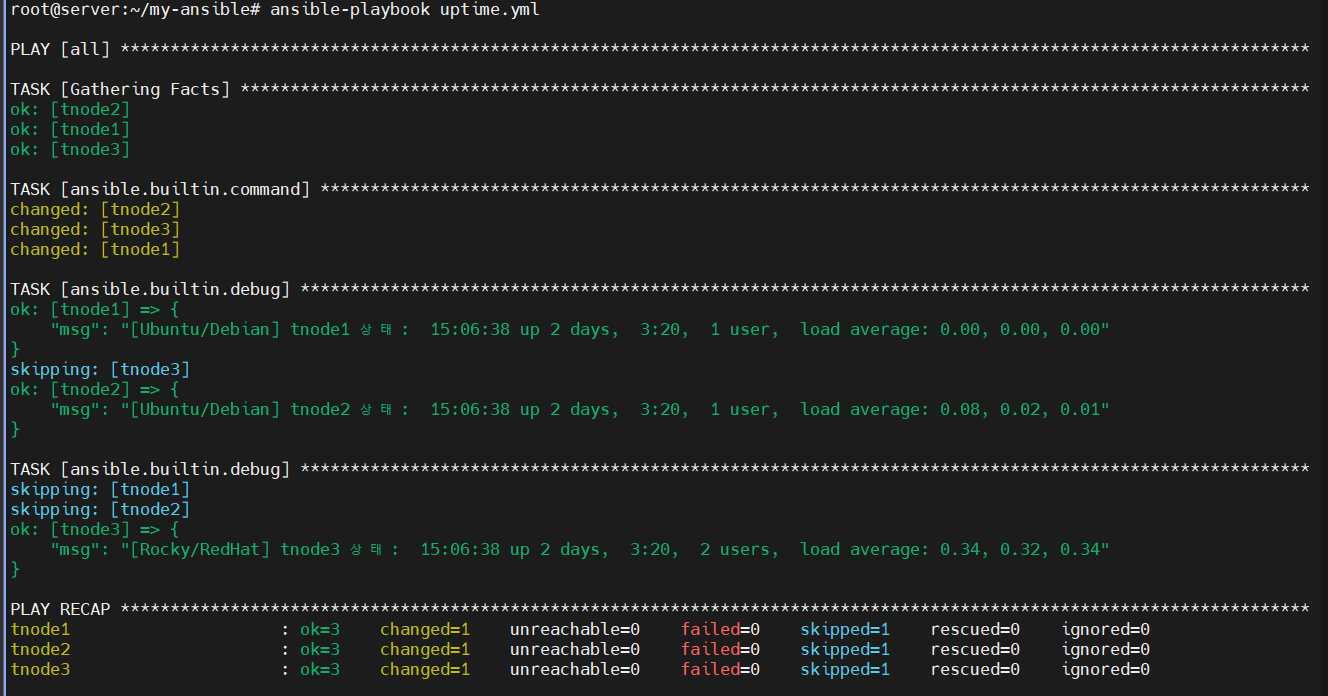
[도전과제 2] 관리 대상에 uptime 을 ansible.builtin.debug 모듈을 통해서 제거
---
- hosts: all
  gather_facts: yes  # OS 계열을 파악하기 위해 Facts 수집

  tasks:
    # 1. 공통적으로 uptime 명령어를 실행하여 변수에 저장
    - name:
      ansible.builtin.command: uptime
      register: uptime_raw

    # 2. 우분투(Debian 계열)일 경우 실행 결과 출력
    - name:
      ansible.builtin.debug:
        msg: "[Ubuntu/Debian] {{ inventory_hostname }} 상태: {{ uptime_raw.stdout }}"
      when: ansible_os_family == "Debian"

    # 3. 로키 리눅스(RedHat 계열)일 경우 실행 결과 출력
    - name:
      ansible.builtin.debug:
        msg: "[Rocky/RedHat] {{ inventory_hostname }} 상태: {{ uptime_raw.stdout }}"
      when: ansible_os_family == "RedHat"
[도전관제2 - 결과]
Facts
팩트 Facts는 앤서블이 관리 호스트에서 자동으로 검색한 변수(자동 예약 변수)입니다. 팩트에는 플레이, 조건문, 반복문 또는 관리 호스트에서 수집한 값에 의존하는 기타 명령문의 일반 변수처럼 사용 가능한 호스트별 정보가 포함되어 있습니다. 관리 호스트에서 수집된 일부 팩트에는 다음 내용들이 포함될 수 있습니다.
- 호스트 이름
- 커널 버전
- 네트워크 인터페이스 이름
- 운영체제 버전
- CPU 개수
- 사용 가능한 메모리
- 스토리지 장치의 크기 및 여유 공간
- 등등 ...
팩트 사용하기 : 기본 활성화로, 플레이북을 실행할 때 자동으로 팩트가 수집됨. ansible_facts 변수로 사용.
1. 파일 생성
my-ansible/facts.yml
---

- hosts: db

  tasks:
  - name: Print all facts
    ansible.builtin.debug:
      var: ansible_facts
2. 플레이북 실행
#
ansible-playbook facts.yml
...
TASK [Gathering Facts] ***********************************************************************************************************************************************************************
ok: [tnode3]

TASK [Print all facts] ***********************************************************************************************************************************************************************
ok: [tnode3] => {
...
  "hostname": "tnode3",
...
  "default_ipv4": {
      "address": "10.10.1.13",
...
  "os_family": "Debian",    # 참고로 Ubuntu도 os_family는 Debian 으로 출력 - Link
...
[출력결과]
root@server:~/my-ansible# ansible-playbook facts.yml
PLAY [db] ************************************************************************************************************************
TASK [Gathering Facts] ***********************************************************************************************************
ok: [tnode3]
TASK [Print all facts] ***********************************************************************************************************
ok: [tnode3] => {
"ansible_facts": {
"all_ipv4_addresses": [
"100.100.100.248"
],
"all_ipv6_addresses": [
"fe80::f816:3eff:fe97:a6bc"
],
"ansible_local": {},
"apparmor": {
"status": "disabled"
},
"architecture": "x86_64",
"bios_date": "04/01/2014",
"bios_vendor": "SeaBIOS",
"bios_version": "1.16.3-4.el9",
"board_asset_tag": "NA",
"board_name": "NA",
"board_serial": "NA",
"board_vendor": "NA",
"board_version": "NA",
"chassis_asset_tag": "NA",
"chassis_serial": "NA",
"chassis_vendor": "Red Hat",
"chassis_version": "RHEL 7.6.0 PC (i440FX + PIIX, 1996)",
"cmdline": {
"BOOT_IMAGE": "(hd0,gpt3)/vmlinuz-5.14.0-570.17.1.el9_6.x86_64",
"console": "ttyS0,115200n8",
"crashkernel": "1G-4G:192M,4G-64G:256M,64G-:512M",
"net.ifnames": "0",
"no_timer_check": true,
"root": "UUID=9e80229d-48ee-4412-ae76-c18439c52af8"
},
"date_time": {
"date": "2026-01-15",
"day": "15",
"epoch": "1768458542",
"epoch_int": "1768458542",
"hour": "15",
"iso8601": "2026-01-15T06:29:02Z",
"iso8601_basic": "20260115T152902301907",
"iso8601_basic_short": "20260115T152902",
"iso8601_micro": "2026-01-15T06:29:02.301907Z",
"minute": "29",
"month": "01",
"second": "02",
"time": "15:29:02",
"tz": "KST",
"tz_dst": "KST",
"tz_offset": "+0900",
"weekday": "Thursday",
"weekday_number": "4",
"weeknumber": "02",
"year": "2026"
},
"default_ipv4": {
"address": "100.100.100.248",
"alias": "eth0",
"broadcast": "100.100.100.255",
"gateway": "100.100.100.254",
"interface": "eth0",
"macaddress": "fa:16:3e:97:a6:bc",
"mtu": 1450,
"netmask": "255.255.255.0",
"network": "100.100.100.0",
"prefix": "24",
"type": "ether"
},
"default_ipv6": {},
"device_links": {
"ids": {
"vda": [
"virtio-21f8752b-eda7-4c34-a"
],
"vda1": [
"virtio-21f8752b-eda7-4c34-a-part1"
],
"vda2": [
"virtio-21f8752b-eda7-4c34-a-part2"
],
"vda3": [
"virtio-21f8752b-eda7-4c34-a-part3"
],
"vda4": [
"virtio-21f8752b-eda7-4c34-a-part4"
]
},
"labels": {
"vda2": [
"EFI"
],
"vda3": [
"BOOT"
],
"vda4": [
"rocky"
]
},
"masters": {},
"uuids": {
"vda2": [
"DFA8-417E"
],
"vda3": [
"17cc1761-0d3c-44cb-ae30-a94796e7ac81"
],
"vda4": [
"9e80229d-48ee-4412-ae76-c18439c52af8"
]
}
},
"devices": {
"vda": {
"holders": [],
"host": "",
"links": {
"ids": [
"virtio-21f8752b-eda7-4c34-a"
],
"labels": [],
"masters": [],
"uuids": []
},
"model": null,
"partitions": {
"vda1": {
"holders": [],
"links": {
"ids": [
"virtio-21f8752b-eda7-4c34-a-part1"
],
"labels": [],
"masters": [],
"uuids": []
},
"sectors": 4096,
"sectorsize": 512,
"size": "2.00 MB",
"start": "2048",
"uuid": null
},
"vda2": {
"holders": [],
"links": {
"ids": [
"virtio-21f8752b-eda7-4c34-a-part2"
],
"labels": [
"EFI"
],
"masters": [],
"uuids": [
"DFA8-417E"
]
},
"sectors": 204800,
"sectorsize": 512,
"size": "100.00 MB",
"start": "6144",
"uuid": "DFA8-417E"
},
"vda3": {
"holders": [],
"links": {
"ids": [
"virtio-21f8752b-eda7-4c34-a-part3"
],
"labels": [
"BOOT"
],
"masters": [],
"uuids": [
"17cc1761-0d3c-44cb-ae30-a94796e7ac81"
]
},
"sectors": 2048000,
"sectorsize": 512,
"size": "1000.00 MB",
"start": "210944",
"uuid": "17cc1761-0d3c-44cb-ae30-a94796e7ac81"
},
"vda4": {
"holders": [],
"links": {
"ids": [
"virtio-21f8752b-eda7-4c34-a-part4"
],
"labels": [
"rocky"
],
"masters": [],
"uuids": [
"9e80229d-48ee-4412-ae76-c18439c52af8"
]
},
"sectors": 123570143,
"sectorsize": 512,
"size": "58.92 GB",
"start": "2258944",
"uuid": "9e80229d-48ee-4412-ae76-c18439c52af8"
}
},
"removable": "0",
"rotational": "1",
"sas_address": null,
"sas_device_handle": null,
"scheduler_mode": "mq-deadline",
"sectors": 125829120,
"sectorsize": "512",
"size": "60.00 GB",
"support_discard": "0",
"vendor": "0x1af4",
"virtual": 1
}
},
"distribution": "Rocky",
"distribution_file_parsed": true,
"distribution_file_path": "/etc/redhat-release",
"distribution_file_variety": "RedHat",
"distribution_major_version": "9",
"distribution_release": "Blue Onyx",
"distribution_version": "9.6",
"dns": {
"nameservers": [
"8.8.8.8"
]
},
"domain": "novalocal",
"effective_group_id": 0,
"effective_user_id": 0,
"env": {
"BASH_FUNC_which%%": "() { ( alias;\n eval ${which_declare} ) | /usr/bin/which --tty-only --read-alias --read-functio ns --show-tilde --show-dot $@\n}",
"DBUS_SESSION_BUS_ADDRESS": "unix:path=/run/user/0/bus",
"DEBUGINFOD_IMA_CERT_PATH": "/etc/keys/ima:",
"DEBUGINFOD_URLS": "https://debuginfod.rockylinux.org/ ",
"HOME": "/root",
"LANG": "en_US.UTF-8",
"LESSOPEN": "||/usr/bin/lesspipe.sh %s",
"LOGNAME": "root",
"LS_COLORS": "rs=0:di=01;34:ln=01;36:mh=00:pi=40;33:so=01;35:do=01;35:bd=40;33;01:cd=40;33;01:or=40;31;01:mi=01;37;41: su=37;41:sg=30;43:ca=30;41:tw=30;42:ow=34;42:st=37;44:ex=01;32:*.tar=01;31:*.tgz=01;31:*.arc=01;31:*.arj=01;31:*.taz=01;31:*.lha=0 1;31:*.lz4=01;31:*.lzh=01;31:*.lzma=01;31:*.tlz=01;31:*.txz=01;31:*.tzo=01;31:*.t7z=01;31:*.zip=01;31:*.z=01;31:*.dz=01;31:*.gz=01 ;31:*.lrz=01;31:*.lz=01;31:*.lzo=01;31:*.xz=01;31:*.zst=01;31:*.tzst=01;31:*.bz2=01;31:*.bz=01;31:*.tbz=01;31:*.tbz2=01;31:*.tz=01 ;31:*.deb=01;31:*.rpm=01;31:*.jar=01;31:*.war=01;31:*.ear=01;31:*.sar=01;31:*.rar=01;31:*.alz=01;31:*.ace=01;31:*.zoo=01;31:*.cpio =01;31:*.7z=01;31:*.rz=01;31:*.cab=01;31:*.wim=01;31:*.swm=01;31:*.dwm=01;31:*.esd=01;31:*.jpg=01;35:*.jpeg=01;35:*.mjpg=01;35:*.m jpeg=01;35:*.gif=01;35:*.bmp=01;35:*.pbm=01;35:*.pgm=01;35:*.ppm=01;35:*.tga=01;35:*.xbm=01;35:*.xpm=01;35:*.tif=01;35:*.tiff=01;3 5:*.png=01;35:*.svg=01;35:*.svgz=01;35:*.mng=01;35:*.pcx=01;35:*.mov=01;35:*.mpg=01;35:*.mpeg=01;35:*.m2v=01;35:*.mkv=01;35:*.webm =01;35:*.webp=01;35:*.ogm=01;35:*.mp4=01;35:*.m4v=01;35:*.mp4v=01;35:*.vob=01;35:*.qt=01;35:*.nuv=01;35:*.wmv=01;35:*.asf=01;35:*. rm=01;35:*.rmvb=01;35:*.flc=01;35:*.avi=01;35:*.fli=01;35:*.flv=01;35:*.gl=01;35:*.dl=01;35:*.xcf=01;35:*.xwd=01;35:*.yuv=01;35:*. cgm=01;35:*.emf=01;35:*.ogv=01;35:*.ogx=01;35:*.aac=01;36:*.au=01;36:*.flac=01;36:*.m4a=01;36:*.mid=01;36:*.midi=01;36:*.mka=01;36 :*.mp3=01;36:*.mpc=01;36:*.ogg=01;36:*.ra=01;36:*.wav=01;36:*.oga=01;36:*.opus=01;36:*.spx=01;36:*.xspf=01;36:",
"MOTD_SHOWN": "pam",
"PATH": "/root/.local/bin:/root/bin:/usr/local/sbin:/usr/local/bin:/usr/sbin:/usr/bin",
"PWD": "/root",
"SELINUX_LEVEL_REQUESTED": "",
"SELINUX_ROLE_REQUESTED": "",
"SELINUX_USE_CURRENT_RANGE": "",
"SHELL": "/bin/bash",
"SHLVL": "1",
"SSH_CLIENT": "100.100.100.245 59842 22",
"SSH_CONNECTION": "100.100.100.245 59842 100.100.100.248 22",
"SSH_TTY": "/dev/pts/0",
"TERM": "xterm",
"USER": "root",
"XDG_RUNTIME_DIR": "/run/user/0",
"XDG_SESSION_CLASS": "user",
"XDG_SESSION_ID": "2224",
"XDG_SESSION_TYPE": "tty",
"_": "/usr/bin/python3",
"which_declare": "declare -f"
},
"eth0": {
"active": true,
"device": "eth0",
"features": {
"esp_hw_offload": "off [fixed]",
"esp_tx_csum_hw_offload": "off [fixed]",
"generic_receive_offload": "on",
"generic_segmentation_offload": "on",
"highdma": "on [fixed]",
"hsr_dup_offload": "off [fixed]",
"hsr_fwd_offload": "off [fixed]",
"hsr_tag_ins_offload": "off [fixed]",
"hsr_tag_rm_offload": "off [fixed]",
"hw_tc_offload": "off [fixed]",
"l2_fwd_offload": "off [fixed]",
"large_receive_offload": "off [fixed]",
"loopback": "off [fixed]",
"macsec_hw_offload": "off [fixed]",
"ntuple_filters": "off [fixed]",
"receive_hashing": "off [fixed]",
"rx_all": "off [fixed]",
"rx_checksumming": "on [fixed]",
"rx_fcs": "off [fixed]",
"rx_gro_hw": "on",
"rx_gro_list": "off",
"rx_udp_gro_forwarding": "off",
"rx_udp_tunnel_port_offload": "off [fixed]",
"rx_vlan_filter": "on [fixed]",
"rx_vlan_offload": "off [fixed]",
"rx_vlan_stag_filter": "off [fixed]",
"rx_vlan_stag_hw_parse": "off [fixed]",
"scatter_gather": "on",
"tcp_segmentation_offload": "on",
"tls_hw_record": "off [fixed]",
"tls_hw_rx_offload": "off [fixed]",
"tls_hw_tx_offload": "off [fixed]",
"tx_checksum_fcoe_crc": "off [fixed]",
"tx_checksum_ip_generic": "on",
"tx_checksum_ipv4": "off [fixed]",
"tx_checksum_ipv6": "off [fixed]",
"tx_checksum_sctp": "off [fixed]",
"tx_checksumming": "on",
"tx_esp_segmentation": "off [fixed]",
"tx_fcoe_segmentation": "off [fixed]",
"tx_gre_csum_segmentation": "off [fixed]",
"tx_gre_segmentation": "off [fixed]",
"tx_gso_list": "off [fixed]",
"tx_gso_partial": "off [fixed]",
"tx_gso_robust": "on [fixed]",
"tx_ipxip4_segmentation": "off [fixed]",
"tx_ipxip6_segmentation": "off [fixed]",
"tx_nocache_copy": "off",
"tx_scatter_gather": "on",
"tx_scatter_gather_fraglist": "off [fixed]",
"tx_sctp_segmentation": "off [fixed]",
"tx_tcp6_segmentation": "on",
"tx_tcp_ecn_segmentation": "on",
"tx_tcp_mangleid_segmentation": "off",
"tx_tcp_segmentation": "on",
"tx_tunnel_remcsum_segmentation": "off [fixed]",
"tx_udp_segmentation": "off [fixed]",
"tx_udp_tnl_csum_segmentation": "off [fixed]",
"tx_udp_tnl_segmentation": "off [fixed]",
"tx_vlan_offload": "off [fixed]",
"tx_vlan_stag_hw_insert": "off [fixed]",
"vlan_challenged": "off [fixed]"
},
"hw_timestamp_filters": [],
"ipv4": {
"address": "100.100.100.248",
"broadcast": "100.100.100.255",
"netmask": "255.255.255.0",
"network": "100.100.100.0",
"prefix": "24"
},
"ipv6": [
{
"address": "fe80::f816:3eff:fe97:a6bc",
"prefix": "64",
"scope": "link"
}
],
"macaddress": "fa:16:3e:97:a6:bc",
"module": "virtio_net",
"mtu": 1450,
"pciid": "virtio1",
"promisc": false,
"speed": -1,
"timestamping": [],
"type": "ether"
},
"fibre_channel_wwn": [],
"fips": false,
"flags": [
"fpu",
"vme",
"de",
"pse",
"tsc",
"msr",
"pae",
"mce",
"cx8",
"apic",
"sep",
"mtrr",
"pge",
"mca",
"cmov",
"pat",
"pse36",
"clflush",
"mmx",
"fxsr",
"sse",
"sse2",
"syscall",
"nx",
"pdpe1gb",
"rdtscp",
"lm",
"constant_tsc",
"rep_good",
"nopl",
"xtopology",
"cpuid",
"tsc_known_freq",
"pni",
"pclmulqdq",
"vmx",
"ssse3",
"cx16",
"pcid",
"sse4_1",
"sse4_2",
"x2apic",
"popcnt",
"tsc_deadline_timer",
"aes",
"hypervisor",
"lahf_lm",
"cpuid_fault",
"pti",
"tpr_shadow",
"flexpriority",
"ept",
"vpid",
"tsc_adjust",
"arat",
"vnmi",
"umip",
"arch_capabilities"
],
"form_factor": "Other",
"fqdn": "tnode3.novalocal",
"gather_subset": [
"all"
],
"hostname": "tnode3",
"hostnqn": "",
"interfaces": [
"eth0",
"lo"
],
"is_chroot": false,
"iscsi_iqn": "",
"kernel": "5.14.0-570.17.1.el9_6.x86_64",
"kernel_version": "#1 SMP PREEMPT_DYNAMIC Fri May 23 22:47:01 UTC 2025",
"lo": {
"active": true,
"device": "lo",
"features": {
"esp_hw_offload": "off [fixed]",
"esp_tx_csum_hw_offload": "off [fixed]",
"generic_receive_offload": "on",
"generic_segmentation_offload": "on",
"highdma": "on [fixed]",
"hsr_dup_offload": "off [fixed]",
"hsr_fwd_offload": "off [fixed]",
"hsr_tag_ins_offload": "off [fixed]",
"hsr_tag_rm_offload": "off [fixed]",
"hw_tc_offload": "off [fixed]",
"l2_fwd_offload": "off [fixed]",
"large_receive_offload": "off [fixed]",
"loopback": "on [fixed]",
"macsec_hw_offload": "off [fixed]",
"ntuple_filters": "off [fixed]",
"receive_hashing": "off [fixed]",
"rx_all": "off [fixed]",
"rx_checksumming": "on [fixed]",
"rx_fcs": "off [fixed]",
"rx_gro_hw": "off [fixed]",
"rx_gro_list": "off",
"rx_udp_gro_forwarding": "off",
"rx_udp_tunnel_port_offload": "off [fixed]",
"rx_vlan_filter": "off [fixed]",
"rx_vlan_offload": "off [fixed]",
"rx_vlan_stag_filter": "off [fixed]",
"rx_vlan_stag_hw_parse": "off [fixed]",
"scatter_gather": "on",
"tcp_segmentation_offload": "on",
"tls_hw_record": "off [fixed]",
"tls_hw_rx_offload": "off [fixed]",
"tls_hw_tx_offload": "off [fixed]",
"tx_checksum_fcoe_crc": "off [fixed]",
"tx_checksum_ip_generic": "on [fixed]",
"tx_checksum_ipv4": "off [fixed]",
"tx_checksum_ipv6": "off [fixed]",
"tx_checksum_sctp": "on [fixed]",
"tx_checksumming": "on",
"tx_esp_segmentation": "off [fixed]",
"tx_fcoe_segmentation": "off [fixed]",
"tx_gre_csum_segmentation": "off [fixed]",
"tx_gre_segmentation": "off [fixed]",
"tx_gso_list": "on",
"tx_gso_partial": "off [fixed]",
"tx_gso_robust": "off [fixed]",
"tx_ipxip4_segmentation": "off [fixed]",
"tx_ipxip6_segmentation": "off [fixed]",
"tx_nocache_copy": "off [fixed]",
"tx_scatter_gather": "on [fixed]",
"tx_scatter_gather_fraglist": "on [fixed]",
"tx_sctp_segmentation": "on",
"tx_tcp6_segmentation": "on",
"tx_tcp_ecn_segmentation": "on",
"tx_tcp_mangleid_segmentation": "on",
"tx_tcp_segmentation": "on",
"tx_tunnel_remcsum_segmentation": "off [fixed]",
"tx_udp_segmentation": "on",
"tx_udp_tnl_csum_segmentation": "off [fixed]",
"tx_udp_tnl_segmentation": "off [fixed]",
"tx_vlan_offload": "off [fixed]",
"tx_vlan_stag_hw_insert": "off [fixed]",
"vlan_challenged": "on [fixed]"
},
"hw_timestamp_filters": [],
"ipv4": {
"address": "127.0.0.1",
"broadcast": "",
"netmask": "255.0.0.0",
"network": "127.0.0.0",
"prefix": "8"
},
"ipv6": [
{
"address": "::1",
"prefix": "128",
"scope": "host"
}
],
"mtu": 65536,
"promisc": false,
"timestamping": [],
"type": "loopback"
},
"loadavg": {
"15m": 0.36,
"1m": 0.68,
"5m": 0.44
},
"locally_reachable_ips": {
"ipv4": [
"100.100.100.248",
"127.0.0.0/8",
"127.0.0.1"
],
"ipv6": [
"::1",
"fe80::f816:3eff:fe97:a6bc"
]
},
"lsb": {},
"lvm": "N/A",
"machine": "x86_64",
"machine_id": "1768bbd2179641ffab980faaef7d2b39",
"memfree_mb": 822,
"memory_mb": {
"nocache": {
"free": 1556,
"used": 215
},
"real": {
"free": 822,
"total": 1771,
"used": 949
},
"swap": {
"cached": 0,
"free": 0,
"total": 0,
"used": 0
}
},
"memtotal_mb": 1771,
"module_setup": true,
"mounts": [
{
"block_available": 14932299,
"block_size": 4096,
"block_total": 15429883,
"block_used": 497584,
"device": "/dev/vda4",
"dump": 0,
"fstype": "xfs",
"inode_available": 30851998,
"inode_total": 30892528,
"inode_used": 40530,
"mount": "/",
"options": "rw,seclabel,relatime,attr2,inode64,logbufs=8,logbsize=32k,noquota",
"passno": 0,
"size_available": 61162696704,
"size_total": 63200800768,
"uuid": "9e80229d-48ee-4412-ae76-c18439c52af8"
},
{
"block_available": 172723,
"block_size": 4096,
"block_total": 239616,
"block_used": 66893,
"device": "/dev/vda3",
"dump": 0,
"fstype": "xfs",
"inode_available": 511635,
"inode_total": 512000,
"inode_used": 365,
"mount": "/boot",
"options": "rw,seclabel,relatime,attr2,inode64,logbufs=8,logbsize=32k,noquota",
"passno": 0,
"size_available": 707473408,
"size_total": 981467136,
"uuid": "17cc1761-0d3c-44cb-ae30-a94796e7ac81"
},
{
"block_available": 45826,
"block_size": 2048,
"block_total": 51091,
"block_used": 5265,
"device": "/dev/vda2",
"dump": 0,
"fstype": "vfat",
"inode_available": 0,
"inode_total": 0,
"inode_used": 0,
"mount": "/boot/efi",
"options": "rw,relatime,fmask=0077,dmask=0077,codepage=437,iocharset=ascii,shortname=winnt,errors=remount-ro",
"passno": 0,
"size_available": 93851648,
"size_total": 104634368,
"uuid": "DFA8-417E"
}
],
"nodename": "tnode3.novalocal",
"os_family": "RedHat",
"pkg_mgr": "dnf",
"proc_cmdline": {
"BOOT_IMAGE": "(hd0,gpt3)/vmlinuz-5.14.0-570.17.1.el9_6.x86_64",
"console": "ttyS0,115200n8",
"crashkernel": "1G-4G:192M,4G-64G:256M,64G-:512M",
"net.ifnames": "0",
"no_timer_check": true,
"root": "UUID=9e80229d-48ee-4412-ae76-c18439c52af8"
},
"processor": [
"0",
"GenuineIntel",
"Westmere E56xx/L56xx/X56xx (Nehalem-C)"
],
"processor_cores": 1,
"processor_count": 1,
"processor_nproc": 1,
"processor_threads_per_core": 1,
"processor_vcpus": 1,
"product_name": "OpenStack Compute",
"product_serial": "1768bbd2-1796-41ff-ab98-0faaef7d2b39",
"product_uuid": "1768bbd2-1796-41ff-ab98-0faaef7d2b39",
"product_version": "30.0.0-1.el9s",
"python": {
"executable": "/usr/bin/python3",
"has_sslcontext": true,
"type": "cpython",
"version": {
"major": 3,
"micro": 21,
"minor": 9,
"releaselevel": "final",
"serial": 0
},
"version_info": [
3,
9,
21,
"final",
0
]
},
"python_version": "3.9.21",
"real_group_id": 0,
"real_user_id": 0,
"selinux": {
"config_mode": "permissive",
"mode": "permissive",
"policyvers": 33,
"status": "enabled",
"type": "targeted"
},
"selinux_python_present": true,
"service_mgr": "systemd",
"ssh_host_key_ecdsa_public": "AAAAE2VjZHNhLXNoYTItbmlzdHAyNTYAAAAIbmlzdHAyNTYAAABBBDh2IWQkVCPc8tYN1RqCE3zlYQMXvcuShOHcqKAp 9c+XOxcGEZNYO7ugLeMaZdeLMdR2KkMkz0DJIFy3bHhpofI=",
"ssh_host_key_ecdsa_public_keytype": "ecdsa-sha2-nistp256",
"ssh_host_key_ed25519_public": "AAAAC3NzaC1lZDI1NTE5AAAAIPiaBDbNx0ve4Dvn1iY+czndIZOV/NShkAJLrMvk80Rf",
"ssh_host_key_ed25519_public_keytype": "ssh-ed25519",
"ssh_host_key_rsa_public": "AAAAB3NzaC1yc2EAAAADAQABAAABgQCr0Q3mJgtEoQqtj+q4fQgOmcQWuvzIK3N3kXB/9HeVim+unejuSnAlKgfYs3mQpR 2PMZ34bDS6+25kb5o6TLjrinCsU+LouFaADTuUu8DqGNQoIWR/GlCBo0htsrkQ2OmHeFZhsSrMK3I7Go/9ohw/k/1/5uqtifcufwDGjpK3u/b5U/rzhdzzu+ezh4x8KJDB oZRHT8+9nmDDYSzN93putEawhhmuWXq4RRljVMnPXCwI13UeUwg278IrOTB3y4NBdrgaH4KdVoZabpCE82phm1agPy9UcC1Xl/K0azIDLI1peRrsD8Y3PrfldGgKRAYNdt gszoFMEkssM45wK5tk4t2KdBJlGkrnfKfL4fiPILfivXplpYCfjI07SdyrZP2Dx+pUp39H5qB8pczLFZZHhEWhLgb6H8niXl2VZAQrMzlegDgHLe+CQJyORegkWuqxztJ4 E5fZwTKrtZ8ebr15RabiQpP0GkR339lvWjml6WV9o9LE0+2uVkiG+NkY8d8=",
"ssh_host_key_rsa_public_keytype": "ssh-rsa",
"swapfree_mb": 0,
"swaptotal_mb": 0,
"system": "Linux",
"system_capabilities": [],
"system_capabilities_enforced": "False",
"system_vendor": "RDO",
"systemd": {
"features": "+PAM +AUDIT +SELINUX -APPARMOR +IMA +SMACK +SECCOMP +GCRYPT +GNUTLS +OPENSSL +ACL +BLKID +CURL +ELFUTILS +FIDO2 +IDN2 -IDN -IPTC +KMOD +LIBCRYPTSETUP +LIBFDISK +PCRE2 -PWQUALITY +P11KIT -QRENCODE +TPM2 +BZIP2 +LZ4 +XZ +ZLIB +ZSTD -BPF_ FRAMEWORK +XKBCOMMON +UTMP +SYSVINIT default-hierarchy=unified",
"version": 252
},
"uptime_seconds": 186165,
"user_dir": "/root",
"user_gecos": "root",
"user_gid": 0,
"user_id": "root",
"user_shell": "/bin/bash",
"user_uid": 0,
"userspace_architecture": "x86_64",
"userspace_bits": "64",
"virtualization_role": "guest",
"virtualization_tech_guest": [
"openstack"
],
"virtualization_tech_host": [
"kvm"
],
"virtualization_type": "openstack"
}
}
PLAY RECAP ***********************************************************************************************************************
tnode3 : ok=2 changed=0 unreachable=0 failed=0 skipped=0 rescued=0 ignored=0
3. 팩트를 통해 수집된 변수 중 특정 값만 추출
my-ansible/facts1.yml
---

- hosts: db

  tasks:
  - name: Print all facts
    ansible.builtin.debug:
      msg: >
        The default IPv4 address of {{ ansible_facts.hostname }}
        is {{ ansible_facts.default_ipv4.address }}
변수로 사용할 수 있는 앤서블 팩트 : 엔서블 2.* 버전에서는 ansible_facts.* 네임스페이스 표기법을 따름
| 팩트 | ansible_facts.* 표기법 |
| 호스트명 | ansible_facts.hostname |
| 도메인 기반 호스트명 | ansible_facts.fqdn |
| 기본 IPv4 주소 | ansible_facts.default_ipv4.address |
| 네트워크 인터페이스 이름 목록 | ansible_facts.interfaces |
| /dev/vda1 디스크 파티션 크기 | ansible_facts.device.vda.partitions.vda1.size |
| DNS 서버 목록 | ansible_facts.dns.nameservers |
| 현재 실행 중인 커널 버전 | ansible_facts.kernel |
| 운영체제 종류 | ansible_facts.distribution |
- 구 표기법은 비권장(변수와 충돌 위험, 팩트는 우선순위가 매우 높음)
| ansible_* 표기법 | ansible_facts.* 표기법 |
| ansible_hostname | ansible_facts.hostname |
| ansible_fqdn | ansible_facts.fqdn |
| ansible_default_ipv4.address | ansible_facts.default_ipv4.address |
| ansible_interfaces | ansible_facts.interfaces |
| ansible_device.vda.partitions.vda1.size | ansible_facts.device.vda.partitions.vda1.size |
| ansible_dns.nameservers | ansible_facts.dns.nameservers |
| ansible_kernel | ansible_facts.kernel |
| ansible_distribution | ansible_facts.distribution |
현재 위 두 개의 표기법 모두 인지. 이는 앤서블 환경 설정 파일인 ansible.cfg [defaults] 섹션에 있는 inject_facts_as_vars 매개 변수 기본 설정 값이 true이기 때문이며, false로 설정하면 ansible_* 표기법을 비활성화 할 수 있습니다.
1. 파일 생성
my-ansible/facts2.yml
---

- hosts: db

  tasks:
  - name: Print all facts
    ansible.builtin.debug:
      msg: >
        The node's host name is {{ ansible_hostname }}
        and the ip is {{ ansible_default_ipv4.address }}
2. 실행
#
ansible-playbook facts2.yml
...
TASK [Print all facts] **************************************************************************
ok: [tnode3-ubuntu.local] => {
    "msg": "The node's host name is tnode3 and the ip is 10.10.1.13"
}
3. ansible.cfg 수정 후 실행
# ansible.cfg 파일 편집
[defaults]
inventory = ./inventory
remote_user = root
ask_pass = false
inject_facts_as_vars = false

[privilege_escalation]
become = true
become_method = sudo
become_user = root
become_ask_pass = false

# 실행
ansible-playbook facts2.yml
ansible.builtin.setup 모듈 - https://docs.ansible.com/ansible/latest/collections/ansible/builtin/setup_module.html
팩트 수집 끄기 : 팩트 수집 기능 비활성화 가능
- 팩트 수집을 위해 해당 호스트에 특정 패키지를 설치해야만 하는 경우가 있습니다. 그런데 간혹 특정 이유로 패키지를 설치할 수 없는 경우에는 앤서블도 팩트 수집을 할 수 없게 됩니다. 또는 사용자가 팩트 수집으로 인해 호스트에 부하가 걸리는 것을 원치 않을 수도 있습니다. 이런 경우에는 팩트 수집 기능을 비활성화 할 수 있습니다.
1. 팩트 수집 실행 시 관리 호스트에 프로세스 확인
# (터미널2) tnode3에 SSH 접속 후 아래 모니터링
ssh tnode3
watch -d -n 1 pstree -a

# [ansible-server]에서 아래 플레이북 실행
ansible-playbook facts.yml
ansible-playbook facts.yml
ansible-playbook facts.yml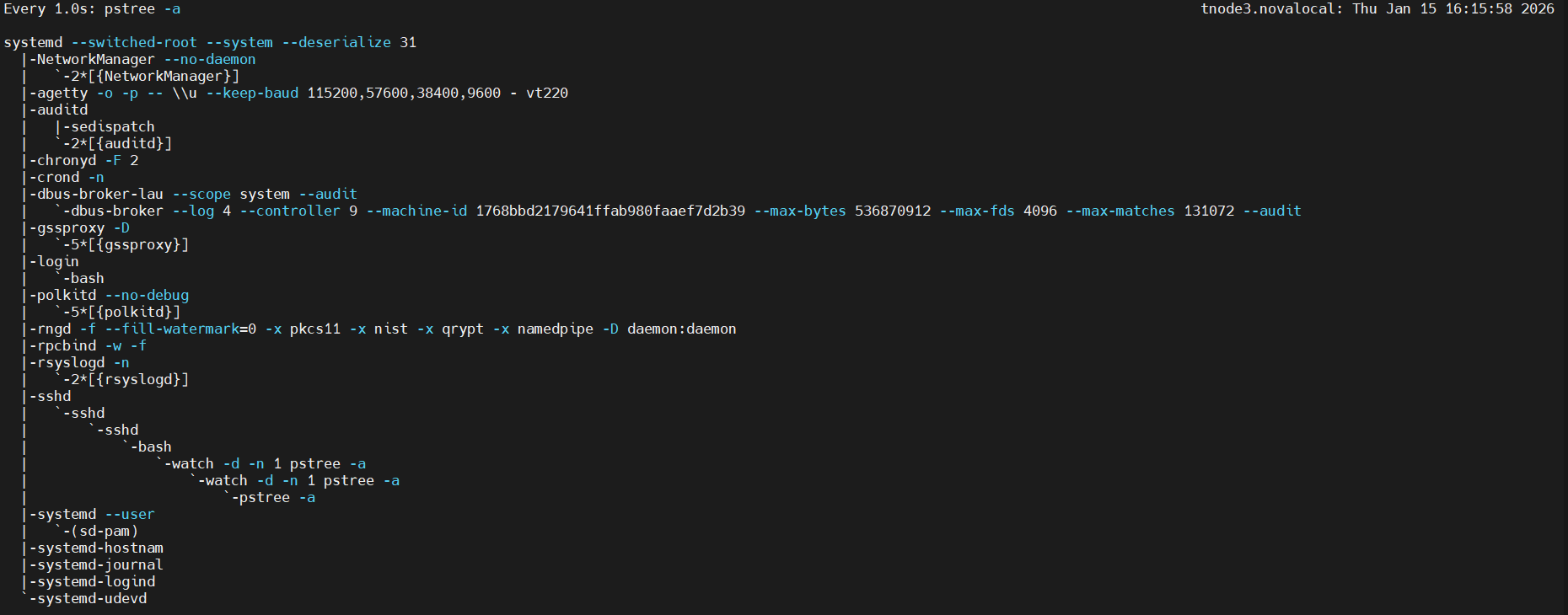
2. 플레이북 작성
---

- hosts: db
  gather_facts: no

  tasks:
  - name: Print all facts
    ansible.builtin.debug:
      msg: >
        The default IPv4 address of {{ ansible_facts.hostname }}
        is {{ ansible_facts.default_ipv4.address }}
3. 실행
# 실행 결과 확인 : 팩트를 수집하지 않았는데, 팩트에서 수집해야만 하는 변수를 사용하려고 해서 에러가 발생
ansible-playbook facts3.yml


# 파일 복사
cp facts3.yml facts3-2.yml

# facts3-2.yml 파일 편집
---

- hosts: db
  gather_facts: no

  tasks:
  - name: Print message
    debug:
      msg: Hello Ansible World

# 실행 : TASK [Print all facts] 가 없다!
ansible-playbook facts3-2.yml
PLAY [db] ***************************************************************************

TASK [Print message] ****************************************************************
ok: [tnode3] => {
    "msg": "Hello Ansible World"
}
...
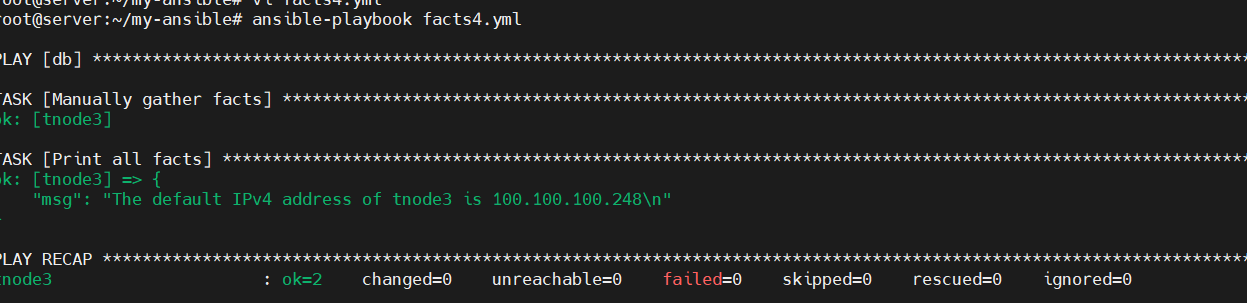
4. 매뉴얼한 방법으로 플레이북에 팩트 수집을 설정
# 파일 복사
cp facts3.yml facts4.yml

# facts4.yml 파일 편집
---

- hosts: **db
  gather_facts: no**

  tasks:
  **- name: Manually gather facts
    ansible.builtin.setup:**

  - name: Print all facts
    ansible.builtin.debug:
      msg: >
        The default IPv4 address of {{ ansible_facts.hostname }}
        is {{ ansible_facts.default_ipv4.address }}
5. 실행
Gathering Facts 캐싱 - https://docs.ansible.com/ansible/latest/plugins/cache.html
- facts 정보와 inventory 정보는 기본적으로 default 캐시 플러그인인 memory 플러그인을 사용하고 있습니다.
- 캐싱하여 영구 저장을 위해서 파일 혹은 데이터베이스를 사용 할 수 있습니다.
Gathering Facts 캐싱 설정
- ansible.cfg
[defaults]
inventory = ./inventory
remote_user = root
ask_pass = false
**gathering = smart
fact_caching = jsonfile
fact_caching_connection = myfacts**

[privilege_escalation]
become = true
become_method = sudo
become_user = root
become_ask_pass = false- DEFAULT_GATHERING(수집 정책 3가지) : implicit(기본값), explicit, smart - Link
- fact_caching_connection : 연결 정의 or 캐싱 경로 - Link
사용자 지정 팩트 만들기 : 사용자에 의해 정의된 팩트를 이용하여 환경 설정 파일의 일부 항목을 구성하거나 조건부 작업을 진행할 수 있습니다.
- 사용자 지정 팩트는 관리 호스트의 로컬에 있는 /etc/ansible/facts.d 디렉터리 내에 ‘*.fact’로 저장되어야만 앤서블이 플레이북을 실행할 때 자동으로 팩트를 수집할 수 있습니다.
1. ansible-server 에 디렉터리 생성 후 파일 생성
#
mkdir /etc/ansible/facts.d

# my-custom.fact 파일 생성
cat <<EOT > /etc/ansible/facts.d/my-custom.fact
[packages]
web_package = httpd
db_package = mariadb-server

[users]
user1 = ansible
user2 = gasida
EOT

cat /etc/ansible/facts.d/my-custom.fact
2. 플레이북 파일 생성
# 파일 복사
cp facts4.yml facts5.yml

# facts5.yml 파일 편집
---

- hosts: localhost

  tasks:
  - name: Print all facts
    ansible.builtin.debug:
      var: ansible_local
3. 실행
# 실행 : 커스텀으로 생성했던 팩트 내용이 출력
ansible-playbook facts5.yml
PLAY [localhost] ******************************************************************************************************************************************************************

TASK [Gathering Facts] ************************************************************************************************************************************************************
ok: [localhost]

TASK [Print all facts] ************************************************************************************************************************************************************
ok: [localhost] => {
    "ansible_local": {
        "my-custom": {
            "packages": {
                "db_package": "mariadb-server",
                "web_package": "httpd"
            },
            "users": {
                "user1": "ansible",
                "user2": "gasida"
            }
        }
    }
}
...

#
tail -n 5 /etc/passwd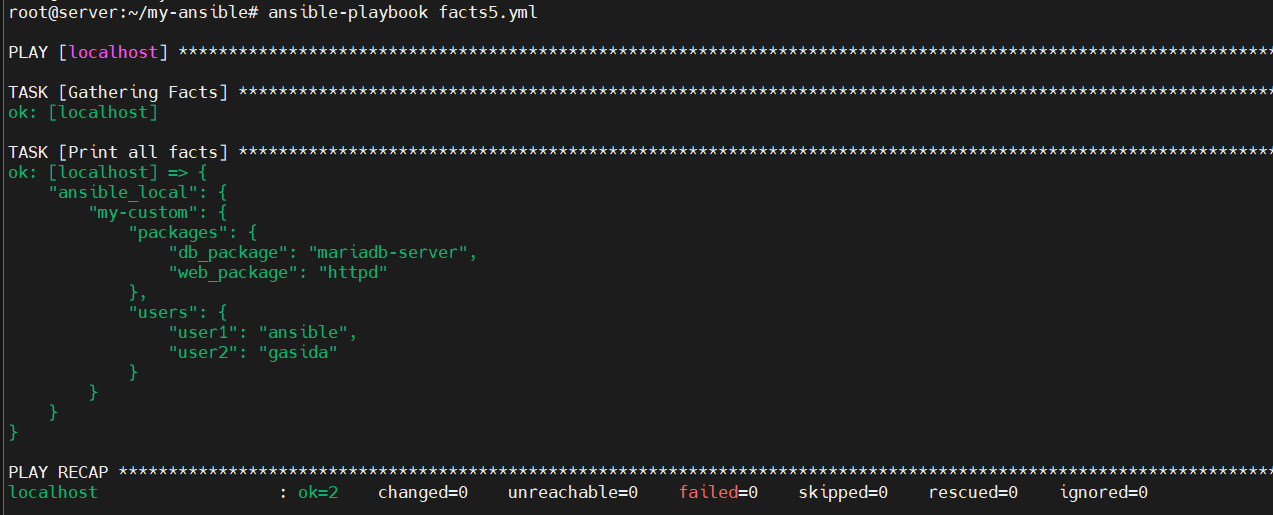
4. 실습 완료 후 작성한 yml 파일 삭제
rm -r *.yml
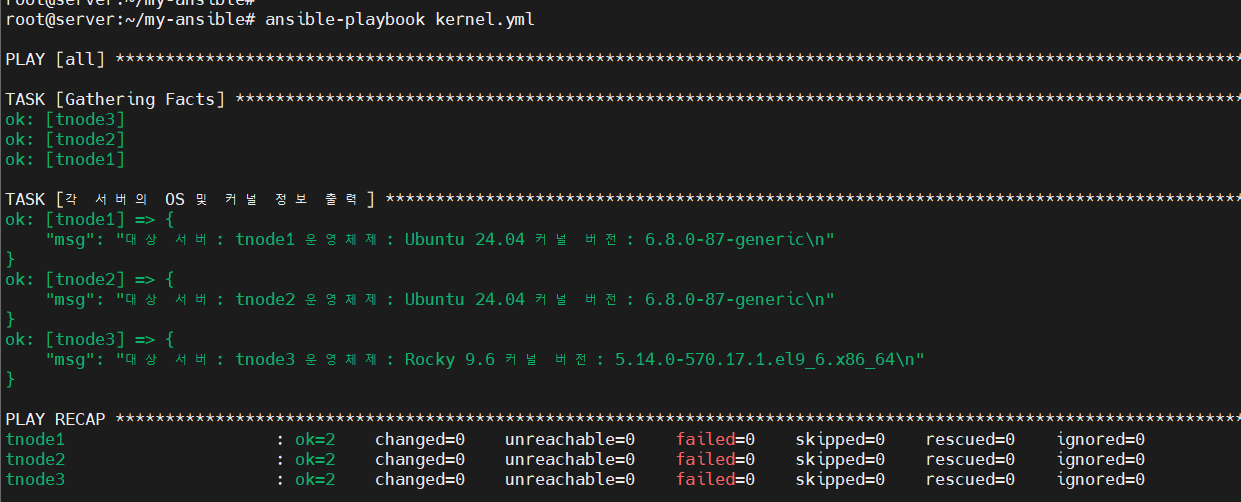
[도전과제 3] 팩트를 사용하여 3개의 서버(노드)의 ‘커널 버전’과 ‘운영체제 종류’를 출력해보자
1. kernel.yml 작성
---
- hosts: all
  gather_facts: yes  # 커널과 OS 정보를 가져오기 위한 설정

  tasks:
    - name: "각 서버의 OS 및 커널 정보 출력"
      ansible.builtin.debug:
        msg: >
          대상 서버: {{ inventory_hostname }}
          운영체제: {{ ansible_facts.distribution }} {{ ansible_facts.distribution_version }}
          커널 버전: {{ ansible_facts.kernel }}
2. 실행
 # kernel.yml 실행
 ansible-playbook kernel.yml
3. 출력결과
반복문
Ansible **Loops** - https://docs.ansible.com/ansible/latest/playbook_guide/playbooks_loops.html
반복문을 사용하면 동일한 모듈을 사용하는 작업을 여러 번 작성하지 않아도 됩니다. 예를 들어 서비스에 필요한 포트를 방화벽에 추가한다고 하면, 포트를 추가하는 작업을 여러 개 작성하는 대신 loop 반복문을 이용해 작업 하나로 여러 개의 포트를 추가할 수 있습니다.
단순 반복문 : 특정 항목에 대한 작업을 반복 - item 변수, 변수 목록 지정
- loop 키워드를 작업에 추가하면 작업을 반복해야 하는 항목의 목록을 값으로 사용합니다. 그리고 해당하는 값을 사용하려면 item 변수를 이용할 수 있습니다.
- 플레이북 파일 생성 : sshd 와 rsyslog 서비스가 시작되어 있지 않다면 시작 ← 최종 목적 동작
- state - https://docs.ansible.com/ansible/latest/collections/ansible/builtin/service_module.html#parameter-state
- started : Start service httpd, if not started
- stooped : Stop service httpd, if started
- restarted : Restart service httpd, in all cases
- reloaded : Reload service httpd, in all cases
- state - https://docs.ansible.com/ansible/latest/collections/ansible/builtin/service_module.html#parameter-state
2. 실행
# 프로세스 동작 확인
ansible -m shell -a "pstree |grep sshd" all
ansible -m shell -a "pstree |grep rsyslog" all

# systemd로 실행 중인 서비스 목록을 확인
systemctl list-units --type=service

# 실행
ansible-playbook check-services.yml
'Kubernetes' 카테고리의 다른 글
| [4주차] Kubespary 배포 분석 (0) | 2026.02.06 |
|---|---|
| [3주차] Kubeadm & K8S Upgrade (0) | 2026.01.20 |
| [1주차] Bootstrap Kubernetes the hard way (0) | 2026.01.08 |
| [kind] 쿠버네티스 경량화 서비스 설치 (1) | 2025.10.31 |
| [kubespray] Ansible로 k8s 자동 설치 (0) | 2025.10.31 |