
티스토리 뷰
KIND 란?
로컬 컴퓨터 환경에 쿠버네티스 클러스터를 손쉽고 빠르게 설치 하기 위해 만들어진 쿠버네티스 경량화 툴
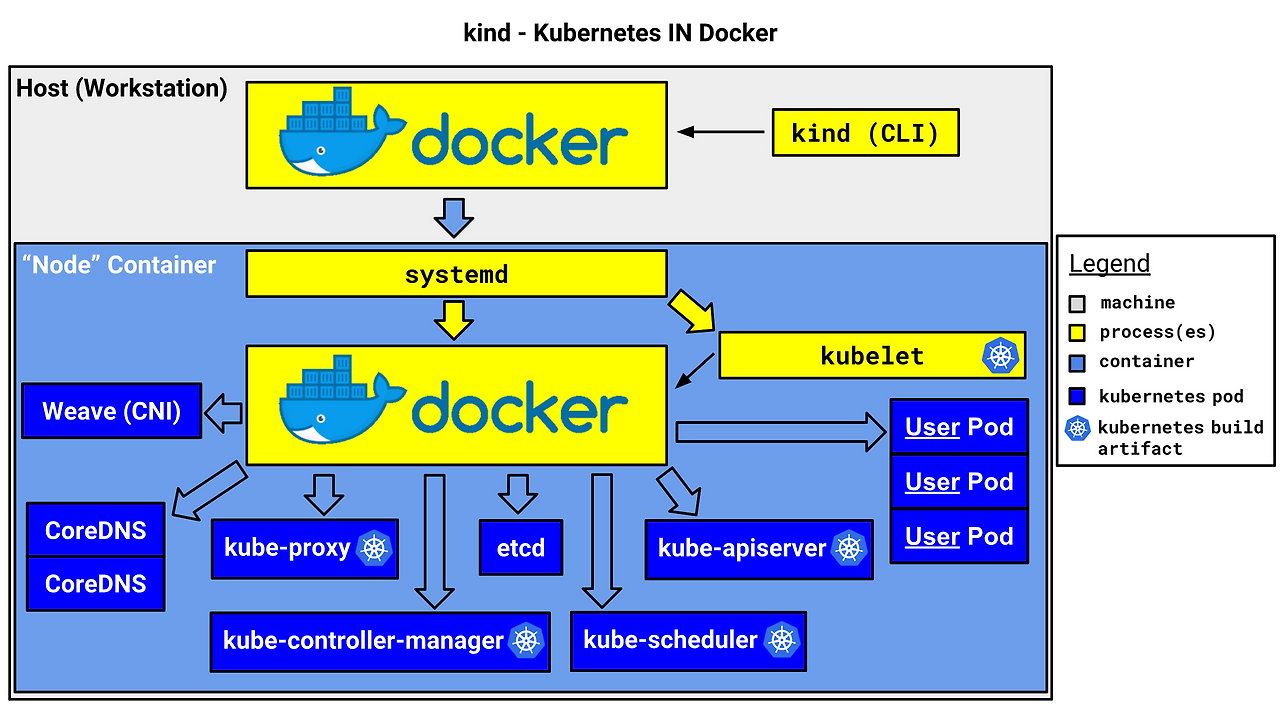
- kind or kubernetes in docker is a suite of tooling for local Kubernetes “clusters” where each “node” is a Docker container
- kind is targeted at testing Kubernetes , kind supports multi-node (including HA) clusters
- kind uses kubeadm to configure cluster nodes.
KIND k8s 실습 환경 :
실습 환경은 베어메탈 서버의 VM을 생성하여 실제 프로덕션 환경과 유사한 환경으로 경량화 쿠버네티스 오케스트레이션 환경에서 서비스를 테스트하고자 함
개발 서비스를 도커 컨테이너로 실습하는 환경에 편리한 도구로서 가장 적합함
1) 운영체제 : 우분투 22.04 LTS
2) 서버사양 : 2 vCPU / 16G RAM / 60G Disk
3) Docker 버전 : Docker version 28.0.4, build b8034c0
kind 및 관리 툴 설치
# 기본 사용자 디렉터리 이동
cd $PWD
pwd
/home/ubuntu

#
sudo systemctl stop apparmor && sudo systemctl disable apparmor

#
sudo apt update && sudo apt-get install bridge-utils net-tools jq tree unzip kubectx kubecolor -y

# Install Kind
sudo curl -Lo ./kind https://kind.sigs.k8s.io/dl/v0.27.0/kind-linux-amd64
sudo chmod +x ./kind
sudo mv ./kind /usr/local/bin/kind
kind --version

# Install kubectl
sudo curl -LO "https://dl.k8s.io/release/$(curl -L -s https://dl.k8s.io/release/stable.txt)/bin/linux/amd64/kubectl"
sudo chmod +x kubectl
sudo mv ./kubectl /usr/bin
sudo kubectl version --client=true

# Install Helm
sudo curl -s https://raw.githubusercontent.com/helm/helm/master/scripts/get-helm-3 | bash
helm version

# Source the completion
source <(kubectl completion bash)
echo 'source <(kubectl completion bash)' >> ~/.bashrc

# Alias kubectl to k
echo 'alias k=kubectl' >> ~/.bashrc
echo 'complete -o default -F __start_kubectl k' >> ~/.bashrc

## Install Kubeps & Setting PS1

# kube-ps1 설치 및 불러오기
git clone https://github.com/jonmosco/kube-ps1.git
echo -e "source $PWD/kube-ps1/kube-ps1.sh" >> ~/.bashrc

cat <<"EOT" >> ~/.bashrc
# kube-ps1 최소 설정
KUBE_PS1_SYMBOL_ENABLE=false          # ⎈ 심볼 제거
KUBE_PS1_COLORIZE=false               # 색상 제거
KUBE_PS1_NAMESPACE_ENABLE=false       # 네임스페이스 표시 제거
KUBE_PS1_PREFIX='('                   # 시작 괄호
KUBE_PS1_SEPARATOR=':'                # 구분자 (네임스페이스 제거했으므로 영향 없음)
KUBE_PS1_SUFFIX=') '                  # 끝 괄호 + 공백
KUBE_PS1_DEFAULT='-'                  # 클러스터 정보 없을 때 대체 문자

# 클러스터 이름 간략화 (예: mycluster.local → mycluster)
function get_cluster_short() {
  echo "$1" | cut -d . -f1
}
KUBE_PS1_CLUSTER_FUNCTION=get_cluster_short

# 프롬프트에 kube_ps1 적용
PS1='$(kube_ps1)'$PS1
EOT


## kube_ps1 에러발생시 지우는 방법

rm -rf ~/kube-ps1

# bashrc에 추가된 kube-ps1 관련 설정 제거
sed -i '/kube-ps1/d' ~/.bashrc
sed -i '/KUBE_PS1_/d' ~/.bashrc
sed -i '/get_cluster_short/d' ~/.bashrc
sed -i "/kube_ps1/d" ~/.bashrc
source ~/.bashrc


# .bashrc 적용을 위해서 logout 후 터미널 다시 접속 하자
exit
(옵션) 전체 삭제
#!/bin/bash

# 1. 기존 Kind 삭제
kind delete clusters --all
sudo rm -f /usr/local/bin/kind
rm -rf ~/.kube/config ~/.cache/kind

# 2. 도커 리소스 정리 (주의!)
docker ps -aq | xargs docker stop
docker system prune -a --volumes -f

# 3. Kind 재설치
curl -Lo ./kind https://kind.sigs.k8s.io/dl/latest/kind-linux-amd64
chmod +x ./kind
sudo mv ./kind /usr/local/bin/kind

# 4. 클러스터 생성 및 확인
kind create cluster --name fresh-cluster
kubectl cluster-info
kubectl get nodes
KIND k8s 클러스터 설치 (1.23.17 - myk8s)
# 배포파일 git clone
git clone https://github.com/AcornPublishing/istio-in-action
cd istio-in-action/book-source-code-master

# pwd
root@ubuntu:/home/ubuntu/istio-in-action/book-source-code-master# pwd
/home/ubuntu/istio-in-action/book-source-code-master

# KIND 클러스터 설치(클러스터명 : myk8s)
kind create cluster --name myk8s --image kindest/node:v1.23.17 --config - <<EOF
kind: Cluster
apiVersion: kind.x-k8s.io/v1alpha4
nodes:
- role: control-plane
  extraPortMappings:
  - containerPort: 30000 # Sample Application (istio-ingrssgateway)
    hostPort: 30000
  - containerPort: 30001 # Prometheus
    hostPort: 30001
  - containerPort: 30002 # Grafana
    hostPort: 30002
  - containerPort: 30003 # Kiali
    hostPort: 30003
  - containerPort: 30004 # Tracing
    hostPort: 30004
  - containerPort: 30005 # kube-ops-view
    hostPort: 30005
  - containerPort: 30006
    hostPort: 30006
  - containerPort: 30007
    hostPort: 30007
  - containerPort: 30008
    hostPort: 30008
  - containerPort: 30009
    hostPort: 30009
  - containerPort: 30010
    hostPort: 30010
  extraMounts:
  - hostPath: /home/ubuntu/istio-in-action/book-source-code-master  # 각자 자신의 pwd 경로로 설정
    containerPath: /istiobook
networking:
  podSubnet: 10.10.0.0/16
  serviceSubnet: 10.200.1.0/24
EOF


# 설치 확인
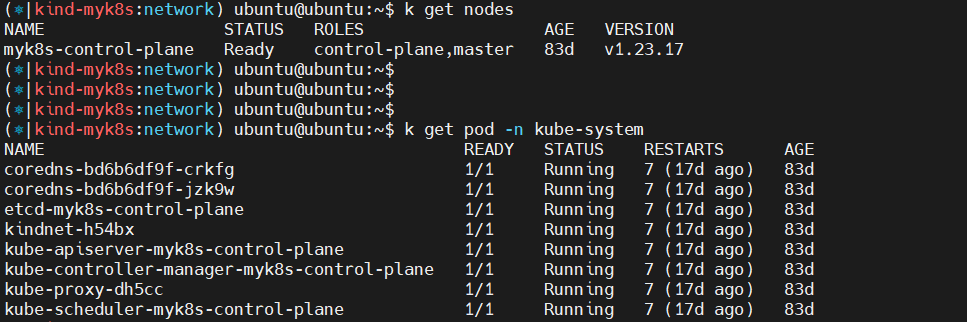
docker ps

# 노드에 기본 툴 설치
docker exec -it myk8s-control-plane sh -c 'apt update && apt install tree psmisc lsof wget bridge-utils net-tools dnsutils tcpdump ngrep iputils-ping git vim -y'
# (참고)클러스터 삭제
kind delete cluster --name myk8s
docker ps
cat ~/.kube/config
편의성 툴 설치
# (옵션) kube-ops-view
helm repo add geek-cookbook https://geek-cookbook.github.io/charts/
helm install kube-ops-view geek-cookbook/kube-ops-view --version 1.2.2 --set service.main.type=NodePort,service.main.ports.http.nodePort=30007 --set env.TZ="Asia/Seoul" --namespace kube-system
kubectl get deploy,pod,svc,ep -n kube-system -l app.kubernetes.io/instance=kube-ops-view

## kube-ops-view 접속 URL 확인
curl "http://localhost:30005/#scale=1.5"
curl "http://localhost:30005/#scale=1.3"

# (옵션) metrics-server
helm repo add metrics-server https://kubernetes-sigs.github.io/metrics-server/
helm install metrics-server metrics-server/metrics-server --set 'args[0]=--kubelet-insecure-tls' -n kube-system
kubectl get all -n kube-system -l app.kubernetes.io/instance=metrics-server

# krew 설치
(
  set -x; cd "$(mktemp -d)" &&
  OS="$(uname | tr '[:upper:]' '[:lower:]')" &&
  ARCH="$(uname -m | sed -e 's/x86_64/amd64/' -e 's/\(arm\)\(64\)\?.*/\1\2/' -e 's/aarch64$/arm64/')" &&
  KREW="krew-${OS}_${ARCH}" &&
  curl -fsSLO "https://github.com/kubernetes-sigs/krew/releases/latest/download/${KREW}.tar.gz" &&
  tar zxvf "${KREW}.tar.gz" &&
  ./"${KREW}" install krew
)

# krew 환경변수 설정
export PATH="${KREW_ROOT:-$HOME/.krew}/bin:$PATH"

# krew 설치 확인
(⎈|kind-myk8s:N/A) ubuntu@ubuntu:~$ kubectl-krew list
PLUGIN         VERSION
access-matrix  v0.5.0
df-pv          v0.3.0
get-all        v1.3.8
krew           v0.4.5
neat           v2.0.4
oomd           v0.0.7
rbac-tool      v1.20.0
rolesum        v1.5.5
sniff          v1.6.2
stern          v1.32.0
tail           v0.17.4
view-secret    v0.14.0
whoami         v0.0.46
Istio 설치 (version 1.17.8)
# myk8s-control-plane 진입 후 설치 진행
docker exec -it myk8s-control-plane bash
-----------------------------------
# 코드 파일들 마운트 확인
tree /istiobook/ -L 1

# istioctl 설치
export ISTIOV=1.17.8
echo 'export ISTIOV=1.17.8' >> /root/.bashrc

curl -s -L https://istio.io/downloadIstio | ISTIO_VERSION=$ISTIOV sh -
tree istio-$ISTIOV -L 2 # sample yaml 포함
cp istio-$ISTIOV/bin/istioctl /usr/local/bin/istioctl

# 검증
istioctl version --remote=false

(⎈|kind-myk8s:N/A) ubuntu@ubuntu:~$ docker exec -it myk8s-control-plane bash
root@myk8s-control-plane:/# istioctl version --remote=false
1.17.8  // 버전 확인


# default 프로파일 컨트롤 플레인 배포
istioctl x precheck # 설치 전 k8s 조건 충족 검사
istioctl profile list
istioctl install --set profile=default -y
✔ Istio core installed
✔ Istiod installed
✔ Ingress gateways installed
✔ Installation complete


# 설치 확인 : istiod, istio-ingressgateway, crd 등
kubectl get istiooperators -n istio-system
NAME              REVISION   STATUS   AGE
installed-state                       4d10h


kubectl get istiooperators -n istio-system -o yaml
...
  spec:
    components:
      base:
        enabled: true
      cni:
        enabled: false
      egressGateways:
      - enabled: false
        name: istio-egressgateway
      ingressGateways:
      - enabled: true
        name: istio-ingressgateway
      istiodRemote:
        enabled: false
      pilot:
        enabled: true
    hub: docker.io/istio
    meshConfig:
      defaultConfig:
        proxyMetadata: {}
      enablePrometheusMerge: true
    profile: default
    ...
      pilot:
        autoscaleEnabled: true
        autoscaleMax: 5
        autoscaleMin: 1
        configMap: true
        cpu:
          targetAverageUtilization: 80
        deploymentLabels: null
        enableProtocolSniffingForInbound: true
        enableProtocolSniffingForOutbound: true
        env: {}
        image: pilot
        keepaliveMaxServerConnectionAge: 30m
        nodeSelector: {}
        podLabels: {}
        replicaCount: 1
        traceSampling: 1
      telemetry:
        enabled: true
        v2:
          enabled: true
          metadataExchange:
            wasmEnabled: false
          prometheus:
            enabled: true
            wasmEnabled: false
          stackdriver:
            configOverride: {}
            enabled: false
            logging: false
            monitoring: false
            topology: false


# 설치확인
kubectl get all,svc,ep,sa,cm,secret,pdb -n istio-system


NAME                                       READY   STATUS    RESTARTS   AGE
pod/istio-ingressgateway-996bc6bb6-s2rgz   1/1     Running   0          4d11h
pod/istiod-7df6ffc78d-qgtv6                1/1     Running   0          4d11h
                                    4d10h
service/istio-ingressgateway   NodePort    10.200.1.46    <none>        15021:31099/TCP,80:30000/TCP,443:30228/TCP   4d11h
service/istiod                 ClusterIP   10.200.1.186   <none>        15010/TCP,15012/TCP,443/TCP,15014/TCP        4d11h

NAME                                   READY   UP-TO-DATE   AVAILABLE   AGE
deployment.apps/istio-ingressgateway   1/1     1            1           4d11h
deployment.apps/istiod                 1/1     1            1           4d11h

NAME                                             DESIRED   CURRENT   READY   AGE
replicaset.apps/istio-ingressgateway-996bc6bb6   1         1         1       4d11h
replicaset.apps/istiod-7df6ffc78d                1         1

NAME                                                      TYPE                                  DATA   AGE

secret/istio-ca-secret                                    istio.io/ca-root                      5      4d11h
secret/istio-ingressgateway-service-account-token-h49h5   kubernetes.io/service-account-token   3      4d11h
secret/istio-reader-service-account-token-9z9jw           kubernetes.io/service-account-token   3      4d11h
secret/istiod-service-account-token-cwmzb                 kubernetes.io/service-account-token   3      4d11h
secret/istiod-token-6xvdx                                 kubernetes.io/service-account-token   3      4d11h
   3      4d10h

NAME                                              MIN AVAILABLE   MAX UNAVAILABLE   ALLOWED DISRUPTIONS   AGE
poddisruptionbudget.policy/istio-ingressgateway   1               N/A               0                     4d11h
poddisruptionbudget.policy/istiod                 1               N/A               0                     4d11h


#
kubectl get crd | grep istio.io | sort
root@myk8s-control-plane:/# kubectl get crd | grep istio.io | sort
authorizationpolicies.security.istio.io    2025-04-07T12:10:11Z
destinationrules.networking.istio.io       2025-04-07T12:10:11Z
envoyfilters.networking.istio.io           2025-04-07T12:10:12Z
gateways.networking.istio.io               2025-04-07T12:10:12Z
istiooperators.install.istio.io            2025-04-07T12:10:


istioctl verify-install # 설치 확인

root@myk8s-control-plane:/# istioctl verify-install

✔ Istio is installed and verified successfully


# 보조 도구 설치
kubectl apply -f istio-$ISTIOV/samples/addons

#
kubectl get pod -n istio-system
NAME                                   READY   STATUS    RESTARTS   AGE
istio-ingressgateway-996bc6bb6-s2rgz   1/1     Running   0          4d11h
istiod-7df6ffc78d-qgtv6                1/1     Running   0          4d11h


# 빠져나오기
exit
-----------------------------------


#

# 설치 확인 : istiod, istio-ingressgateway, crd 등
kubectl get istiooperators -n istio-system -o yaml
kubectl get all,svc,ep,sa,cm,secret,pdb -n istio-system
kubectl get cm -n istio-system istio -o yaml
kubectl get crd | grep istio.io | sort

# 실습을 위한 네임스페이스 설정
kubectl create ns istioinaction
kubectl label namespace istioinaction istio-injection=enabled
kubectl get ns --show-labels

# istio-ingressgateway 서비스 : NodePort 변경 및 nodeport 지정 변경 , externalTrafficPolicy 설정 (ClientIP 수집)
kubectl patch svc -n istio-system istio-ingressgateway -p '{"spec": {"type": "NodePort", "ports": [{"port": 80, "targetPort": 8080, "nodePort": 30000}]}}'
kubectl patch svc -n istio-system istio-ingressgateway -p '{"spec": {"type": "NodePort", "ports": [{"port": 443, "targetPort": 8443, "nodePort": 30010}]}}'
kubectl patch svc -n istio-system istio-ingressgateway -p '{"spec":{"externalTrafficPolicy": "Local"}}'
kubectl describe svc -n istio-system istio-ingressgateway

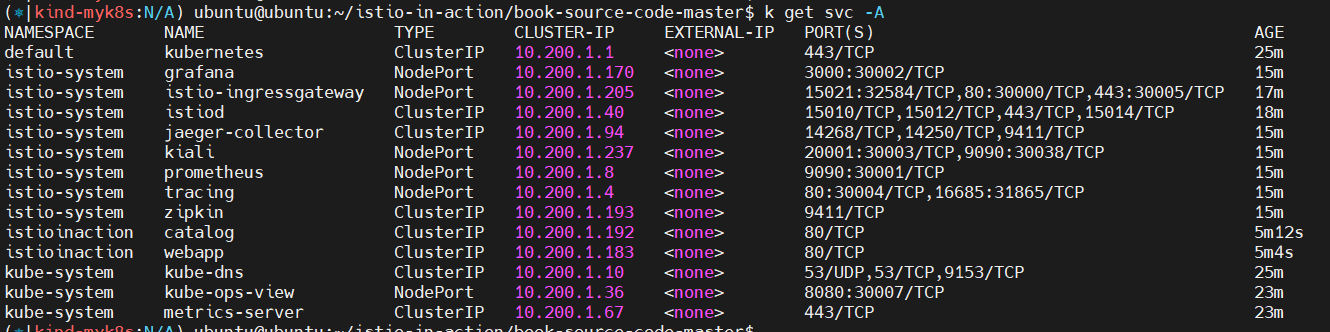
# NodePort 변경 및 nodeport 30001~30003으로 변경 : prometheus(30001), grafana(30002), kiali(30003), tracing(30004)
kubectl patch svc -n istio-system prometheus -p '{"spec": {"type": "NodePort", "ports": [{"port": 9090, "targetPort": 9090, "nodePort": 30001}]}}'
kubectl patch svc -n istio-system grafana -p '{"spec": {"type": "NodePort", "ports": [{"port": 3000, "targetPort": 3000, "nodePort": 30002}]}}'
kubectl patch svc -n istio-system kiali -p '{"spec": {"type": "NodePort", "ports": [{"port": 20001, "targetPort": 20001, "nodePort": 30003}]}}'
kubectl patch svc -n istio-system tracing -p '{"spec": {"type": "NodePort", "ports": [{"port": 80, "targetPort": 16686, "nodePort": 30004}]}}'

# Prometheus 접속 : envoy, istio 메트릭 확인
open http://127.0.0.1:30001

# Grafana 접속
open http://127.0.0.1:30002

# Kiali 접속 1 : NodePort
open http://127.0.0.1:30003

# (옵션) Kiali 접속 2 : Port forward
kubectl port-forward deployment/kiali -n istio-system 20001:20001 &
open http://127.0.0.1:20001

# tracing 접속 : 예거 트레이싱 대시보드
open http://127.0.0.1:30004
Prometheus 서비스 메시 상태 확인
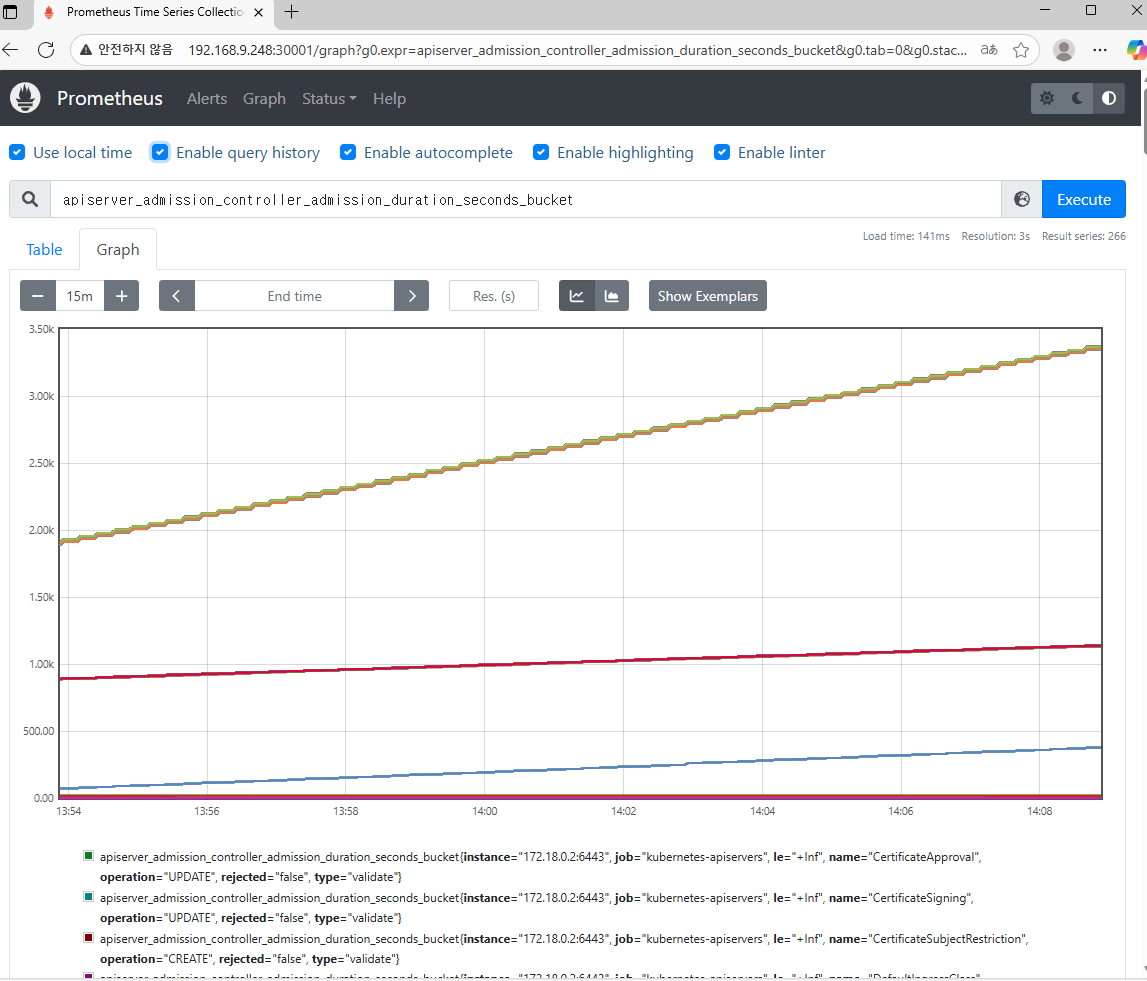
프로메테우스 접속 : http://192.168.9.248:30001/
Grafana 서비스 메시 상태 확인
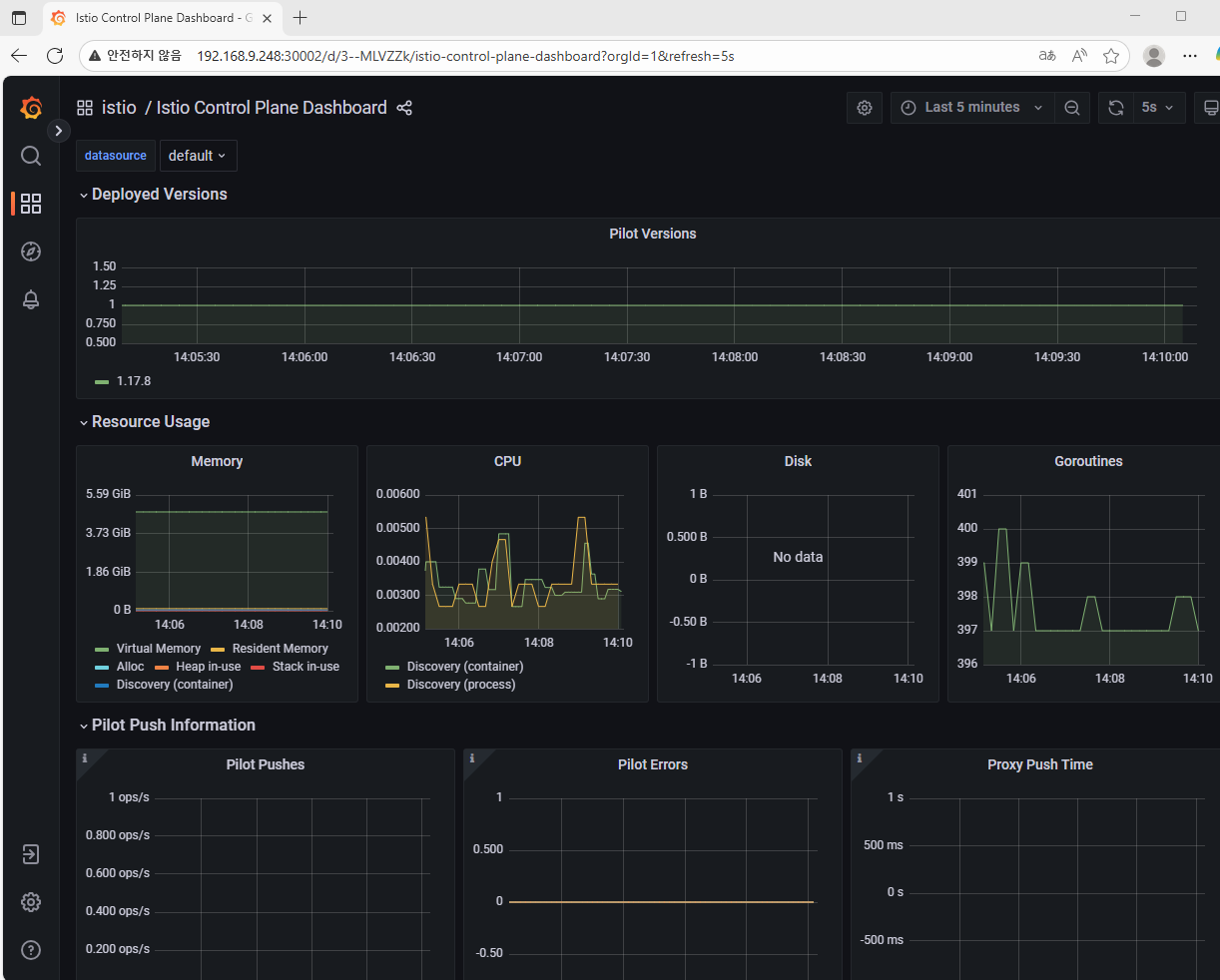
> 그라파나 접속 : http://x.x.x.x:30002/
Istio kiali 서비스 메시 상태 확인
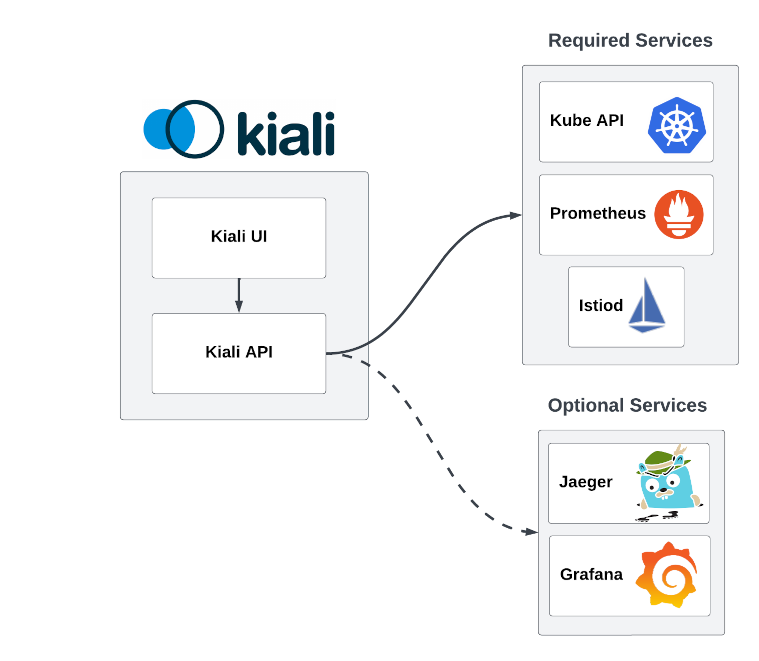
> 이스티오 Kiali 접속 : http://x.x.x.x:30003/
kiali 확인 : 메트릭(프로메테우스)과 트레이싱(zipkin, jaeger, tempo)을 수집하여 해당 정보를 기반으로 시각화!
Jaeger 서비스 메시 상태 확인
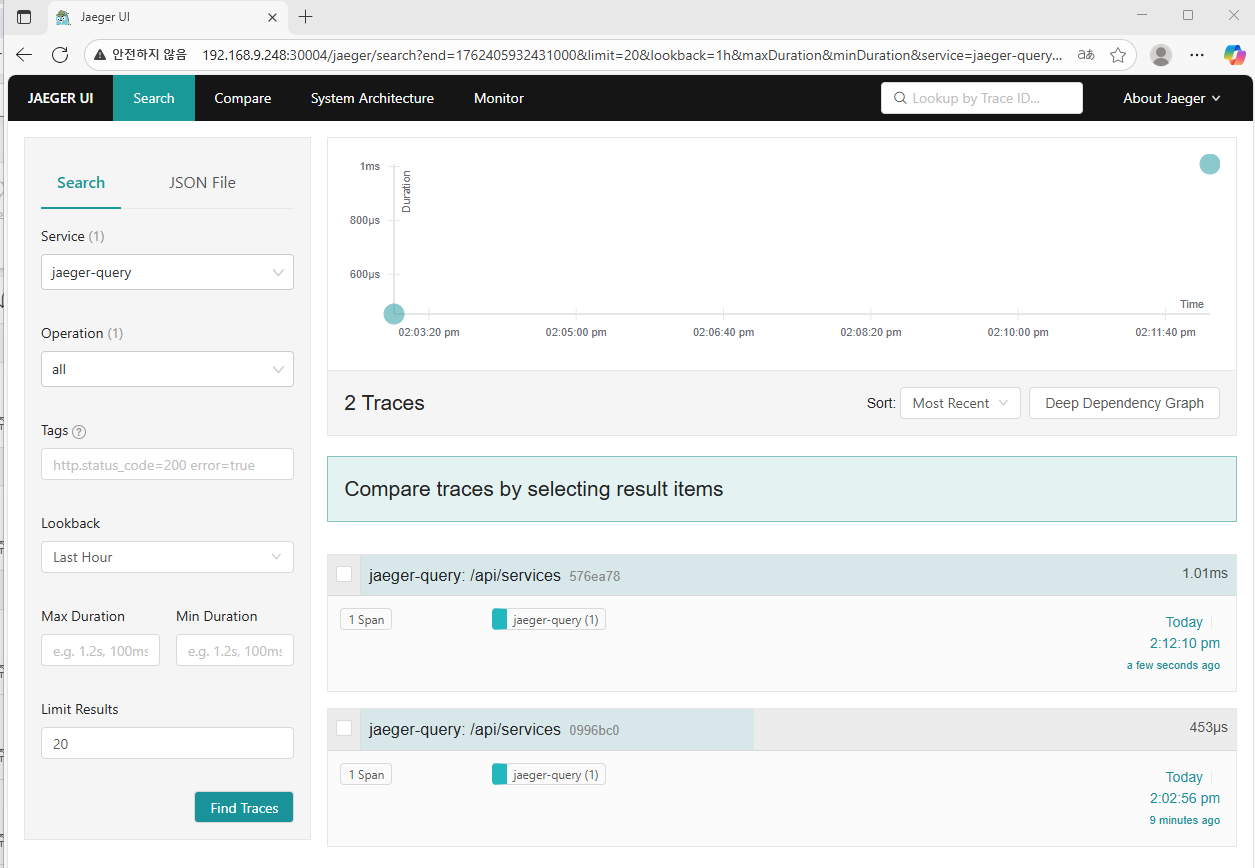
jaeger 접속 : http://192.168.9.248:30004/
서비스 메시 첫 애플리케이션 배포
필자는 namespace에 label을 추가하는 방식으로 설치하였음
#
kubectl create ns istioinaction

# 방법1 : yaml에 sidecar 설정을 추가
cat services/catalog/kubernetes/catalog.yaml
docker exec -it myk8s-control-plane istioctl kube-inject -f /istiobook/services/catalog/kubernetes/catalog.yaml
...
  - args:
        - proxy
        - sidecar
        - --domain
        - $(POD_NAMESPACE).svc.cluster.local
        - --proxyLogLevel=warning
        - --proxyComponentLogLevel=misc:error
        - --log_output_level=default:info
        - --concurrency
        - "2"
        env:
        - name: JWT_POLICY
          value: third-party-jwt
        - name: PILOT_CERT_PROVIDER
          value: istiod
        - name: CA_ADDR
          value: istiod.istio-system.svc:15012
        - name: POD_NAME
          valueFrom:
            fieldRef:
              fieldPath: metadata.name
  ...
        image: docker.io/istio/proxyv2:1.13.0
        name: istio-proxy


# 방법2 : namespace에 레이블을 추가하면 istiod (오퍼레이터)가 해당 namepsace의 pod spec에 자동으로 sidecar 설정을 주입
kubectl label namespace istioinaction istio-injection=enabled
kubectl get ns --show-labels


# mutatingwebhookconfiguration 확인
(⎈|kind-myk8s:N/A) ubuntu@ubuntu:/$ kubectl get mutatingwebhookconfigurations.admissionregistration.k8s.io
NAME                         WEBHOOKS   AGE
istio-revision-tag-default   4          4d11h # 특정 revision의 사이드카 주입 설정 관리
istio-sidecar-injector       4          4d11h # Istio는 각 애플리케이션 Pod에 Envoy 사이드카 프록시를 자동으로 주입
                                              ## 네임스페이스나 Pod에 istio-injection=enabled 라벨이 있어야 작동


kubectl get mutatingwebhookconfiguration istio-sidecar-injector -o yaml

#
kubectl get cm -n istio-system istio-sidecar-injector -o yaml | kubectl neat
Catalog & Webapp 서비스 배포
cat services/catalog/kubernetes/catalog.yaml
kubectl apply -f services/catalog/kubernetes/catalog.yaml -n istioinaction

cat services/webapp/kubernetes/webapp.yaml
kubectl apply -f services/webapp/kubernetes/webapp.yaml -n istioinaction

#
kubectl get pod -n istioinaction
NAME                     READY   STATUS    RESTARTS   AGE
catalog-6cf4b97d-jx8xw   2/2     Running   0          29s
webapp-7685bcb84-zlxmv   2/2     Running   0          29s

# catalog 디플로이먼트에서 파드 관련 spec
kubectl get deploy -n istioinaction catalog -o jsonpath="{.spec.template.spec}" | jq

# catalog 파드 관련 spec : 위 디플로이먼트와 파드 spec 을 비교해보자
kubectl get pod -n istioinaction -l app=catalog -o jsonpath="{.items[0].spec}" | jq


# 접속 테스트용 netshoot 파드 생성
cat <<EOF | kubectl apply -f -
apiVersion: v1
kind: Pod
metadata:
  name: netshoot
spec:
  containers:
  - name: netshoot
    image: nicolaka/netshoot
    command: ["tail"]
    args: ["-f", "/dev/null"]
  terminationGracePeriodSeconds: 0
EOF

# catalog 접속 확인
kubectl exec -it netshoot -- curl -s http://catalog.istioinaction/items/1 | jq
{
  "id": 1,
  "color": "amber",
  "department": "Eyewear",
  "name": "Elinor Glasses",
  "price": "282.00"
}

# webapp 접속 확인 : webapp 서비스는 다른 서비스에서 데이터를 집계해 브라우저에 시각적으로 표시한다.
## 즉 webapp은 다른 백엔드 서비스의 파사드 facade 역할을 한다.
kubectl exec -it netshoot -- curl -s http://webapp.istioinaction/api/catalog/items/1 | jq
{
  "id": 1,
  "color": "amber",
  "department": "Eyewear",
  "name": "Elinor Glasses",
  "price": "282.00"
}
서비스 임시 접속 방법
# 아래 방법 대신 임시 사용
kubectl port-forward -n istioinaction deploy/webapp 8080:8080
확인 후 CTRL+C 로 종료

#
open http://localhost:8080
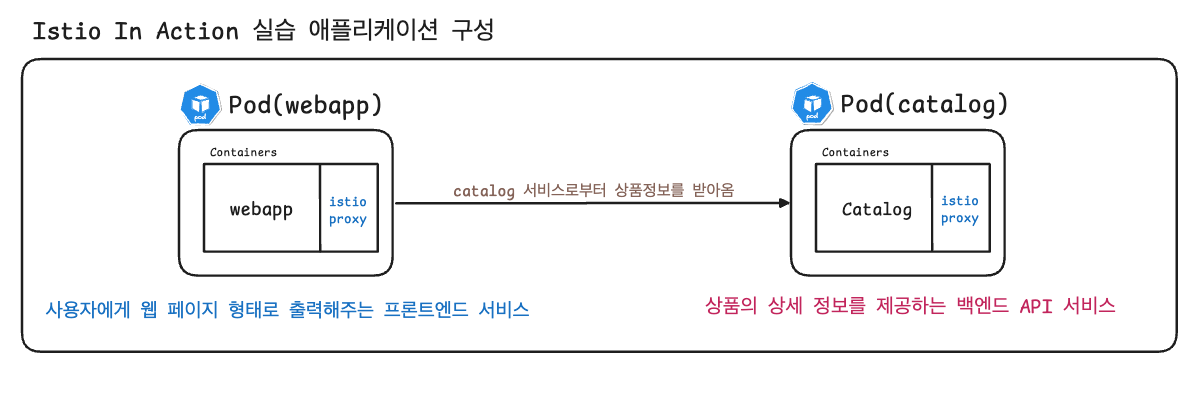
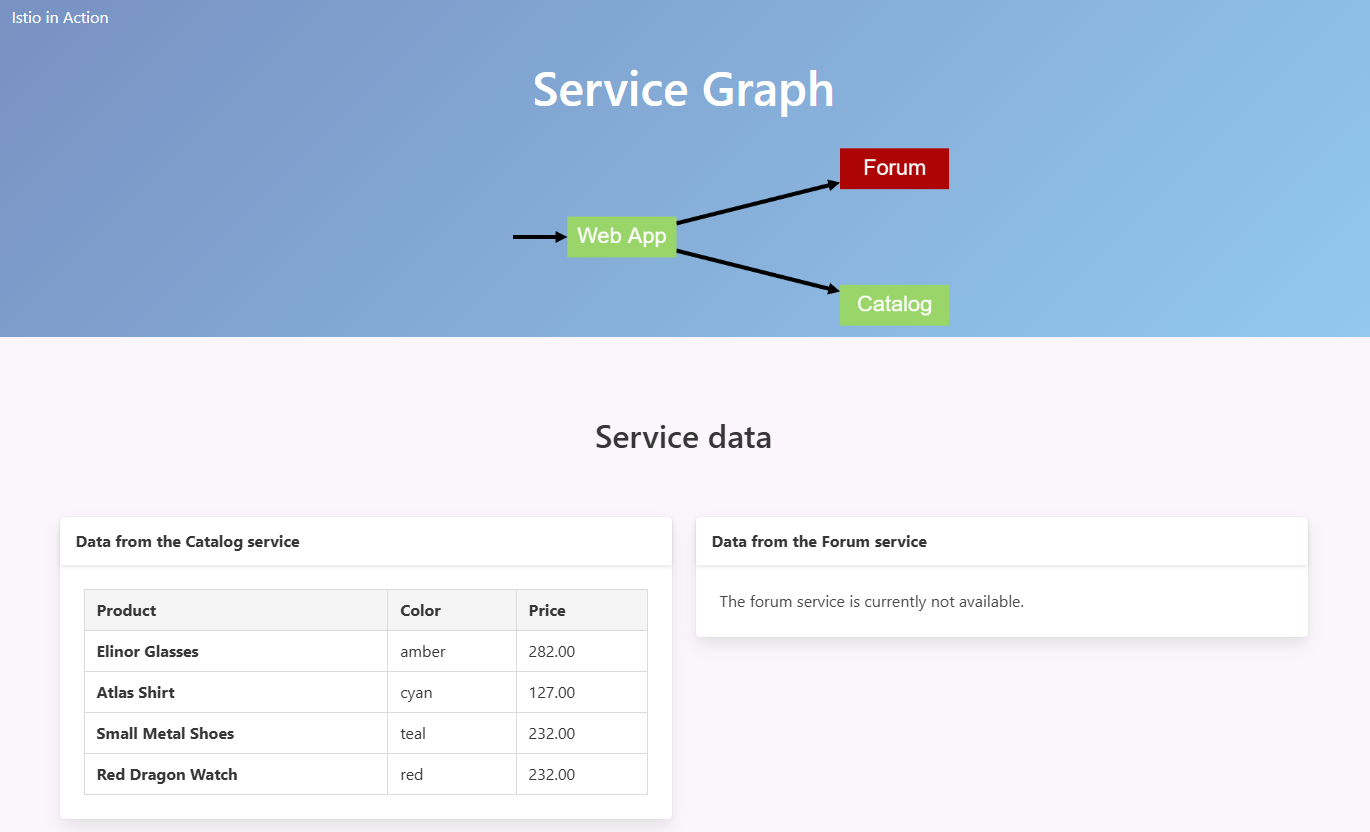
webapp 서비스는 다른 서비스에서 데이터를 집계해 브라우저에 시각적으로 표시한다.
- (참고) istio-ingressgateway 에 istio-proxy 에도 로깅 변경 해보자
kubectl exec -it deploy/istio-ingressgateway -n istio-system -- curl -X POST http://localhost:15000/logging
kubectl exec -it deploy/istio-ingressgateway -n istio-system -- curl -X POST http://localhost:15000/logging?http=debug
kubectl exec -it deploy/istio-ingressgateway -n istio-system -- curl -X POST http://localhost:15000/logging?http=info
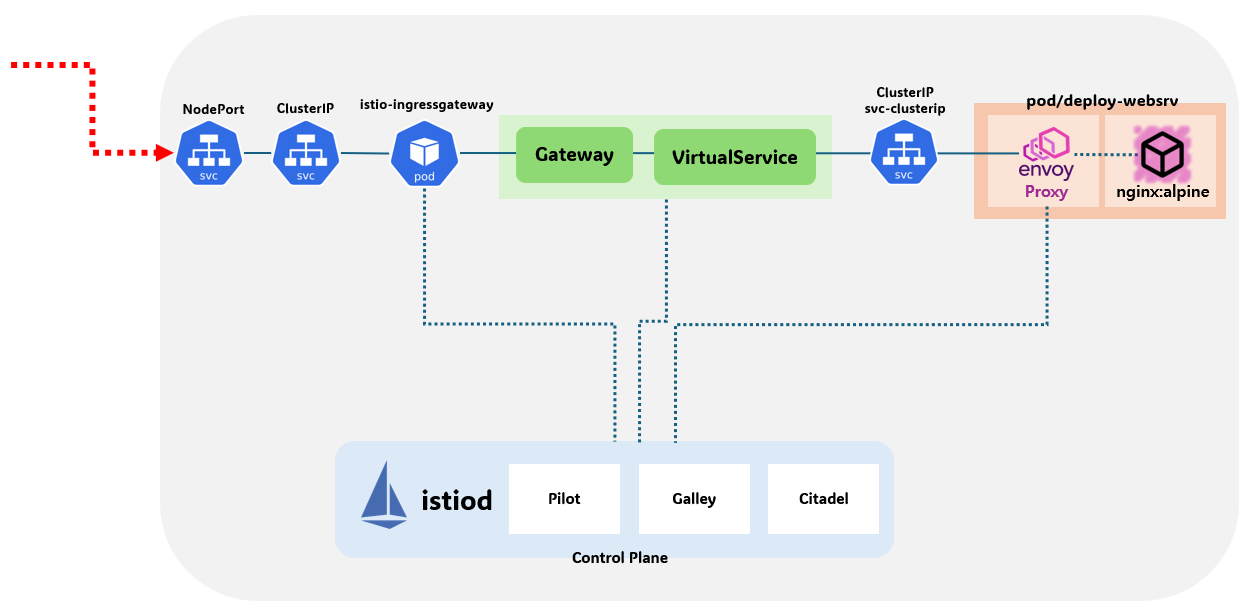
- (참고) istio-proxy 파드에 envoy 컨테이너 admin 페이지 접속
# istio-proxy 파드에 envoy 컨테이너 admin 접속 포트 포워딩 설정
kubectl port-forward deployment/deploy-websrv 15000:15000 &

# envoy 컨테이너 admin 페이지 접속
open http://localhost:15000
복원력, 관찰가능성, 트래픽 제어
- 이스티오 프록시가 호출 경로 커넥션의 양쪽에 위치하는 덕분에, 이스티오는 애플리케이션 사이에 무슨 일이 일어나고 있는지에 대해 많은 텔레메트리를 수집하고 통찰력을 항샹시킬 수 있다. 이스티오의 서비스 프록시는 각 애플리케이션 곁에 사이드카로 배포되므로, 서비스 프록시가 수집하는 통찰력은 애플리케이션의 ‘프로세스 외부’에서 나온다. 즉, 대부분의 경우 애플리케이션은 이 수준의 관찰력을 얻기 위해 라이브러리나 프레임워크에 특정 구현을 추가할 필요가 없다. 프록시에게 애플리케이션은 블랙박스이며, 텔레메트리는 네트워크를 통해 관찰된 애플리케이션의 동작에 초점을 맞춘다.
- 이스티오가 생성하는 텔레메트리는 관찰 가능성의 2가지 주요 범주에 대한 것이다. 첫 번째는 주요 메트릭, 이를테면 초당 요청 수, 실패 횟수, 지연 시간 백분위수와 같은 것들이다. 이런 값들을 알면 시스템에서 문제가 시작되는 지점에 대한 훌륭한 통찰력을 얻을 수 있다. 두 번째로, 이스티오는 OpenTracing 와 같은 분산 트레이싱을 지원할 수 있다. 이스티오는 애플리케이션들이 신경 쓰지 않아도 분산 트레이싱 백엔드로 스팬을 보낼 수 있다. 이렇게 하면 특정 서비스 상호작용 중에 어떤 일이 일어났는지, 어디에서 지연이 발생했는지를 확인하고 전반적인 호출 지연에 대한 정보를 얻을 수 있다.
# istioctl proxy-status : 단축어 ps
docker exec -it myk8s-control-plane istioctl proxy-status
docker exec -it myk8s-control-plane istioctl ps

#
cat ch2/ingress-gateway.yaml
cat <<EOF | kubectl -n istioinaction apply -f -
apiVersion: networking.istio.io/v1alpha3
kind: Gateway
metadata:
  name: outfitters-gateway
  namespace: istioinaction
spec:
  selector:
    istio: ingressgateway # use istio default controller
  servers:
  - port:
      number: 80
      name: http
      protocol: HTTP
    hosts:
    - "*"
---
apiVersion: networking.istio.io/v1alpha3
kind: VirtualService
metadata:
  name: webapp-virtualservice
  namespace: istioinaction
spec:
  hosts:
  - "*"
  gateways:
  - outfitters-gateway
  http:
  - route:
    - destination:
        host: webapp
        port:
          number: 80
EOF

#
kubectl get gw,vs -n istioinaction
NAME                                             AGE
gateway.networking.istio.io/outfitters-gateway   126m

NAME                                                       GATEWAYS                 HOSTS   AGE
virtualservice.networking.istio.io/webapp-virtualservice   ["outfitters-gateway"]   ["*"]   126m


# istioctl proxy-status : 단축어 ps
docker exec -it myk8s-control-plane istioctl proxy-status
NAME                                                  CLUSTER        CDS        LDS        EDS        RDS        ECDS         ISTIOD                      VERSION
catalog-6cf4b97d-nccfj.istioinaction                  Kubernetes     SYNCED     SYNCED     SYNCED     SYNCED     NOT SENT     istiod-7df6ffc78d-bj7h7     1.17.8
istio-ingressgateway-996bc6bb6-mz544.istio-system     Kubernetes     SYNCED     SYNCED     SYNCED     SYNCED     NOT SENT     istiod-7df6ffc78d-bj7h7     1.17.8
webapp-7685bcb84-c55ck.istioinaction                  Kubernetes     SYNCED     SYNCED     SYNCED     SYNCED     NOT SENT     istiod-7df6ffc78d-bj7h7     1.17.8

ISTIOIGW=istio-ingressgateway-996bc6bb6-647tx.istio-system
WEBAPP=webapp-7685bcb84-nfntj.istioinaction

# istioctl proxy-config : 단축어 pc
docker exec -it myk8s-control-plane istioctl proxy-config all $ISTIOIGW
docker exec -it myk8s-control-plane istioctl proxy-config all $WEBAPP

docker exec -it myk8s-control-plane istioctl proxy-config listener $ISTIOIGW
docker exec -it myk8s-control-plane istioctl proxy-config route $ISTIOIGW
docker exec -it myk8s-control-plane istioctl proxy-config cluster $ISTIOIGW
docker exec -it myk8s-control-plane istioctl proxy-config endpoint $ISTIOIGW
docker exec -it myk8s-control-plane istioctl proxy-config log $ISTIOIGW

docker exec -it myk8s-control-plane istioctl proxy-config listener $WEBAPP
docker exec -it myk8s-control-plane istioctl proxy-config route $WEBAPP
docker exec -it myk8s-control-plane istioctl proxy-config cluster $WEBAPP
docker exec -it myk8s-control-plane istioctl proxy-config endpoint $WEBAPP
docker exec -it myk8s-control-plane istioctl proxy-config log $WEBAPP

# envoy 가 사용하고 있는 인증서 정보 확인
docker exec -it myk8s-control-plane istioctl proxy-config secret $ISTIOIGW
docker exec -it myk8s-control-plane istioctl proxy-config secret $WEBAPP


#
docker exec -it myk8s-control-plane istioctl proxy-config routes deploy/istio-ingressgateway.istio-system
NAME          DOMAINS     MATCH                  VIRTUAL SERVICE
http.8080     *           /*                     webapp-virtualservice.istioinaction
              *           /stats/prometheus*
              *           /healthz/ready*


# istio-ingressgateway 서비스 NodePort 변경 및 nodeport 30000로 지정 변경
kubectl get svc,ep -n istio-system istio-ingressgateway
kubectl patch svc -n istio-system istio-ingressgateway -p '{"spec": {"type": "NodePort", "ports": [{"port": 80, "targetPort": 8080, "nodePort": 30000}]}}'
kubectl get svc -n istio-system istio-ingressgateway

# istio-ingressgateway 서비스 externalTrafficPolicy 설정 : ClientIP 수집 확인
kubectl patch svc -n istio-system istio-ingressgateway -p '{"spec":{"externalTrafficPolicy": "Local"}}'
kubectl describe svc -n istio-system istio-ingressgateway

#
kubectl stern -l app=webapp -n istioinaction
kubectl stern -l app=catalog -n istioinaction

#
curl -s http://127.0.0.1:30000/api/catalog | jq
curl -s http://127.0.0.1:30000/api/catalog/items/1 | jq
curl -s http://127.0.0.1:30000/api/catalog -I | head -n 1

# webapp 반복 호출
while true; do curl -s http://192.168..9.248:30000/api/catalog/items/1 ; sleep 1; echo; done
while true; do curl -s http://127.0.0.1:30000/api/catalog -I | head -n 1 ; date "+%Y-%m-%d %H:%M:%S" ; sleep 1; echo; done
while true; do curl -s http://127.0.0.1:30000/api/catalog -I | head -n 1 ; date "+%Y-%m-%d %H:%M:%S" ; sleep 0.5; echo; done


# 윈도우 cli에서 반복 호출
while ($true) {
    try {
        $response = Invoke-WebRequest -Uri "http://webapp.istioinaction.io:30000/api/catalog" -UseBasicParsing -TimeoutSec 3
        $status = $response.StatusCode
    }
    catch {
        $status = "Fail"
    }
    Write-Output "$(Get-Date -Format 'yyyy-MM-dd HH:mm:ss') - HTTP Code: $status"
    Start-Sleep -Seconds 1
}
> webapp.istioinaction.io:30000
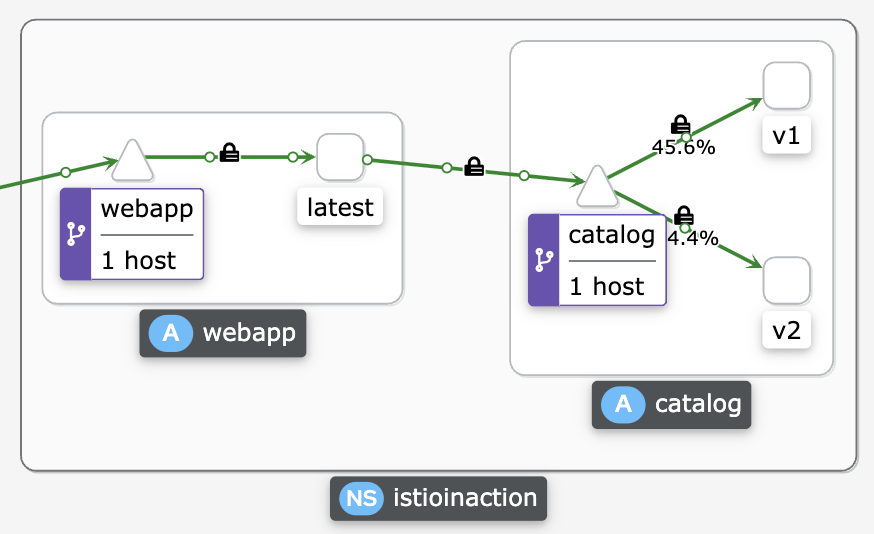
kiali 서비스 메시 상태 확인


Catalog V2 서비스 배포
특정 사용자 집단만 새 배포로 라우팅하도록, 릴리즈에 단계적 접근 : catalog v2 에 imageUrl 새 속성 추가
# catalog v2 배포
cat <<EOF | kubectl -n istioinaction apply -f -
apiVersion: apps/v1
kind: Deployment
metadata:
  labels:
    app: catalog
    version: v2
  name: catalog-v2
spec:
  replicas: 1
  selector:
    matchLabels:
      app: catalog
      version: v2
  template:
    metadata:
      labels:
        app: catalog
        version: v2
    spec:
      containers:
      - env:
        - name: KUBERNETES_NAMESPACE
          valueFrom:
            fieldRef:
              fieldPath: metadata.namespace
        - name: SHOW_IMAGE
          value: "true"
        image: istioinaction/catalog:latest
        imagePullPolicy: IfNotPresent
        name: catalog
        ports:
        - containerPort: 3000
          name: http
          protocol: TCP
        securityContext:
          privileged: false
EOF

# (옵션) 500 에러 발생 꺼두기
docker exec -it myk8s-control-plane bash
----------------------------------------
cd /istiobook/bin/
./chaos.sh 500 delete
exit
----------------------------------------

#
kubectl get deploy,pod,svc,ep -n istioinaction
kubectl get gw,vs -n istioinaction

# 반복 접속 종료해두기


#
cat <<EOF | kubectl -n istioinaction apply -f -
apiVersion: networking.istio.io/v1alpha3
kind: DestinationRule
metadata:
  name: catalog
spec:
  host: catalog
  subsets:
  - name: version-v1
    labels:
      version: v1
  - name: version-v2
    labels:
      version: v2
EOF

#
kubectl get gw,vs,dr -n istioinaction

# 반복 접속 : v1,v2 분산 접속 확인
while true; do curl -s http://127.0.0.1:30000/api/catalog | jq; date "+%Y-%m-%d %H:%M:%S" ; sleep 1; echo; done


# v1 라우팅 VS 수정(업데이트)
cat <<EOF | kubectl -n istioinaction apply -f -
apiVersion: networking.istio.io/v1alpha3
kind: VirtualService
metadata:
  name: catalog
spec:
  hosts:
  - catalog
  http:
  - route:
    - destination:
        host: catalog
        subset: version-v1
EOF

# 반복 접속 : v1 접속 확인
while true; do curl -s http://127.0.0.1:30000/api/catalog | jq; date "+%Y-%m-%d %H:%M:%S" ; sleep 1; echo; done
특정 헤더는 v2, 그외에는 v1 접속 설정
# 라우팅 VS 수정(업데이트)
cat <<EOF | kubectl -n istioinaction apply -f -
apiVersion: networking.istio.io/v1alpha3
kind: VirtualService
metadata:
  name: catalog
spec:
  hosts:
  - catalog
  http:
  - match:
    - headers:
        x-dark-launch:
          exact: "v2"
    route:
    - destination:
        host: catalog
        subset: version-v2
  - route:
    - destination:
        host: catalog
        subset: version-v1
EOF

#
kubectl get gw,vs,dr -n istioinaction

# 반복 접속 : v1 접속 확인
while true; do curl -s http://192.168.9.248:30000/api/catalog | jq; date "+%Y-%m-%d %H:%M:%S" ; sleep 1; echo; done

# 반복 접속 : v2 접속 확인
while true; do curl -s http://192.168.9.248:30000/api/catalog -H "x-dark-launch: v2" | jq; date "+%Y-%m-%d %H:%M:%S" ; sleep 1; echo; done
cluster 살제
kubectl delete deploy,svc,gw,vs,dr --all -n istioinaction && kind delete cluster --name myk8sBookinfo 애플리케이션 배포
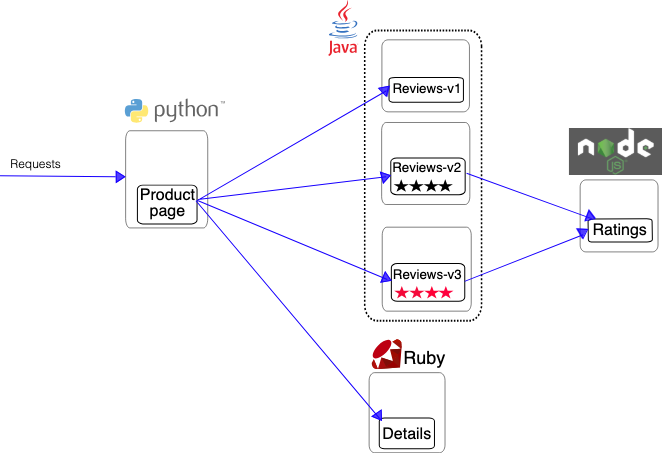
#
kubectl apply -f samples/bookinfo/platform/kube/bookinfo.yaml

# 확인 : 서비스 어카운트(sa)는 spiffe 에 svid 에 사용됨
kubectl get all,sa

# product 웹 접속 확인
kubectl exec "$(kubectl get pod -l app=ratings -o jsonpath='{.items[0].metadata.name}')" -c ratings -- curl -sS productpage:9080/productpage | grep -o "<title>.*</title>"

# productpage 파드 로그
kubectl logs -l app=productpage -c istio-proxy --tail=-1
kubectl logs -l app=productpage -c productpage -f
Open the application to outside traffic
# Istio Gateway/VirtualService 설정
cat samples/bookinfo/networking/bookinfo-gateway.yaml
apiVersion: networking.istio.io/v1beta1    # istio 1.25 버전에서는 v1beta1 로 설정해야함
kind: Gateway
metadata:
  name: bookinfo-gateway
spec:
  # The selector matches the ingress gateway pod labels.
  # If you installed Istio using Helm following the standard documentation, this would be "istio=ingress"
  selector:
    istio: ingressgateway # use istio default controller
  servers:
  - port:
      number: 8080
      name: http
      protocol: HTTP
    hosts:
    - "*"
---
apiVersion: networking.istio.io/v1beta1               # istio 1.25 버전에서는 v1beta1 로 설정해야함
kind: VirtualService
metadata:
  name: bookinfo
spec:
  hosts:
  - "*"
  gateways:
  - bookinfo-gateway
  http:
  - match:
    - uri:
        exact: /productpage
    - uri:
        prefix: /static
    - uri:
        exact: /login
    - uri:
        exact: /logout
    - uri:
        prefix: /api/v1/products
    route:
    - destination:
        host: productpage
        port:
          number: 9080

kubectl apply -f samples/bookinfo/networking/bookinfo-gateway.yaml

# Istio Gateway/VirtualService 설정 확인
kubectl get gw,vs
istioctl proxy-status

# productpage 파드의 istio-proxy 로그 확인 Access log 가 출력 - Default access log format : 링크
kubectl logs -l app=productpage -c istio-proxy -f
kubectl stern -l app=productpage

# productpage 웹 접속 : 새로고침
open http://127.0.0.1:30000/productpage
curl -v -s http://127.0.0.1:30000/productpage | grep -o "<title>.*</title>"

# 반복 접속
for i in {1..10};  do curl -s http://127.0.0.1:30000/productpage | grep -o "<title>.*</title>" ; done
for i in {1..100}; do curl -s http://127.0.0.1:30000/productpage | grep -o "<title>.*</title>" ; done

while true; do curl -s http://127.0.0.1:30000/productpage | grep -o "<title>.*</title>" ; echo "--------------" ; sleep 1; done
while true; do curl -s http://127.0.0.1:30000/productpage | grep -o "<title>.*</title>" ; echo "--------------" ; sleep 0.5; done
while true; do curl -s http://127.0.0.1:30000/productpage | grep -o "<title>.*</title>" ; echo "--------------" ; sleep 0.1; done

(참고) istio-proxy 파드에 envoy 컨테이너 admin 페이지 접속
# istio-proxy 파드에 envoy 컨테이너 admin 접속 포트 포워딩 설정
kubectl port-forward deployment/deploy-websrv 15000:15000 &

# envoy 컨테이너 admin 페이지 접속
open http://localhost:15000

# 실습 완료 후 삭제
kind delete cluster --name myk8s
Getting started with the Kubernetes Gateway API
[사전 지식]
K8S Ingress → K8S Gateway API 흐름 , Istio 전용의 Ingress GW API → K8S 표준 GW API(for Service Mesh) 흐름
- K8S 공식 문서 Ingress 를 보면, 대놓고 이제 Ingress 는 업데이트 하지 않고, Gateway API를 사용권고
- K8S Ingress vs (일반적인) API Gateway 를 비교해보면, K8S Ingress는 HTTP 고급 기능이 거의 없다.
- Gateway API는 최근 요구되고 있는 ‘역할 분리’ 와 ‘HTTP 고급 기능’ 를 구현할 수 있다.
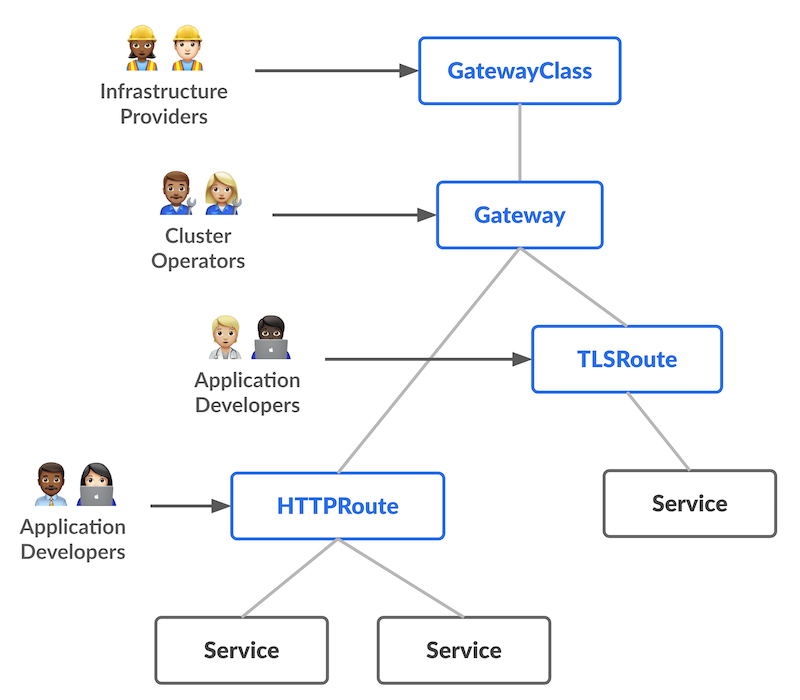
- Gateway API가 제공하는 3가지 stable API kinds 는 아래와 같다.
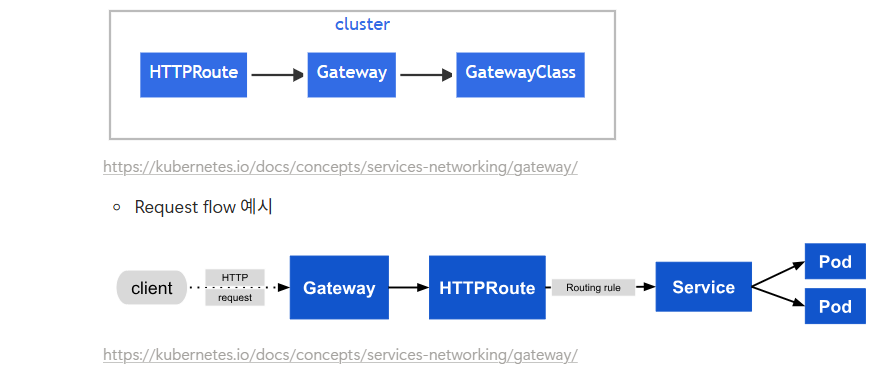
Istio 전용의 Ingress GW API → K8S 표준 GW API 흐름
- Istio 전용의 Ingress GW API
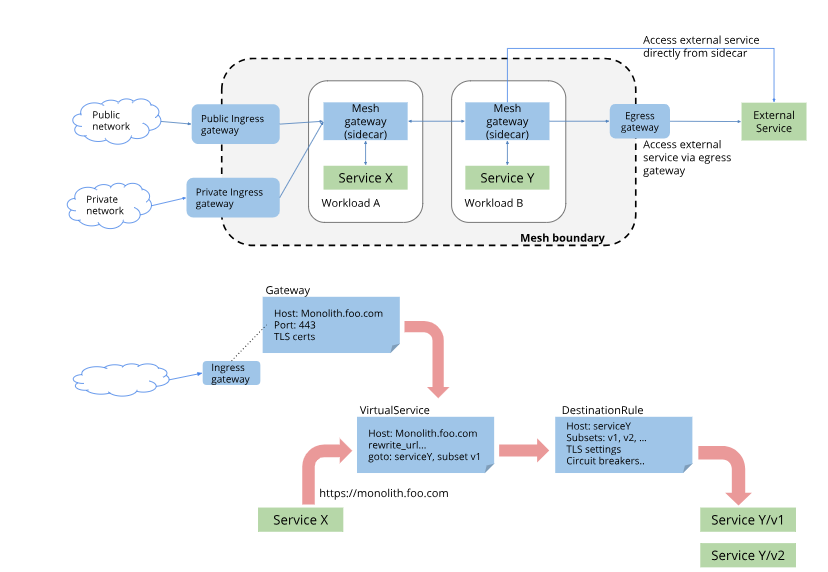
Istio API vs Gateway API
| apiVersion: networking.istio.io/v1 kind: VirtualService ... spec: hosts: - details http: - route: - destination: host: details subset: v1 |
apiVersion: gateway.networking.k8s.io/v1 kind: HTTPRoute metadata: name: reviews spec: parentRefs: - group: "" kind: Service name: reviews port: 9080 rules: - backendRefs: - name: reviews-v1 port: 9080 |
kind : k8s(1.32.2) 배포
#
kind create cluster --name myk8s --image kindest/node:v1.32.2 --config - <<EOF
kind: Cluster
apiVersion: kind.x-k8s.io/v1alpha4
nodes:
- role: control-plane
  extraPortMappings:
  - containerPort: 30000 # Sample Application
    hostPort: 30000
  - containerPort: 30001 # Prometheus
    hostPort: 30001
  - containerPort: 30002 # Grafana
    hostPort: 30002
  - containerPort: 30003 # Kiali
    hostPort: 30003
  - containerPort: 30004 # Tracing
    hostPort: 30004
  - containerPort: 30005 # kube-ops-view
    hostPort: 30005
networking:
  podSubnet: 10.10.0.0/16
  serviceSubnet: 10.200.1.0/24
EOF

# 설치 확인
docker ps

# 노드에 기본 툴 설치
docker exec -it myk8s-control-plane sh -c 'apt update && apt install tree psmisc lsof wget bridge-utils net-tools dnsutils tcpdump ngrep iputils-ping git vim -y'
kind 및 관리 툴 설치
# 기본 사용자 디렉터리 이동
cd $PWD
pwd

#
sudo systemctl stop apparmor && sudo systemctl disable apparmor

#
sudo apt update && sudo apt-get install bridge-utils net-tools jq tree unzip kubectx kubecolor -y

# Install Kind
curl -Lo ./kind https://kind.sigs.k8s.io/dl/v0.27.0/kind-linux-amd64
chmod +x ./kind
sudo mv ./kind /usr/local/bin/kind
kind --version

# Install kubectl
curl -LO "https://dl.k8s.io/release/$(curl -L -s https://dl.k8s.io/release/stable.txt)/bin/linux/amd64/kubectl"
chmod +x kubectl
sudo mv ./kubectl /usr/bin
sudo kubectl version --client=true

# Install Helm
curl -s https://raw.githubusercontent.com/helm/helm/master/scripts/get-helm-3 | bash
helm version

# Source the completion
source <(kubectl completion bash)
echo 'source <(kubectl completion bash)' >> ~/.bashrc

# Alias kubectl to k
echo 'alias k=kubectl' >> ~/.bashrc
echo 'complete -o default -F __start_kubectl k' >> ~/.bashrc

# Install Kubeps & Setting PS1
git clone https://github.com/jonmosco/kube-ps1.git
echo -e "source $PWD/kube-ps1/kube-ps1.sh" >> ~/.bashrc
cat <<"EOT" >> ~/.bashrc
KUBE_PS1_SYMBOL_ENABLE=true
function get_cluster_short() {
  echo "$1" | cut -d . -f1
}exi
KUBE_PS1_CLUSTER_FUNCTION=get_cluster_short
KUBE_PS1_SUFFIX=') '
PS1='$(kube_ps1)'$PS1
EOT

# .bashrc 적용을 위해서 logout 후 터미널 다시 접속 하자
exit
istio 1.25.1 설치
#
export ISTIOV=1.25.1
curl -s -L https://istio.io/downloadIstio | ISTIO_VERSION=$ISTIOV sh -

# 샘플 코드 확인
cd istio-$ISTIOV
tree
code .

# Gateway CRD 설치
kubectl get crd gateways.gateway.networking.k8s.io &> /dev/null || \
  { kubectl kustomize "github.com/kubernetes-sigs/gateway-api/config/crd?ref=v1.2.1" | kubectl apply -f -; }

kubectl get crd | grep .gateway.
gatewayclasses.gateway.networking.k8s.io    2025-04-10T12:41:23Z
gateways.gateway.networking.k8s.io          2025-04-10T12:41:23Z
grpcroutes.gateway.networking.k8s.io        2025-04-10T12:41:23Z
httproutes.gateway.networking.k8s.io        2025-04-10T12:41:23Z
referencegrants.gateway.networking.k8s.io   2025-04-10T12:41:23Z

# istioctl 명령어 환경변수 적용
export PATH=$PATH:/istio-1.25.1/bin

# istio 최소(minimal) 설치 : ingress/egress GW 미설치
istioctl install --set profile=minimal -y

# 확인
kubectl get-all -n istio-system
kubectl get crd | grep .istio.io
kubectl get deploy,pod -n istio-system
NAME                     READY   UP-TO-DATE   AVAILABLE   AGE
deployment.apps/istiod   1/1     1            1           2m6s

NAME                          READY   STATUS    RESTARTS   AGE
pod/istiod-7758b6bbf6-llttg   1/1     Running   0          2m6s
공통 : addon 등 설치
# addon 설치
kubectl apply -f samples/addons

# 확인
kubectl get pod,svc -n istio-system

# NodePort 변경 및 nodeport 30001~30003으로 변경 : prometheus(30001), grafana(30002), kiali(30003), tracing(30004)
kubectl patch svc -n istio-system prometheus -p '{"spec": {"type": "NodePort", "ports": [{"port": 9090, "targetPort": 9090, "nodePort": 30001}]}}'
kubectl patch svc -n istio-system grafana -p '{"spec": {"type": "NodePort", "ports": [{"port": 3000, "targetPort": 3000, "nodePort": 30002}]}}'
kubectl patch svc -n istio-system kiali -p '{"spec": {"type": "NodePort", "ports": [{"port": 20001, "targetPort": 20001, "nodePort": 30003}]}}'
kubectl patch svc -n istio-system tracing -p '{"spec": {"type": "NodePort", "ports": [{"port": 80, "targetPort": 16686, "nodePort": 30004}]}}'

# Prometheus 접속 : envoy, istio 메트릭 확인
open http://127.0.0.1:30001

# Grafana 접속
open http://127.0.0.1:30002

# Kiali 접속 1 : NodePort
open http://127.0.0.1:30003

# (옵션) Kiali 접속 2 : Port forward
kubectl port-forward deployment/kiali -n istio-system 20001:20001 &
open http://127.0.0.1:20001

# tracing 접속 : 예거 트레이싱 대시보드
open http://127.0.0.1:30004
Gateway 설정
# default 네임스페이스에 istio-proxy sidecar 주입 설정 - Docs
kubectl label namespace default istio-injection=enabled
kubectl get ns --show-labels

# 샘플 애플리케이션 배포
kubectl apply -f samples/httpbin/httpbin.yaml

# 확인
kubectl get deploy,pod,svc,ep


# Deploy the Gateway API configuration including a single exposed route (i.e., /get):
kubectl create namespace istio-ingress
kubectl apply -f - <<EOF
apiVersion: gateway.networking.k8s.io/v1
kind: Gateway
metadata:
  name: gateway
  namespace: istio-ingress
spec:
  gatewayClassName: istio
  listeners:
  - name: default
    hostname: "*.example.com"
    port: 80
    protocol: HTTP
    allowedRoutes:
      namespaces:
        from: All
---
apiVersion: gateway.networking.k8s.io/v1
kind: HTTPRoute
metadata:
  name: http
  namespace: default
spec:
  parentRefs:
  - name: gateway
    namespace: istio-ingress
  hostnames: ["httpbin.example.com"]
  rules:
  - matches:
    - path:
        type: PathPrefix
        value: /get
    backendRefs:
    - name: httpbin
      port: 8000
EOF

# Istio gateway 확인
kubectl get-all -n istio-ingress
kubectl get gateway -n istio-ingress
kubectl get deploy,pod,svc,ep -n istio-ingress
...
NAME                                 READY   STATUS    RESTARTS   AGE
pod/gateway-istio-86dbc46fdd-68bj5   1/1     Running   0          117s

NAME                    TYPE           CLUSTER-IP     EXTERNAL-IP   PORT(S)                        AGE
service/gateway-istio   LoadBalancer   10.200.1.105   <pending>     15021:30749/TCP,80:31008/TCP   117s
...

# NodePort 로 변경
kubectl annotate gateway -n istio-ingress gateway networking.istio.io/service-type=NodePort --overwrite

# 확인
kubectl get svc -n istio-ingress gateway-istio -o json | jq
kubectl get svc -n istio-ingress gateway-istio
NAME            TYPE       CLUSTER-IP     EXTERNAL-IP   PORT(S)                        AGE
gateway-istio   NodePort   10.200.1.105   <none>        15021:30749/TCP,80:31008/TCP   4m6s

# NodePort 를 30000번으로 변경
kubectl patch svc -n istio-ingress gateway-istio -p '{"spec": {"type": "NodePort", "ports": [{"port": 80, "targetPort": 80, "nodePort": 30000}]}}'
NAME            TYPE       CLUSTER-IP     EXTERNAL-IP   PORT(S)                        AGE
gateway-istio   NodePort   10.200.1.105   <none>        15021:30749/TCP,80:30000/TCP   5m48s
Gateway 를 통한 접속 확인 : Istio API(VirtualService 등) 미사용 확인
# Istio Gateway의 NodePort로 접속 확인
curl -s -I -HHost:httpbin.example.com "http://127.0.0.1:30000/get"
curl -s -HHost:httpbin.example.com "http://127.0.0.1:30000/get"

# Access any other URL that has not been explicitly exposed. You should see an HTTP 404 error
curl -s -I -HHost:httpbin.example.com "http://127.0.0.1:30000/headers"
HTTP/1.1 404 Not Found


# Update the route rule to also expose /headers and to add a header to the request:
kubectl apply -f - <<EOF
apiVersion: gateway.networking.k8s.io/v1
kind: HTTPRoute
metadata:
  name: http
  namespace: default
spec:
  parentRefs:
  - name: gateway
    namespace: istio-ingress
  hostnames: ["httpbin.example.com"]
  rules:
  - matches:
    - path:
        type: PathPrefix
        value: /get
    - path:
        type: PathPrefix
        value: /headers
    filters:
    - type: RequestHeaderModifier
      requestHeaderModifier:
        add:
        - name: my-added-header
          value: added-value
    backendRefs:
    - name: httpbin
      port: 8000
EOF


# Access /headers again and notice header My-Added-Header has been added to the request:
curl -s -HHost:httpbin.example.com "http://127.0.0.1:30000/headers" | jq '.headers["My-Added-Header"][0]'
"added-value"
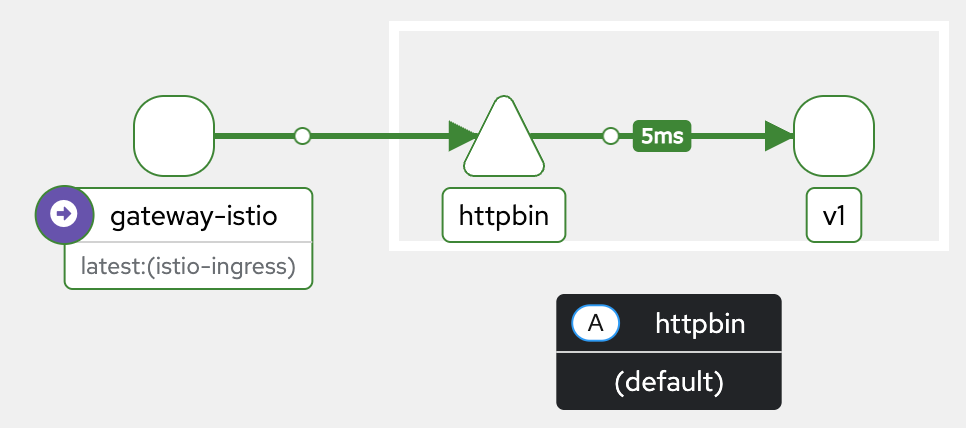
Getting started with the Kubernetes Gateway API

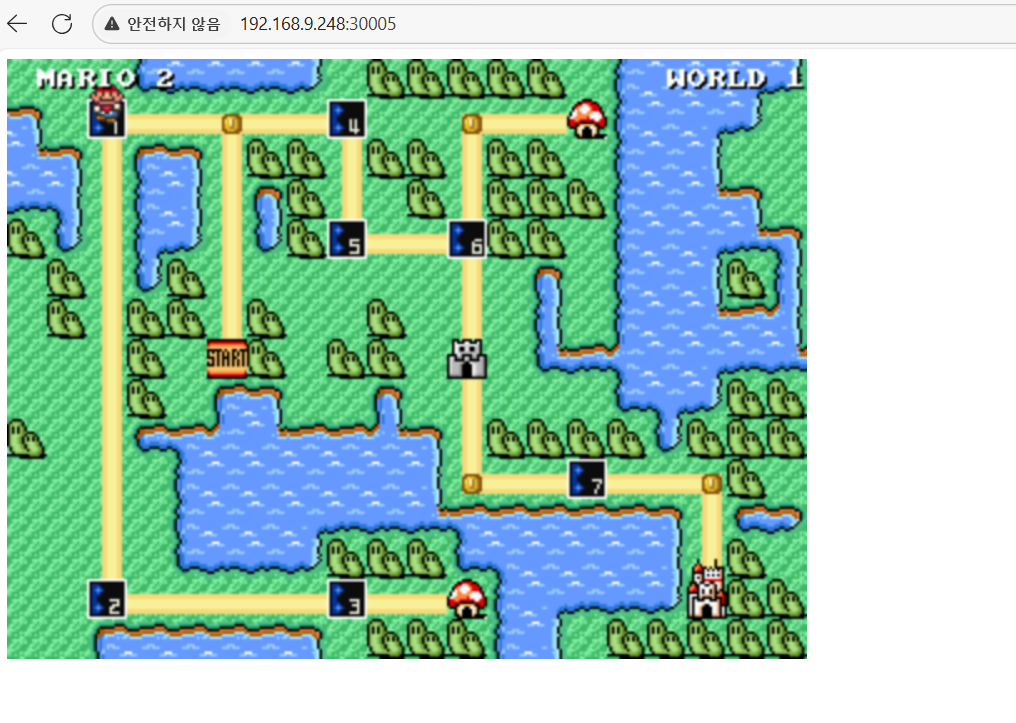
☞ Test 파드(게임 : 슈퍼마리오)
# 게임서버(슈퍼마리오)
(⎈|kind-myk8s:network) ubuntu@ubuntu:~$ k get svc -n game
NAME     TYPE       CLUSTER-IP     EXTERNAL-IP   PORT(S)                                         AGE
mario    NodePort   10.200.1.57    <none>        80:30005/TCP                                    71d
quake    NodePort   10.200.1.115   <none>        8080:30001/TCP,27960:30230/TCP,9090:30006/TCP   71d
tetris   NodePort   10.200.1.33    <none>        80:30002/TCP                                    71d

# 노드포트 접속
http://192.168.9.248:30005

'Kubernetes' 카테고리의 다른 글
| [3주차] Kubeadm & K8S Upgrade (0) | 2026.01.20 |
|---|---|
| [2주차] Ansible 기초 (0) | 2026.01.12 |
| [1주차] Bootstrap Kubernetes the hard way (0) | 2026.01.08 |
| [kubespray] Ansible로 k8s 자동 설치 (0) | 2025.10.31 |
| Gemini CLI 를 통한 k3s 쿠버네티스 제어 (0) | 2025.07.11 |