
티스토리 뷰
실습목표
- 베어메탈 서버 환경에서 Ansible로 Kubernetes Cluster 를 자동 배포하기
실습환경
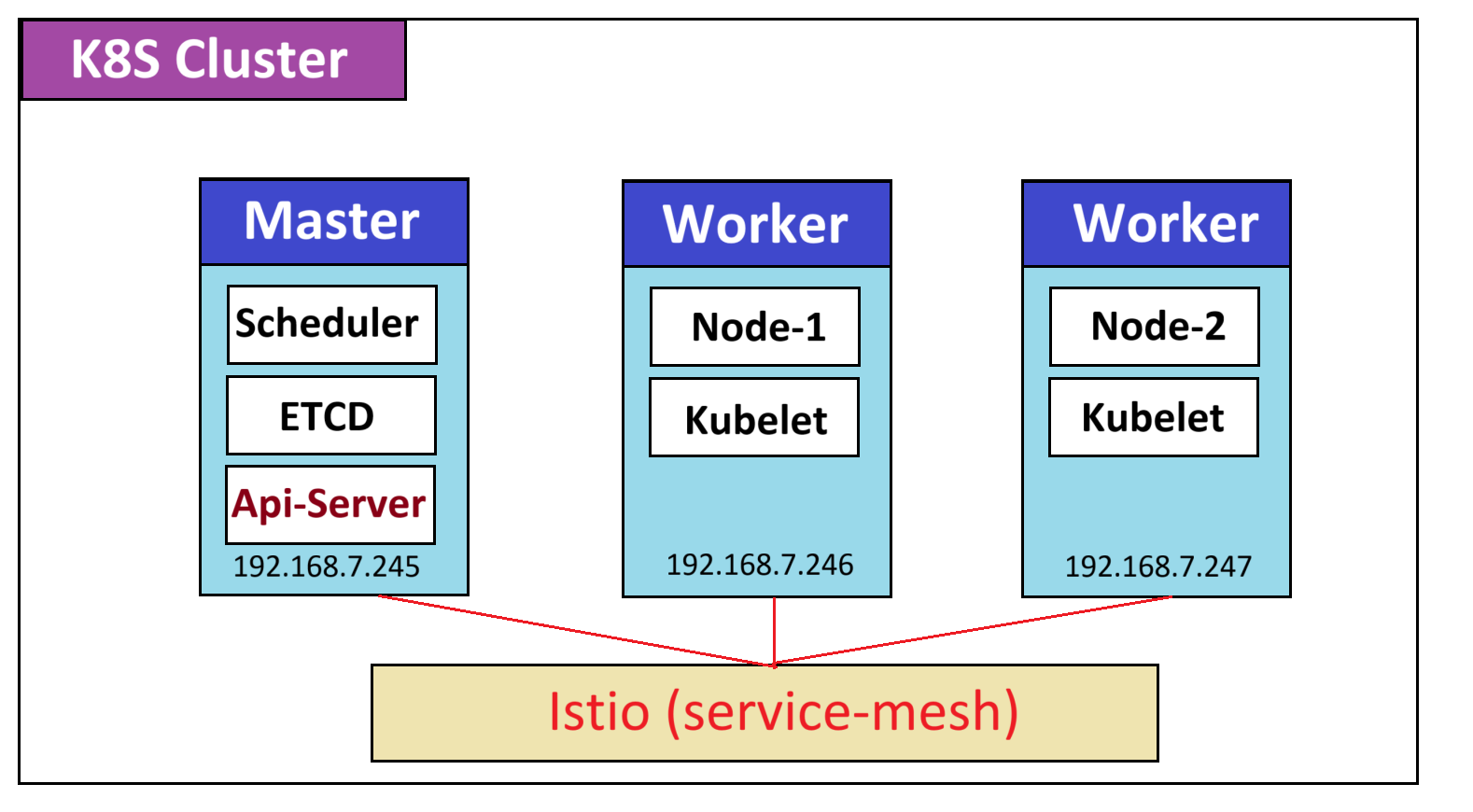
- 물리서버 : 베어메탈 서버 (proxmox 하이퍼바이저) 1식
- 노드구성 : VM 3식
- 운영체제 : 우분투 22.04 LTS
- K8S 클러스터 : kubenetes 1.32.5
| 호스트 종류 | 노드명 | 운영체제 | IP | 사양 |
| Control Plane | master01 | Ubuntu 22.04.5 LTS | 192.168.9.245 | 2 vCPU / 16G RAM / 80G |
| Worker node -1 | worker01 | Ubuntu 22.04.5 LTS | 192.168.9.246 | 2 vCPU / 16G RAM / 80G |
| Worker node -2 | worker02 | Ubuntu 22.04.5 LTS | 192.168.9.247 | 2 vCPU / 16G RAM / 80G |
설치방법
☞ 사전작업 (노드별 공통설정)
1) VM 생성 (우분투 22.04 LTS) 3식
2) VM별 호스트 설정
#  노드별 호스트 설정
# sudo hostnamectl set-hostname "master01"   // 1st master node
$ sudo hostnamectl set-hostname "worker01"   // 1st worker node
$ sudo hostnamectl set-hostname "worker02"   // 2nd worker node
exec bash                                    // 공통사항


# 호스트 설정 상태

yeshua@master01:~/k8s/kubespray$ cat /etc/hosts

192.168.7.245 master01
192.168.7.246 worker01
192.168.7.247 worker02

# Ansible inventory hosts BEGIN
192.168.7.247 worker02.cluster.local worker02
192.168.7.246 worker01.cluster.local worker01
192.168.7.245 master01.cluster.local master01
3) SSH key 설정
ssh-copy-id -i ~/.ssh/id_rsa.pub <new-worker-node-1-user>@<new-worker-node-1-ip> ssh-copy-id -i ~/.ssh/id_rsa.pub <new-worker-node-2-user>@<new-worker-node-2-ip>
4) swaff off
# 스왑메모리 비활성화 sudo swapoff -a sudo sed -i '/ swap / s/^\(.*\)$/#\1/g' /etc/fstab
5) 커널 설정
-> Kubernetes, containerd, Docker, CRI-O 같은 컨테이너 런타임 환경을 위한 네트워크/스토리지 기반 기능을 활성화sudo tee /etc/modules-load.d/containerd.conf <<EOF overlay br_netfilter EOF sudo modprobe overlay sudo modprobe br_netfilter sudo tee /etc/sysctl.d/kubernetes.conf <<EOT net.bridge.bridge-nf-call-ip6tables = 1 net.bridge.bridge-nf-call-iptables = 1 net.ipv4.ip_forward = 1 EOT6) 변경사항 적용
sudo sysctl --system
☞ Ansible 설치
# 1. 필수 패키지 설치
sudo add-apt-repository ppa:deadsnakes/ppa -y
sudo apt-get -y update
sudo apt install -y python3.10 python3-pip git python3.10-venv
python3.10 --version

# 2. Kubespray 클론 (디렉토리 확인)
cd ~
if [ ! -d "kubespray" ]; then
    git clone https://github.com/kubernetes-sigs/kubespray.git
fi

# 3. kubespray 디렉토리로 이동
cd kubespray

# 4. 가상환경 생성 및 활성화
python3.10 -m venv venv
source venv/bin/activate

# 5. 필수 패키지 설치
pip install -U -r requirements.txt


#6. requirments.txt 확인 (설치된 설정과 다를 경우 아래 작업 진행)

cat <<EOF | sudo tee requirements.txt
ansible-core==2.16.14
cryptography==45.0.2
jmespath==1.0.1
netaddr==1.3.0
EOF
☞ Kubespray 배포 (inventory & k8s-cluster & addons수정)
# inventory/sample/inventory.ini

[kube_control_plane]
master01 ansible_host=192.168.7.245 ip=192.168.7.245 etcd_member_name=etcd1

[etcd:children]
kube_control_plane

[kube_node]
worker01
worker02


#inventory/sample/group_vars/k8s_cluster/k8s-cluster.yml

kube_network_plugin: cilium
cluster_name: cluster.local


#inventory/sample/group_vars/k8s_cluster/addons.yml

helm_enabled: true
metrics_server_enabled: true
☞ Ansible 설치 버전 확인
yeshua@master01:~/k8s/kubespray$ pip show ansible-core cryptography jmespath netaddr | egrep "Name|Version"
Name: ansible-core
Version: 2.16.14
Name: cryptography
Version: 45.0.2
Name: jmespath
Version: 1.0.1
Name: netaddr
Version: 1.3.0
☞ 노드별 Ansible 통신상태 점검 명령어
yeshua@master01:~/k8s/kubespray$ ansible -i inventory/sample/inventory.ini all -m ping
[WARNING]: Skipping callback plugin 'ara_default', unable to load
master01 | SUCCESS => {
    "changed": false,
    "ping": "pong"
}
worker02 | SUCCESS => {
    "changed": false,
    "ping": "pong"
}
worker01 | SUCCESS => {
    "changed": false,
    "ping": "pong"
}
☞ Ansible 플레이북 배포 실행
# 주의할점 ~/kubespray 해당경로에서 진행
ansible-playbook -i inventory/sample/inventory.ini cluster.yml --become

# 백그라운드 실행
nohup ansible-playbook -i inventory/sample/inventory.ini cluster.yml --become &

# scale
nohup ansible-playbook -i inventory/sample/inventory.ini scale.yml --become &
nohup ansible-playbook -i inventory/sample/inventory.ini scale.yml --limit add_node --become &

# remove
ansible-playbook -i inventory/sample/inventory.ini remove-node.yml -b --extra-vars='node=node3' --extra-vars reset_nodes=true
☞ k8s 자격증명 가져오기
mkdir ~/.kube
sudo cp /etc/kubernetes/admin.conf ~/.kube/config
sudo chown $USER:$USER ~/.kube/config


<오류 발생시 아래 절차 진행>
# 1. 기존 config 파일 백업
mv ~/.kube/config ~/.kube/config.backup.$(date +%Y%m%d_%H%M%S)

# 2. 새로운 admin config 파일 복사
sudo cp /etc/kubernetes/admin.conf ~/.kube/config

# 3. 소유권 변경
sudo chown $USER:$USER ~/.kube/config

# 4. 권한 설정
chmod 600 ~/.kube/config

# 5. kubectl로 노드 확인
kubectl get nodes
☞ kubelet 설치 및 자동완성
echo '# kubectl completion and alias' >> ~/.bashrc
echo 'source <(kubectl completion bash)' >> ~/.bashrc
echo 'alias k=kubectl' >> ~/.bashrc
echo 'complete -F __start_kubectl k' >> ~/.bashrc

# bashrc 적용
source ~/.bashrc
☞ k8s cluster 상태 확인

☞ Test Your Kubernetes Cluster Installation
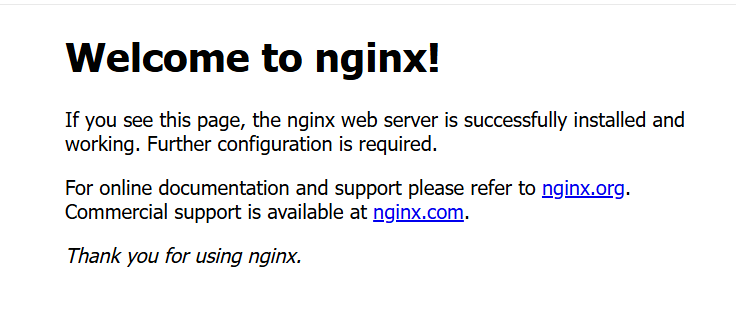
# nginx 배포
kubectl create deployment nginx-app --image=nginx --replicas=2

# 배포 확인
kubectl get deployments.apps nginx-app
NAME        READY   UP-TO-DATE   AVAILABLE   AGE
nginx-app   0/2     2            0           9s

# nginx 서비스 연결(노드포트 변경)
kubectl expose deployment nginx-app --type=NodePort --port=80

# nginx 노드포트 상태 확인
yeshua@master01:~/k8s/kubespray$ kubectl get svc
NAME         TYPE        CLUSTER-IP     EXTERNAL-IP   PORT(S)        AGE
kubernetes   ClusterIP   10.233.0.1     <none>        443/TCP        5h31m
nginx-app    NodePort    10.233.29.22   <none>        80:30915/TCP   3s

# nginx 접속
curl http://192.168.7.245:30915

[참고문서] https://github.com/torgeirl/kubernetes-playbooks
'Kubernetes' 카테고리의 다른 글
| [3주차] Kubeadm & K8S Upgrade (0) | 2026.01.20 |
|---|---|
| [2주차] Ansible 기초 (0) | 2026.01.12 |
| [1주차] Bootstrap Kubernetes the hard way (0) | 2026.01.08 |
| [kind] 쿠버네티스 경량화 서비스 설치 (1) | 2025.10.31 |
| Gemini CLI 를 통한 k3s 쿠버네티스 제어 (0) | 2025.07.11 |