개별 서비스 메시 2개의 워크로드 간 통신을 노출하고 활성화한다. Exposes and enables the communication of workloads of two separate service meshes.
이 선택지는 덜 자동화돼 있어서 서비스 간 트래픽을 설정하려면 두 메시 모두에게 수동 설정이 필요한다.
그러나 서로 다른 팀에서 두 메시를 운영하거나 보안 격리 요구 사항이 엄격한 경우 좋은 선택지다.
12.2 다중 클러스터 서비스 메시 개요
[필요 사항]
다중 클러스터 서비스 메시는 앱에는 완전히 투명한 방식으로 클러스터 간에 서비스를 연결하면서, 클러스터 간 통신을 위한 서비스 메시의 기능(세밀한 트래픽 제오, 복원력, 관찰 가능성, 보안 등)은 모두 유지한다.
이스티오가 다중 클러스터 서비스 메시를 구현하는 방법은 모든 클러스터의 서비스를 퀴리한 다음 이 정보로 서비스 프록시에 클러스터 사이에서 서비스 간 트래픽을 라우팅하는 방법을 설정하는 것이다.
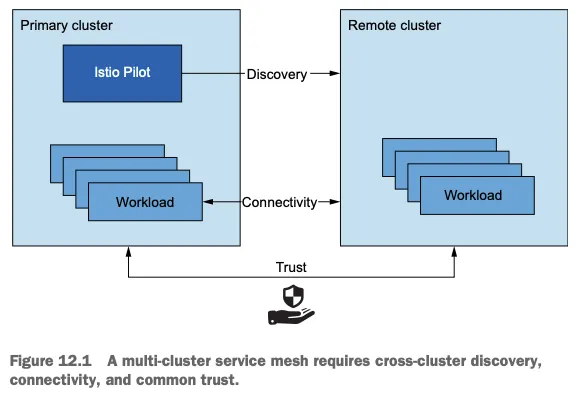
그림 12.1은 클러스터들을 하나의 메시로 결합하는 데 필요한 것을 보여준다.
클러스터 간 워크로드 디스커버리 Cross-cluster workload discovery
Istio 컨트롤 플레인은 서비스 프록시를 설정하기 위해 동료 K8S 클러스터의 워크로드를 찾아야 한다. (K8S 클러스터 API 서버를 상대편 클러스터의 이스티오 컨트롤 플레인에서 접근할 수 있어야 한다. The control planes must discover the workloads in the peer clusters in order to configure the service proxies (the API server of the clusters must be accessible to Istio’s control plane in the opposite cluster).
클러스터 간 워크로드 연결성 Cross-cluster workload connectivity
워크로드는 서로 연결돼 있어야 한다. 워크로드 엔드포인트를 인지하고 있어도 커넥션을 시작할 수 없다면 쓸모가 없다.
클러스터 간 공통 신뢰 Common trust between clusters
이스티오의 보안 기능을 활성화하려면 클러스터 간 워크로드가 서로 인증해야 한다. Cross-cluster workloads must mutually authenticate to enable the security features of Istio.
이 기준들을 충족하면 클러스터가 다른 클러스터에서 실행 중인 워크로드를 인지할 수 있고, 워크로드가 서로 연결될 수 있으며, 워크로드가 이스티오 정책을 사용해 인증하고 인가할 수 있다.
이들 모두가 다중 클러스터 서비스 메시를 설정하기 위한 전체 조건이다.
☞다중 클러스터 연결성과 보안
상술했듯이, 이스티오가 클러스터 간에 다중 클러스터 연결을 수립하려면 워크로드는 동료 클러스터의 쿠버네티스 API에 접근하는 방법으로만 찾을 수 있다.
어떤 조직에서는 이것이 바람직하지 않는 보안 태세일 수 있다.각 클러스터가 다른 클러스터의 API 모두에 접근할 수 있기 때문이다. 이 경우에는메시 연합이 더 나은 방식이다.
12.2.1 이스티오 다중 클러스터 배포 모델
다중 클러스터 서비스 메시에서는 istio 클러스터 유형을 두 가지로 구분한다.
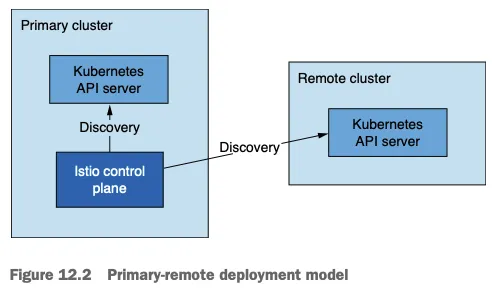
기본 클러스터 primary cluster : 이스티오 컨트롤 플레인이 설치된 K8S 클러스터 → 아래 그림 중 왼쪽
원격 클러스터 remote cluster : 설치된 이스티오 컨트롤 플레인과 떨어져 있는 K8S 클러스터 → 아래 그림 중 오른쪽
기본-원격 배포 모델
달성하고자 하는 가용성 수준에 따라 배포 모델 3가지
기본-원격(컨트롤 플레인 공유) 배포 모델 primary-remote (shared control plane) → 위 그림 12.2
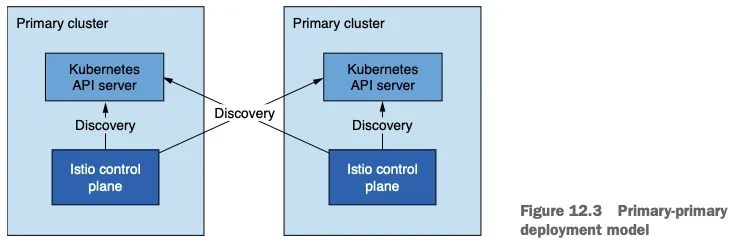
기본-기본(복제된 컨트롤 플레인) 배포 모델 primary-primary (replicated control plane) → 아래 그림 12.3
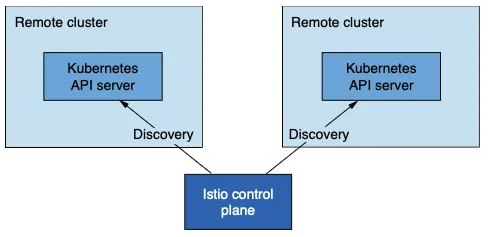
외부 컨트롤 플레인 배포 모델 external control plane → 아래 그림 12.4
기본-기본(복제된 컨트롤 플레인) 배포 모델 primary-primary (replicated control plane) 에는 컨트롤 플레인이 여럿이므로 가용성이 높지만, 트레이드오프로 리소스가 더 많이 필요하다.
이렇게 되면 가용성이 향향되는데, 중단 범위가 중단이 발생한 클러스터로 국한되기 때문이다.
이 모델을 복제된 컨트롤 플레인 배포 모델이라고 부른다
기본-기본 배포 모델
외부 컨트롤 플레인 배포 모델 external control plane 은 모든 클러스터가 컨트롤 플레인과 떨어져 있는 배포 모델이다.
이 배포 모델로 클라우드 프로바이더가 이스티오를 관리형 서비스로 제공할 수 있다.
외부 컨트롤 플레인 배포 모델
12.2.2 다중 클러스터 배포에서 워크로드는 어떻게 찾는가?
이스티오의 컨트롤 플레인은 쿠버네티스 API 서버와 통신해 서비스 뒤의 서비스와 엔드포인트 같은 서비스 프록시 설정 관련 정보를 수집해야 한다.
쿠버네티스 API 서버에 요청하는 것은 막강한 일종의 권한인데, 리소스 세부 정보를 조회하고, 민감 정보를 쿼리할 수 있으며, 클러스터를 불량하고 되돌이킬 수 없는 상태로 만들 수 있는 정도로 리소스를 업데이트하거나 지울 수 있기 때문이다.
토큰과 RBAC으로 원격 쿠버네티스 API로의 접근을 보안 처리하는 방법을 다루겠지만, 통찰력 있는 독자는 이 접근법의 트레이드오프를 고려해야 한다. 메시 연합이 어떻게 이 위험성을 완화할 수 있는지 앞 절을 참조하자.
쿠버네티스는 RBAC를 이용해 API 서버로의 접근을 보호한다. 쿠버네티스 RBAC은 광범위한 주제로, 이 책의 범위를 벗어난다.
그러나 클러스터 간 디스커버리를 용이하게 하는데 사용하는 개념 일부를 잠시 언급할 수는 있다.
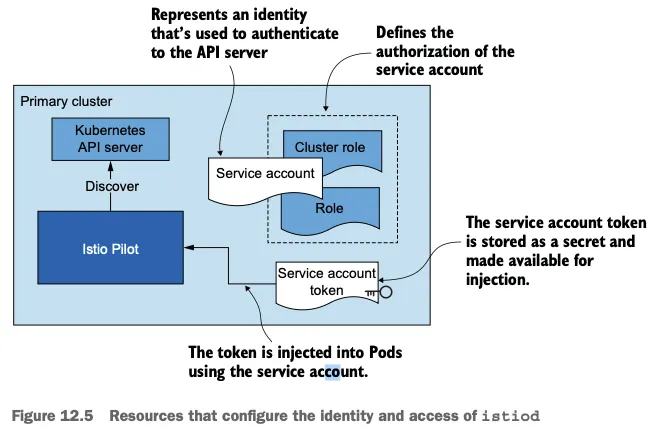
서비스 어카운트는 기계나 서비스 등 사람이 아닌 클라이언트에 ID를 제공한다. Service accounts provide identity to non-human clients such as machines or services.
서비스 어카운트 토큰은 서비스 어카운트마다 자동으로 생성돼 해당 ID 클레임을 나타낸다. 토큰은 JWT 형식이며 쿠버네티스가 파드에 주입한다. 파드는 이 토큰을 사용해 API 서버에게 (자신의 신원) 인증할 수 있다. Service account tokens are automatically generated for every service account and represent its identity claim. Tokens are formatted as JSON Web Tokens and are injected by Kubernetes into Pods that can use the tokens to authenticate to the API server.
롤 role 과 클러스터롤 clusterrole 은 서비스 어카운트나 일반 사용자 같은 ID에 대한 권한 집합을 정의한다. Roles and cluster roles define the set of permissions for identity, such as a service account or a regular user.
그림 12.5는 istiod에 인증과 인가를 제공하는 쿠버네티스 리소스를 시각화한다.
istiod의 ID와 접근을 설정하는 리소스
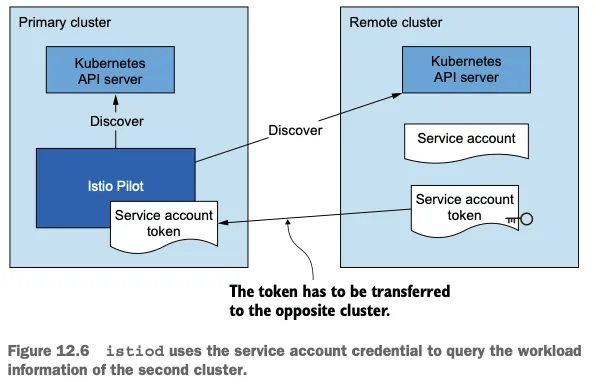
클러스터 간 워크로드 디스커버리는 기술적으로 동일한다. Cross-cluster workload discovery is technically the same.
그러나 그림 12.6과 같이 istiod에 원격 클러스터의 서비스 어카운트 토큰을 제공해야 한다 (구체적인 예제에서 볼 수 있듯이 API 서버로 보안 통신을 시작할 수 있는 인증서와 함께). However, as shown in figure 12.6, we need to provide istiod with the service account token of the remote cluster (along with the certificates to initiate a secure connection to the API server, as we see when we get to the concrete examples).
istiod는 토큰을 사용해 원격 클러스터에 인증하고, 클러스터에서 실행 중인 워크로드를 찾는다. istiod uses the token to authenticate to remote clusters and discover workloads running in them.
험난한 과정처럼 들릴지도 모르지만 걱정할 필요는 없다.
이 장 뒷부분에서 보겠지만 istioctl이 이 과정을 자동화해주기 때문이다.
12.2.3 클러스터 간 워크로드 연결 Cross-cluster workload connectivity - Docs : east-west gw or 라우팅 처리
다른 전체 조건은 워크로드가 클러스터를 건너 연결할 수 있어야 한다는 것이다.
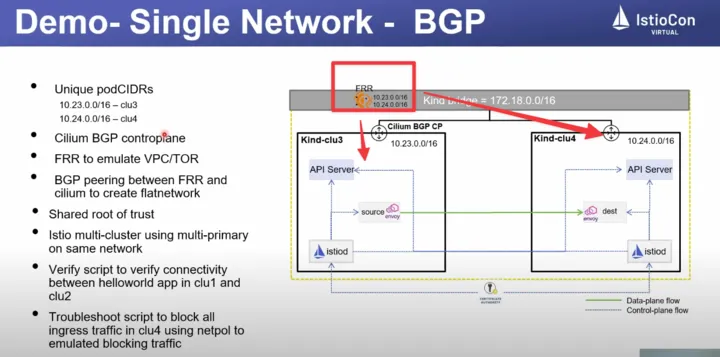
클러스터가 플랫 네트워크 flat network 에 있다면, 그러나까 단일 네트워크를 공유하거나(Amazon VPC 처럼) 네트워크가 네트워크 피어링 network peering 으로 연결된 경우 등에서는 워크로드가 IP 주소로 연결 할 수 있으므로 조건은 이미 충족됐다!
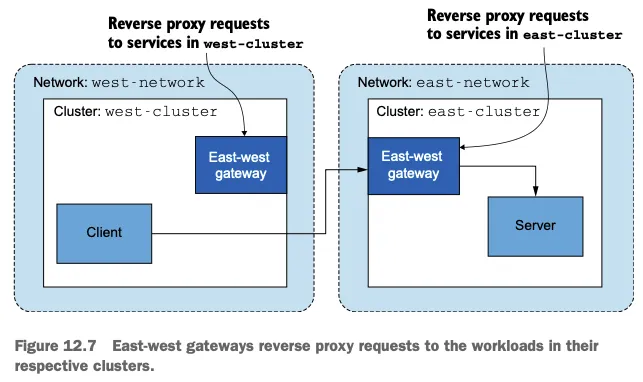
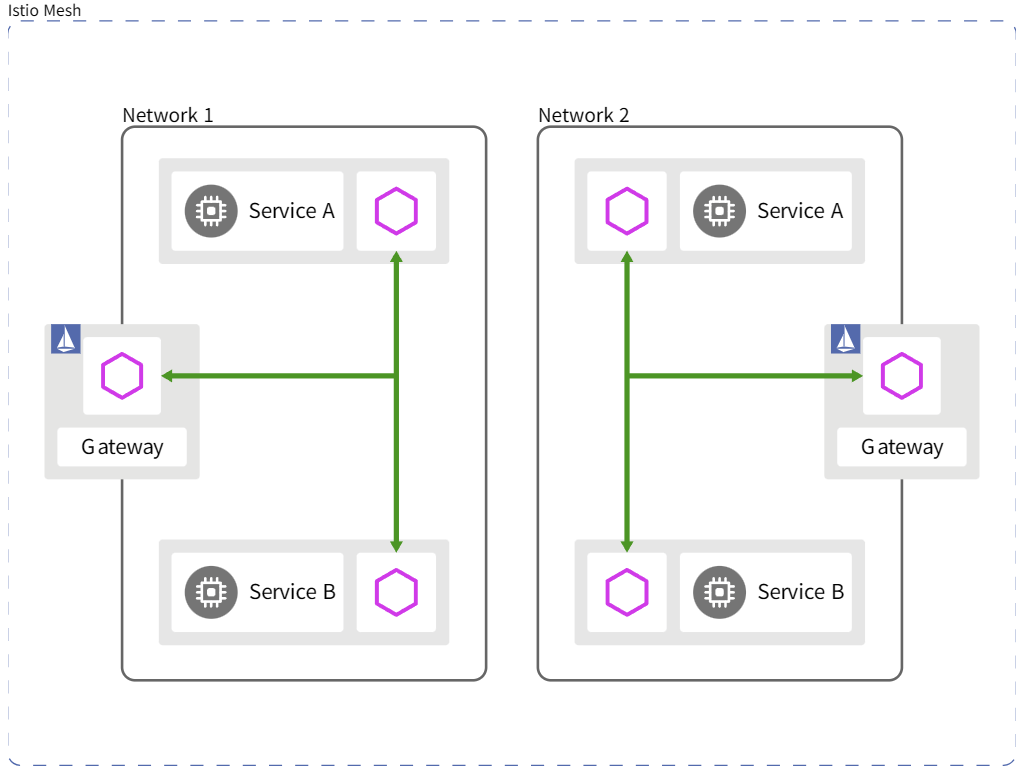
그러나 클러스터가 서로 다른 네트워크에 있다면 네트워크의 에지에 위치해 클러스터 간 트래픽을 프록시해주는 특수한 이스티오 인그레스 게이트웨이를 사용해야 한다. However, when clusters are in different networks, we have to use special Istio ingress gateways that are located at the edge of the network and proxy cross-cluster traffic.
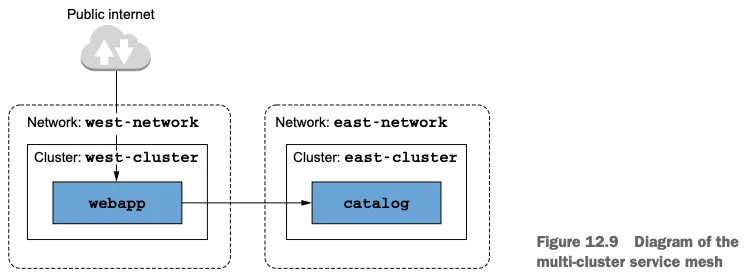
다중 네트워크 메시에서 클러스터를 잇는 인그레스 게이트웨이를 east-west 게이트웨이라고 부른다 (그림 12.7 참조).
[공식 문서] Multiple networks 제공 기능 : 중복 IP 환경 시 해결 등
Overlapping IP or VIP ranges for service endpoints
Crossing of administrative boundaries
Fault tolerance
Scaling of network addresses
Compliance with standards that require network segmentation
Multi-cluster 에 Multi-primary 환경에서 east-west gateway 없이도, 네트워크 장비에 L3 라우팅을 통해서 통신 가능!
우리가 해결해야 하는 마지막 요소는 다중 클러스터 서비스 메시 내 클러스터들이 공통된 신뢰를 가져야 한다는 것이다. The last factor we need to resolve is that clusters in a multi-cluster service mesh must have common trust.
공통 신뢰를 가지면 반대편 클러스터의 워크로드들이 상호 인증할 수 있게 된다. Having common trust ensures that workloads of opposite clusters can mutually authenticate.
반대편 클러스터의 워크로드들 사이에 공통 신뢰를 달성하는 방법에는 두 가지가 있다.
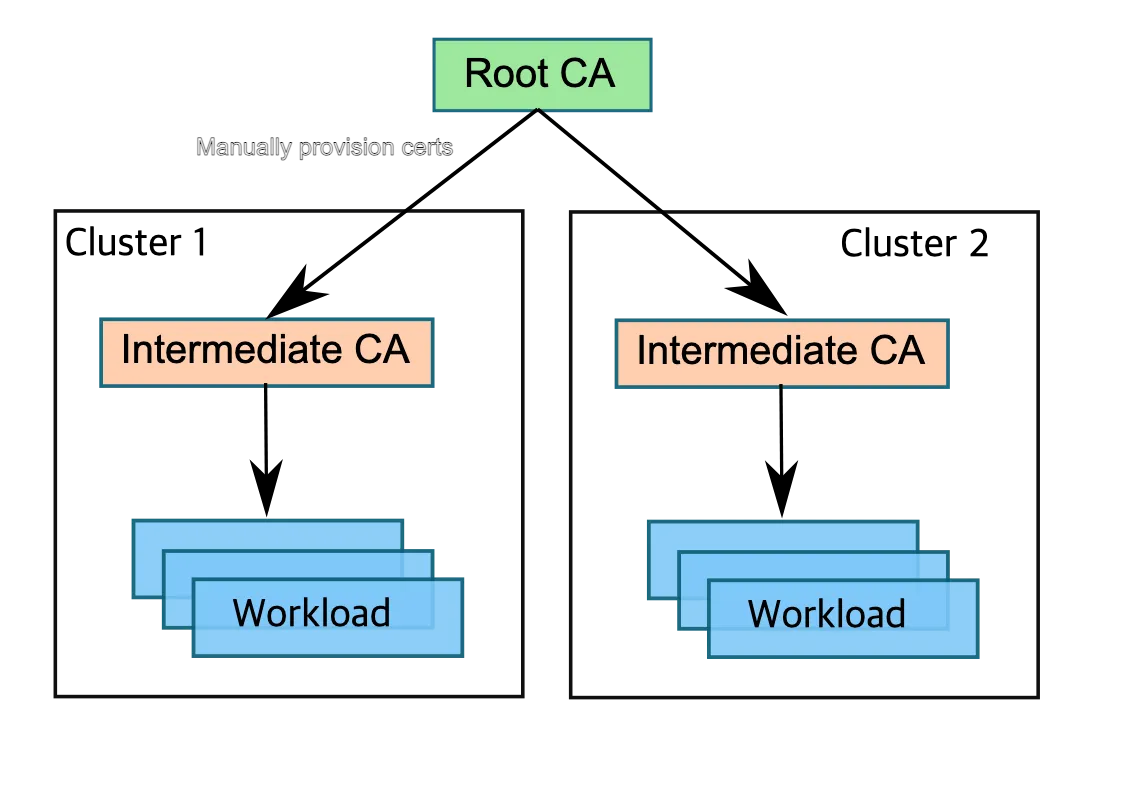
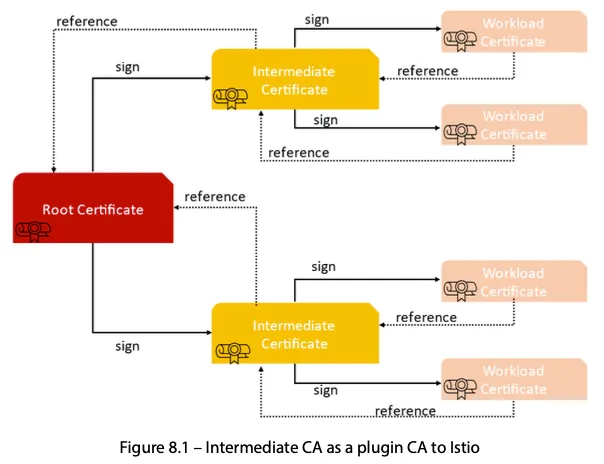
첫 번째 방법은 플러그인 CA 인증서라고 부르는, 공통된 루트 CA가 발급한 사용자 정의 인증서를 사용한다. The first uses what we call plug-in CA certificates: userdefined certificates issued from a common root CA.
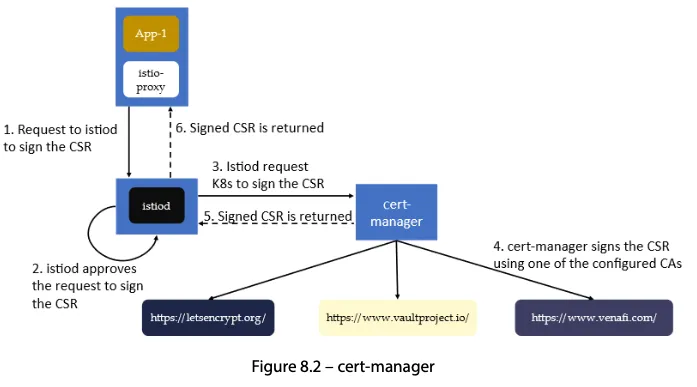
두 번째 방법은 두 클러스터가 인증서를 서명하는 데 사용하는 외부 CA를 통합한다. The second integrates an external CA that both clusters use to sign certificates.
중간 CA를 이스티오가 만들게 하는 대신에 사용할 인증서를 지정하면 된다. 이 인증서는 이스티오가 설치한 네임스페이스에 시크릿으로 제공한다.
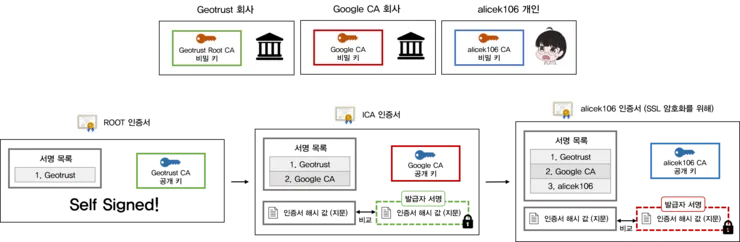
두 클러스터 모두에서 그렇게 함으로써 같은 루트 CA가 서명한 중간 CA를 사용한다.
이 방법은 간단해서 좋다. 그러나 중간 CA가 노출될 경우 보안 위험이 있다.
노출을 감지해 중간 CA의 인증서를 취소할 때까지 공격자들은 중간 CA로 신뢰받는 인증서를 서명할 수 있다.
이런 이유로 조직은 중간 CA를 넘겨주기를(사용하기를) 꺼린다.
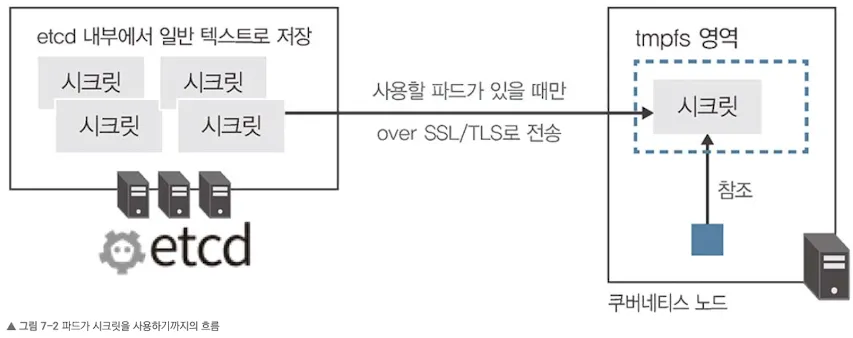
노출 위험은 중간 CA를 메모리에만 올리고 etcd(시크릿 같은 쿠버네티스 리소스를 저장하는 저장소)에 쿠버네티스 시크릿으로 유지하지 않음으로써 줄일 수 있다 ⇒ ??? 아래 Secret 내용 참고
더 안전한 대안은 인증서에 서명하는 외부 CA를 통합하는 것이다.
☞ 외부 인증 기관 통합
이 방법에서 istiod는 쿠버네티스 CSR 리소스로 저장된 인증서 서명 요청 CSRs 을 검증하고 승인하는 등록 기관 역할을 한다. istiod acts as a registration authority that validates and approves certificate signing requests (CSRs) stored as Kubernetes CSRs.
승인된 쿠버네티스 CSR 리소스는 다음 방법 중 하나로 외부 CA에 제출된다. The Kubernetes CSRs that are approved are submitted to the external CA in one of the following ways:
cert-manager 사용하기
cert-manager 가 우리의 외부 CA를 지원할 때만 가능하다. Using cert-manager - Only viable when our external CA is supported by certmanager.
지원하는 경우, cert-manager 의 istio-csr로 쿠버네티스 CSR을 지켜보고 서명을 위해 외부 CA에 제출할 수 있다.
도전과제1 Istio 에 cert-manager 외부 인증 기간 통합 설정 실습
Signature Algorithm: ecdsa-with-SHA256
        Issuer: O=cert-manager, O=cluster.local, CN=istio-ca
        Validity
            Not Before: Jan 13 16:51:59 2022 GMT
            Not After : Jan 13 17:51:59 2022 GMT
...
            X509v3 Subject Alternative Name:
                URI:spiffe://cluster.local/ns/default/sa/httpbin
맞춤 개발 Custom development
승인된 쿠버네티스 CSR을 지켜보고 이를 서명을 위해 외부 CA에 제출하는 쿠버네티스 컨트롤러를 만든다.
#
kind create cluster --name west --image kindest/node:v1.23.17 --kubeconfig ./west-kubeconfig --config - <<EOF
kind: Cluster
apiVersion: kind.x-k8s.io/v1alpha4
nodes:
- role: control-plane
  extraPortMappings:
  - containerPort: 30000 # istio-ingrssgateway HTTP
    hostPort: 30000
  - containerPort: 30001 # Prometheus
    hostPort: 30001
  - containerPort: 30002 # Grafana
    hostPort: 30002
  - containerPort: 30003 # Kiali
    hostPort: 30003
  - containerPort: 30004 # Tracing
    hostPort: 30004
  - containerPort: 30005 # kube-ops-view
    hostPort: 30005
networking:
  podSubnet: 10.10.0.0/16
  serviceSubnet: 10.100.0.0/24
EOF

# 설치 확인
docker ps
cat west-kubeconfig
kubectl get node --kubeconfig=./west-kubeconfig
kubectl get pod -A --kubeconfig=./west-kubeconfig

# 노드에 기본 툴 설치
docker exec -it west-control-plane sh -c 'apt update && apt install tree psmisc lsof wget bridge-utils net-tools dnsutils tcpdump ngrep iputils-ping git vim -y'

# (옵션) kube-ops-view
helm install kube-ops-view geek-cookbook/kube-ops-view --version 1.2.2 --set service.main.type=NodePort,service.main.ports.http.nodePort=30005 --set env.TZ="Asia/Seoul" --namespace kube-system --kubeconfig=./west-kubeconfig
kubectl get deploy,pod,svc,ep -n kube-system -l app.kubernetes.io/instance=kube-ops-view --kubeconfig=./west-kubeconfig

## kube-ops-view 접속 URL 확인
open "http://localhost:30005/#scale=1.5"
open "http://localhost:30005/#scale=1.3"
east k8s 클러스터 배포
#
kind create cluster --name east --image kindest/node:v1.23.17 --kubeconfig ./east-kubeconfig --config - <<EOF
kind: Cluster
apiVersion: kind.x-k8s.io/v1alpha4
nodes:
- role: control-plane
  extraPortMappings:
  - containerPort: 31000 # istio-ingrssgateway HTTP
    hostPort: 31000
  - containerPort: 31001 # Prometheus
    hostPort: 31001
  - containerPort: 31002 # Grafana
    hostPort: 31002
  - containerPort: 31003 # Kiali
    hostPort: 31003
  - containerPort: 31004 # Tracing
    hostPort: 31004
  - containerPort: 31005 # kube-ops-view
    hostPort: 31005
networking:
  podSubnet: 10.20.0.0/16
  serviceSubnet: 10.200.0.0/24
EOF

# 설치 확인
docker ps
cat east-kubeconfig
kubectl get node --kubeconfig=./east-kubeconfig
kubectl get pod -A --kubeconfig=./east-kubeconfig

# 노드에 기본 툴 설치
docker exec -it east-control-plane sh -c 'apt update && apt install tree psmisc lsof wget bridge-utils net-tools dnsutils tcpdump ngrep iputils-ping git vim -y'

# (옵션) kube-ops-view
helm install kube-ops-view geek-cookbook/kube-ops-view --version 1.2.2 --set service.main.type=NodePort,service.main.ports.http.nodePort=31005 --set env.TZ="Asia/Seoul" --namespace kube-system --kubeconfig=./east-kubeconfig
kubectl get deploy,pod,svc,ep -n kube-system -l app.kubernetes.io/instance=kube-ops-view --kubeconfig=./east-kubeconfig

## kube-ops-view 접속 URL 확인
open "http://localhost:31005/#scale=1.5"
open "http://localhost:31005/#scale=1.3"
kind docker network 에 테스트용 PC(실제로는 컨테이너) 배포
# kind 설치 시 kind 이름의 도커 브리지가 생성된다 : 172.18.0.0/16 대역
docker network ls
docker inspect kind

# mypc 컨테이너 기동 : kind 도커 브리지를 사용하고, 컨테이너 IP를 지정 없이 혹은 지정 해서 사용
docker run -d --rm --name mypc --network kind --ip 172.18.0.100 nicolaka/netshoot sleep infinity # IP 지정 실행 시
혹은 IP 지정 실행 시 에러 발생 시 아래 처럼 IP 지정 없이 실행
docker run -d --rm --name mypc --network kind nicolaka/netshoot sleep infinity # IP 지정 없이 실행 시
docker ps

# kind network 중 컨테이너(노드) IP(대역) 확인
docker ps -q | xargs docker inspect --format '{{.Name}} {{.NetworkSettings.Networks.kind.IPAddress}}'
/mypc 172.18.0.100
/east-control-plane 172.18.0.3
/west-control-plane 172.18.0.2

# 동일한 docker network(kind) 내부에서 컨테이너 이름 기반 도메인 통신 가능 확인!
docker exec -it mypc ping -c 1 172.18.0.2
docker exec -it mypc ping -c 1 172.18.0.3
docker exec -it mypc ping -c 1 west-control-plane
docker exec -it mypc ping -c 1 east-control-plane

#
docker exec -it west-control-plane ping -c 1 east-control-plane
docker exec -it east-control-plane ping -c 1 west-control-plane

docker exec -it west-control-plane ping -c 1 mypc
docker exec -it east-control-plane ping -c 1 mypc
[실습 환경 구성] (편리성 설정) MetalLB 배포 - Github & Alias 설정(kwest, keast)
alias kwest='kubectl --kubeconfig=./west-kubeconfig'
alias keast='kubectl --kubeconfig=./east-kubeconfig'

alias iwest='docker exec -it west-control-plane istioctl'
alias ieast='docker exec -it east-control-plane istioctl'
12.3.3 플러그인 CA 인증서 설정하기
9장에서 워크로드 ID를 부트스트래핑(워크로드가 자신의 정체를 입증하는 서명된 인증서를 받는 방법)을 다룰 때는 설치할 때 인증서에 서명할 CA를 생성한다는 사실을 생략했다.
이렇게 만들어진 CA는 이스티오를 설치한 네임스페이스에 istio-ca-secret 이라는 시크릿으로 저장되고, istiod 복제본들에게 공유된다.
이 기본 동작은 우리의 자체 CA를 사용하도록 변경할 수 있는데, 그러면 이스티오 CA가 CA를 새로 만드는 대신 이 CA 를 사용하게 된다.
그렇게 하려면 CA 인증서를 이스티오를 설치한 네임스페이스인 istio-system 에 cacerts 라는 시크릿으로 저장해야 하며, 다음과 같은 데이터를 포함해야 한다.
같은 루트가 서명한 중간 CA 인증서 사용하기
ca.cert.pem : 중간 CA의 인증서 The intermediate CA’s certificate.
ca-key.pem : 중간 CA의 개인 키 The intermediate CA’s private key.
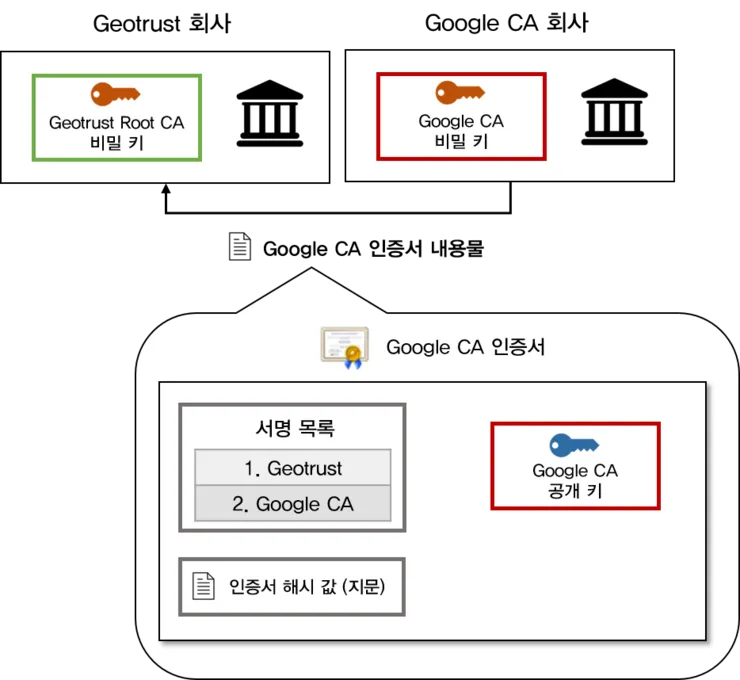
root-cert.pem : 중간 CA를 발급한 루트 CA의 인증서. 루트 CA는 중간 CA들의 인증서를 검증하며, 이것이 클러스터 간 상호 신뢰의 핵심이다. The root CA’s certificate that issued the intermediate CA. The root CA validates the certificates issued by any of its intermediate CAs, which is key for mutual trust across clusters.
cert-chain.pem : 중간 CA의 인증서와 루트 인증서를 이어 붙인 신뢰 체인 The concatenation of the intermediate CA’s certificate and the root CA certificate that forms the trust chain.
Geotrust <-> Google CA 예시 (2계층)Geotrust <-> Google CA <-> 개인 인증서 예시 (3계층)cacerts 시크릿은 루트 CA의 공개 키와 중간 CA의 공개 키 및 비밀 키로 구성된다. 루트 CA의 비밀 키는 클러스터 외부에 안전하게 저장된다.
저자가 제공하는 ./ch12/scripts/generate-certificates.sh 스크립트를 사용하면 중간 CA와 루트 CA는 ./ch12/certs 디렉터리에 만들어진다.
이 스크립트는 루트 CA를 만들고, 이 CA를 사용해 중간 CA 2개에 서명한다. 그 결과 신뢰가 같은 중간 CA가 만들어진다.
#
kwest label namespace istio-system topology.istio.io/network=west-network
keast label namespace istio-system topology.istio.io/network=east-network

# 확인
for i in west east; do echo ">> k8s cluster : $i <<"; kubectl get ns istio-system --show-labels --kubeconfig=./$i-kubeconfig; echo; done
이 레이블들을 사용해 이스티오는 네트워크 토폴로지를 이해하고, 그 이해를 바탕으로 워크로드 설정법을 결정한다.
※ IstioOperator 리소스를 사용해 컨트롤 플레인 설치하기
☞ 많이 수정해야 하므로, IstioOperator 리소스를 사용해 west-cluster 의 이스티오 설치를 정의하자.
# west 에 시크릿 생성
ieast x create-remote-secret --name="east-cluster" | kwest apply -f -
secret/istio-remote-secret-east-cluster created

# istiod 로그 확인 : 시크릿이 생성되면, 바로 istiod가 이 시크릿을 가지고 새로 추가된 원격 클러스터(east)에 워크로드를 쿼리한다.
kwest logs deploy/istiod -n istio-system | grep 'Adding cluster'
2025-05-16T22:45:00.679666Z     info    Adding cluster  cluster=east-cluster secret=istio-system/istio-remote-secret-east-cluster

#
for i in west east; do echo ">> k8s cluster : $i <<"; kubectl get secret -n istio-system --kubeconfig=./$i-kubeconfig; echo; done
kwest get secret -n istio-system istio-remote-secret-east-cluster
kwest get secret -n istio-system istio-remote-secret-east-cluster -o yaml
...

# west 확인 : east 의 모든 CDS/EDS 정보를 west 에서도 확인 가능!
for i in listener route cluster endpoint; do echo ">> k8s cluster : west - istio-config $i <<"; docker exec -it west-control-plane istioctl proxy-config $i deploy/istio-ingressgateway.istio-system; echo; done
iwest proxy-config cluster deploy/istio-ingressgateway.istio-system | grep catalog
iwest proxy-config cluster deploy/istio-ingressgateway.istio-system --fqdn catalog.istioinaction.svc.cluster.local -o json
iwest proxy-config endpoint deploy/istio-ingressgateway.istio-system | grep catalog
10.20.0.15:3000                                         HEALTHY     OK                outbound|80||catalog.istioinaction.svc.cluster.local

# west 에서 10.20.0.15(10.20.0.0/16)로 라우팅이 가능한 상태인가?
iwest proxy-config endpoint deploy/istio-ingressgateway.istio-system --cluster 'outbound|80||catalog.istioinaction.svc.cluster.local' -o json
...
                "address": {
                    "socketAddress": {
                        "address": "10.20.0.15",
                        "portValue": 3000
...

# east 확인 : west 의 CDS/EDS 정보를 아직 모름!
for i in listener route cluster endpoint; do echo ">> k8s cluster : east - istio-config $i <<"; docker exec -it east-control-plane istioctl proxy-config $i deploy/istio-ingressgateway.istio-system; echo; done
ieast proxy-config cluster deploy/istio-ingressgateway.istio-system | grep catalog
ieast proxy-config endpoint deploy/istio-ingressgateway.istio-system | grep catalog
10.20.0.15:3000                                         HEALTHY     OK                outbound|80||catalog.istioinaction.svc.cluster.local
☞ 기본-기본 배포primary-primary deployment 에서는 east 가 west 쿼리 할 수 있게 반대로도 설정하자.
# east 에 시크릿 생성
iwest x create-remote-secret --name="west-cluster" | keast apply -f -
secret/istio-remote-secret-west-cluster created

# istiod 로그 확인 : 시크릿이 생성되면, 바로 istiod가 이 시크릿을 가지고 새로 추가된 원격 클러스터(east)에 워크로드를 쿼리한다.
keast logs deploy/istiod -n istio-system | grep 'Adding cluster'
2025-05-17T00:09:02.438756Z     info    Adding cluster  cluster=west-cluster secret=istio-system/istio-remote-secret-west-cluster

#
for i in west east; do echo ">> k8s cluster : $i <<"; kubectl get secret -n istio-system --kubeconfig=./$i-kubeconfig; echo; done
keast get secret -n istio-system istio-remote-secret-west-cluster
keast get secret -n istio-system istio-remote-secret-west-cluster -o yaml
...

# east 확인 : west 의 모든 CDS/EDS 정보를 east 에서도 확인 가능!
for i in listener route cluster endpoint; do echo ">> k8s cluster : east - istio-config $i <<"; docker exec -it east-control-plane istioctl proxy-config $i deploy/istio-ingressgateway.istio-system; echo; done
ieast proxy-config cluster deploy/istio-ingressgateway.istio-system | grep webapp

# east 에서 10.10.0.15(10.10.0.0/16)로 라우팅이 가능한 상태인가?
ieast proxy-config endpoint deploy/istio-ingressgateway.istio-system | grep webapp
10.10.0.15:8080                                         HEALTHY     OK                outbound|80||webapp.istioinaction.svc.cluster.local
☞ 이제 컨트롤 플레인이 상대 클러스터의 워크로드를 퀴리할 수 있다.
# catalog stub service 정보 확인 : endpoints 는 아직도 none.
kwest get svc,ep -n istioinaction
NAME              TYPE        CLUSTER-IP     EXTERNAL-IP   PORT(S)   AGE
service/catalog   ClusterIP   10.100.2.43    <none>        80/TCP    14h
service/webapp    ClusterIP   10.100.2.172   <none>        80/TCP    14h

NAME                ENDPOINTS        AGE
endpoints/catalog   <none>           14h
endpoints/webapp    10.10.0.8:8080   14h

# webapp stub service 생성하지 않았으므로 별도 west 의 webapp service 정보가 없다
keast get svc,ep -n istioinaction
NAME              TYPE        CLUSTER-IP   EXTERNAL-IP   PORT(S)   AGE
service/catalog   ClusterIP   10.200.3.0   <none>        80/TCP    14h

NAME                ENDPOINTS        AGE
endpoints/catalog   10.20.0.8:3000   14h
12.3.6 클러스터 간 연결 설정하기
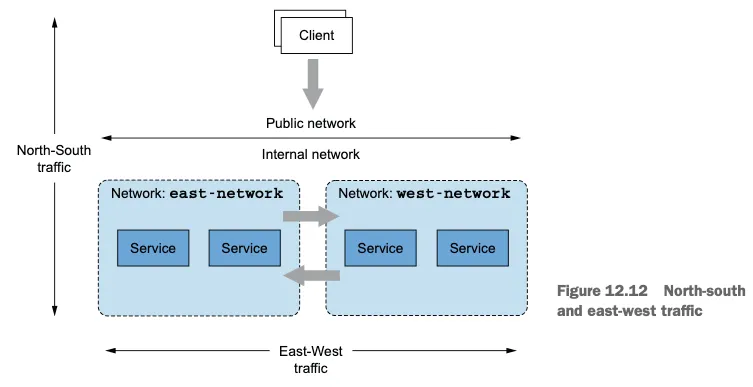
들어가며 : north-south 트래픽, east-west 트래픽
4장에서는 이스티오의 인그레스 게이트웨이를 다루면서 엔보이 프록시 기반이라는 것을 살펴봤다.
인그레스 게이트웨이는 퍼블릭 네트워크에서 시작한 트래픽의 진입점으로, 트래픽을 조직의 내부 네트워크로 보낸다.
이런 유형의 트래픽을 north-south 트래픽이라고도 한다.
한편 서로 다른 내부 네트워크(여기서는 클러스터의 네트워크) 간의 트래픽은 east-west 트래픽이라고 한다.
north-south 와 east-west 트래픽
east-west 트래픽을 단순화하기 위해, 대부분의 클라우드 프로바이더들은 네트워크 주소 공간이 겹치지 않는다면 가상 네트워크의 피어링을 활성화한다.
피어링된 가상 네트워크의 서비스들은 IPv4 및 IPv6 주소로 직접 커넥션을 시작한다. 그러나 네트워크 피어링은 클라우드 전용 기능이다.
네트워크 피어링이 불가능한, 다른 클라우드 프로바이더나 온프레미스에 있는 클러스터에 연결하고 싶을 때 이스티오가 제공하는 선택지가 east-west 게이트웨이다.
게이트웨이는 반대편 클러스터의 워크로드에 접근할 수 있는 로드 밸런서로 노출돼야 한다.
이 절에서는 클러스터 간 연결을 설정하고, 내부적으로 어떻게 동작하는지 보여준다.
☞ 이스티오의 east-west 게이트웨이
east-west 게이트웨이의 목적은 클러스터 간 east-west 트래픽의 진입점 역할을 하는 것 뿐 아니라, 이 과정을 서비스 운영 팀에게 투명하게 만드는 것이다.
이 목표를 달성하려면 게이트웨이는 반드시 다음을 수행해야 한다.
클러스터 사이의 정밀한 트래픽 관리 Enable fine-grained traffic management across clusters
암호화된 트래픽 라우팅, 암호화된 상태로 라우팅해야 워크로드 간 상호 인증이 가능하다.
Route encrypted traffic to enable mutual authentication between workloads
그리고 서비스 메시 운영자는 어떤 추가 리소스도 구성할 필요가 없어야 한다! 즉, 어떤 이스티오 리소스도 추가 구성할 필요가 없어야 한다! And service mesh operators shouldn’t have to configure any additional resources! In other words, you shouldn’t have to configure any additional Istio resources!
이렇게 하면, 트래픽을 클러스터 내에서 라우팅할 때나 클러스터 간에 라우팅할 때 차이가 없다.
두 시나리오 모두에서 워크로드는 서비스를 세밀하게 겨냥할 수 있고 상호 인증된 커넥션을 시작할 수 있다 (미묘한 차이가 하나 있는데, 클러스터 경계를 넘을 때의 로드 밸런싱이 조금 다르다. 이 부분은 다음 절에서 살펴본다).
이것이 어떻게 구현되는지 이해하려면, 이스티오의 두 기능인 SNI 클러스터와 SNI 자동 통과를 소개하고 이들이 게이트웨이의 동작을 어떻게 바꾸는지 살펴봐야 한다. SNI clusters and SNI auto passthrough.
☞ SNI 클러스터로 east-west 게이트웨이 설정하기
east-west 게이트웨이는 SNI 클러스터를 모든 서비스에 추가 설정한 인그레스 게이트웨이다.
그럼 SNI 클러스터란 무엇일까?
SNI 클러스터는 단순히 보통의 엔보이 클러스터Envoy clusters 같은 것으로(10장 10.3.2절의 ‘엔보이 클러스터 설정 쿼리하기’ 절 참조), 트래픽이 라우팅될 수 있는 유사 워크로드 집합을 묶는 속성인 방향, 부분집합, 포트, FQDN을 포함한다.
그러나 SNI 클러스터에는 한 가지 주요 차이점이 있다. SNI 클러스터는 모든 엔보이 클러스터 정보를 SNI에 인코딩한다.
이 덕분에 east-west 게이트웨이는 클러스터가 SNI 안에 지정한 클러스터로 암호화된 트래픽을 라우팅할 수 있는 것이다.
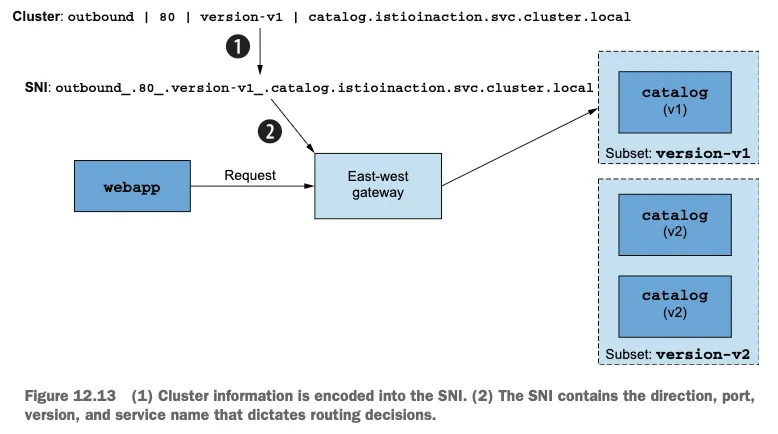
구체적인 예를 들면, 클라이언트(webapp 같은)가 원격 클러스터의 워크로드(catalog 같은)로 커넥션을 시작할 때 그림 12.13 처럼 겨냥하는 클러스터를 SNI에 인코딩한다.
클러스터 정보는 SNI에 인코딩된다.
SNI에는 라우팅 결정을 지시하는 방향, 포트, 버전, 서비스 이름이 포함된다.
그러므로 클라이언트는 세밀한 라우팅 결정을 내릴 수 있으며, 게이트웨이는 SNI 헤더에서 클러스터 정보를 읽어 트래픽을 클라이언트가 의도한 워크로드로 프록시할 수 있다.
이 모든 작업이 안전하고 상호 인증한 커넥션을 워크로드 사이에 유지하는 중에 일어난다.
☞ SNI 클러스터가 있는 east-west 게이트웨이 설치하기
SNI 클러스터 설정은 옵트인 기능으로, 다음 IstioOpertor 정의처럼 환경 변수 ISTIO_META_ROUTER_MODE 로 게이트웨이 라우터 모드를 sni-dnat 으로 설정해서 활성화할 수 있다.
# 설치 전 확인
for i in west east; do echo ">> k8s cluster : $i <<"; kubectl get pod -n istio-system -l istio.io/rev=default --kubeconfig=./$i-kubeconfig; echo; done
for i in west east; do echo ">> k8s cluster : $i <<"; kubectl get IstioOperator -n istio-system --kubeconfig=./$i-kubeconfig; echo; done
kwest get IstioOperator -n istio-system installed-state-istio-controlplane -o yaml
keast get IstioOperator -n istio-system installed-state-istio-controlplane -o yaml

# 설치 전 확인 : west 에서 catalog endpoint 에 IP 확인
for i in listener route cluster endpoint; do echo ">> k8s cluster : west - istio-config $i <<"; docker exec -it west-control-plane istioctl proxy-config $i deploy/istio-ingressgateway.istio-system; echo; done
iwest proxy-config endpoint deploy/istio-ingressgateway.istio-system | grep catalog
10.20.0.15:3000                                         HEALTHY     OK                outbound|80||catalog.istioinaction.svc.cluster.local

# IstioOperator 로 east 클러스터에 east-west 게이트웨이를 설치
cat ch12/gateways/cluster-east-eastwest-gateway.yaml
docker cp ./ch12/gateways/cluster-east-eastwest-gateway.yaml east-control-plane:/cluster-east-eastwest-gateway.yaml
ieast install -f /cluster-east-eastwest-gateway.yaml --set values.global.proxy.privileged=true -y

# east 클러스터에 east-west 게이트웨이를 설치 확인
for i in west east; do echo ">> k8s cluster : $i <<"; kubectl get IstioOperator -n istio-system --kubeconfig=./$i-kubeconfig; echo; done
for i in west east; do echo ">> k8s cluster : $i <<"; kubectl get pod -n istio-system -l istio.io/rev=default --kubeconfig=./$i-kubeconfig; echo; done
...
NAME                                     READY   STATUS    RESTARTS        AGE
istio-eastwestgateway-866794c798-k9xfl   1/1     Running   0               14s
istio-ingressgateway-7f6f8f8d99-4mlp5    1/1     Running   1 (3h38m ago)   17h
istiod-85976468f-vp4zg                   1/1     Running   1 (3h38m ago)   17h

keast get IstioOperator -n istio-system installed-state-istio-eastwestgateway -o yaml
...
    ingressGateways:
    - enabled: true
      k8s:
        env:
        - name: ISTIO_META_ROUTER_MODE
          value: sni-dnat
        - name: ISTIO_META_REQUESTED_NETWORK_VIEW
          value: east-network
        service:
          ports:
          - name: status-port
            port: 15021
            targetPort: 15021
          - name: mtls
            port: 15443
            targetPort: 15443
          - name: tcp-istiod
            port: 15012
            targetPort: 15012
          - name: tcp-webhook
            port: 15017
            targetPort: 15017
      label:
        app: istio-eastwestgateway
        istio: eastwestgateway
        topology.istio.io/network: east-network
      name: istio-eastwestgateway
...

# east 정보 확인
ieast proxy-status
NAME                                                    CLUSTER          CDS        LDS        EDS        RDS          ECDS         ISTIOD                     VERSION
catalog-6cf4b97d-9c995.istioinaction                    east-cluster     SYNCED     SYNCED     SYNCED     SYNCED       NOT SENT     istiod-85976468f-vp4zg     1.17.8
istio-eastwestgateway-866794c798-k9xfl.istio-system     east-cluster     SYNCED     SYNCED     SYNCED     NOT SENT     NOT SENT     istiod-85976468f-vp4zg     1.17.8
istio-ingressgateway-7f6f8f8d99-4mlp5.istio-system      east-cluster     SYNCED     SYNCED     SYNCED     NOT SENT     NOT SENT     istiod-85976468f-vp4zg     1.17.8

# east 에 istio-ingressgateway  에 istio-config 정보 확인 : west 의 CDS/EDS 모두 알고 있음!
for i in listener route cluster endpoint; do echo ">> east k8s cluster : ingressgateway - istio-config $i <<"; docker exec -it east-control-plane istioctl proxy-config $i deploy/istio-ingressgateway.istio-system; echo; done

# east 에 istio-eastwestgateway 에 istio-config 정보 확인 : webapp(CDS) OK, west 에 EDS 아직 모름!
for i in listener route cluster endpoint; do echo ">> east k8s cluster : eastwestgateway - istio-config $i <<"; docker exec -it east-control-plane istioctl proxy-config $i deploy/istio-eastwestgateway.istio-system; echo; done

ieast proxy-config cluster deploy/istio-eastwestgateway.istio-system | grep istioinaction
catalog.istioinaction.svc.cluster.local                      80        -          outbound      EDS
webapp.istioinaction.svc.cluster.local                       80        -          outbound      EDS

ieast proxy-config cluster deploy/istio-eastwestgateway.istio-system --fqdn webapp.istioinaction.svc.cluster.local -o json
ieast proxy-config cluster deploy/istio-eastwestgateway.istio-system --fqdn webapp.istioinaction.svc.cluster.local -o json | grep sni
                        "sni": "outbound_.80_._.webapp.istioinaction.svc.cluster.local"

ieast proxy-config endpoint deploy/istio-eastwestgateway.istio-system | grep istioinaction
ieast proxy-config endpoint deploy/istio-eastwestgateway.istio-system --cluster 'outbound|80||catalog.istioinaction.svc.cluster.local' -o json


# west 정보 확인
iwest proxy-status

# west 에 istio-ingressgateway 에 istio-config 정보 확인
for i in listener route cluster endpoint; do echo ">> west k8s cluster : ingressgateway - istio-config $i <<"; docker exec -it west-control-plane istioctl proxy-config $i deploy/istio-ingressgateway.istio-system; echo; done
iwest proxy-config cluster deploy/istio-ingressgateway.istio-system | grep istioinaction
iwest proxy-config cluster deploy/istio-ingressgateway.istio-system --fqdn catalog.istioinaction.svc.cluster.local -o json
iwest proxy-config cluster deploy/istio-ingressgateway.istio-system --fqdn catalog.istioinaction.svc.cluster.local -o json | grep sni
                        "sni": "outbound_.80_._.catalog.istioinaction.svc.cluster.local"

# west 에 istio-ingressgateway : east EDS 모든 정보에서 east의 eastwestgateway에 mtls 정보로 변경!
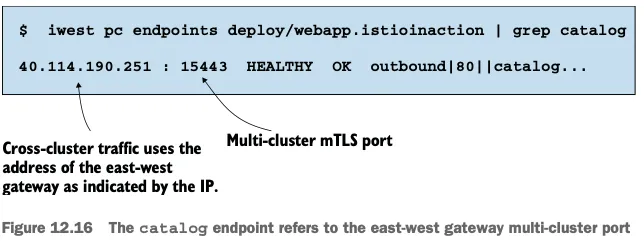
iwest proxy-config endpoint deploy/istio-ingressgateway.istio-system | grep istioinaction
10.10.0.15:8080                                         HEALTHY     OK                outbound|80||webapp.istioinaction.svc.cluster.local
172.18.255.202:15443                                    HEALTHY     OK                outbound|80||catalog.istioinaction.svc.cluster.local

# 출력되는 172.18.X.Y에 IP 확인 : east 에 eastwestgateway 의 Service(LoadBalancer)의 External-IP.
keast get svc,ep -n istio-system istio-eastwestgateway
NAME                            TYPE           CLUSTER-IP    EXTERNAL-IP      PORT(S)                                                           AGE
service/istio-eastwestgateway   LoadBalancer   10.200.0.90   172.18.255.202   15021:32281/TCP,15443:30196/TCP,15012:32628/TCP,15017:32346/TCP   27m

NAME                              ENDPOINTS                                                        AGE
endpoints/istio-eastwestgateway   10.20.0.16:15021,10.20.0.16:15017,10.20.0.16:15012 + 1 more...   27m


# west 에 webapp 에 istio-config 정보 확인
for i in listener route cluster endpoint; do echo ">> west k8s cluster : webapp - istio-config $i <<"; docker exec -it west-control-plane istioctl proxy-config $i deploy/webapp.istioinaction; echo; done
iwest proxy-config endpoint deploy/webapp.istioinaction | grep istioinaction
10.10.0.15:8080                                         HEALTHY     OK                outbound|80||webapp.istioinaction.svc.cluster.local
172.18.255.202:15443                                    HEALTHY     OK                outbound|80||catalog.istioinaction.svc.cluster.local


# west 에서 호출 시도
kwest get svc,ep -n istioinaction
NAME              TYPE        CLUSTER-IP     EXTERNAL-IP   PORT(S)   AGE
service/catalog   ClusterIP   10.100.0.170   <none>        80/TCP    63m
service/webapp    ClusterIP   10.100.0.141   <none>        80/TCP    63m

NAME                ENDPOINTS         AGE
endpoints/catalog   <none>            63m
endpoints/webapp    10.10.0.15:8080   63m

kwest exec -it deploy/webapp -c istio-proxy -n istioinaction -- curl catalog.istioinaction.svc.cluster.local -v
*   Trying 10.100.0.170:80...
* connect to 10.100.0.170 port 80 failed: Connection refused
...
east-west 게이트웨이를 설치하고 라우터 모드를 sni-dnat으로 설정했으면, 다음 단계는 SNI 자동 통과 모드 SNI auto passthrough mode 를 사용해 east-west 게이트웨이에서 다중 클러스터 상호 TLS 포트를 노출하는 것이다.
이스티오는 영리해서 딱 그때만 게이트웨이에 SNI 클러스터를 설정한다.
☞SNI 자동 통과로 클러스터 간 트래픽 라우팅하기
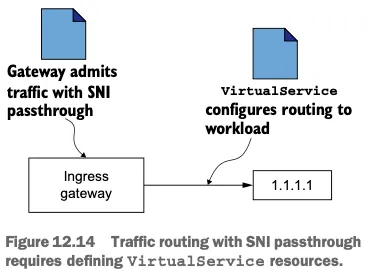
SNI 자동 통과 auto passthrough 를 이해하기 위해, 수동 SNI 통과가 SNI 헤더에 기반해 트래픽을 허용하도록 인그레스 게이트웨이를 설정한다는 것을 떠올려보자 (4장의 4.4.2절 참고).
이는 허용된 트래픽을 라우팅하려면 서비스 운영자가 수작업으로 VirtualService 리소스를 정의해야 함을 보여준다 (그림 12.14)
SNI 자동 통과는 그 이름에서 짐작할 수 있듯이, 허용된 트래픽을 라우팅하자고 VirtualService 를 수작업으로 만들 필요가 없다.
라우팅은 SNI 클러스터를 사용해 수행할 수 있는데, SNI 클러스터는 라우터 모드가 sni-dnat 일때 east-west 게이트웨이에서 자동으로 설정된다.
SNI 자동 통과는 이스티오 Gateway 리소스로 설정할 수 있다. 다음 정의에서는 SNI 헤더의 값이 *.local 인 모든 트래픽에 대해 SNI 자동 통과를 사용한는데, 이는 모든 쿠버네티스 서비스에 해당한다.
# cat ch12/gateways/expose-services.yaml
apiVersion: networking.istio.io/v1alpha3
kind: Gateway
metadata:
  name: cross-network-gateway
  namespace: istio-system
spec:
  selector:
    istio: eastwestgateway # 셀렉터와 일치하는 게이트웨이에만 설정이 적용된다.
  servers:
    - port:
        number: 15443 # 이스티오에서 15443 포트는 멀티 클러스터 상호 TLS 트래픽 용도로 지정된 특수 포트다
        name: tls
        protocol: TLS
      tls:
        mode: AUTO_PASSTHROUGH # SNI 헤더를 사용해 목적지를 해석하고 SNI 클러스터를 사용한다.
      hosts:
        - "*.local" # 정규식 *.local 과 일치하는 SNI에 대해서만 트래픽을 허용한다.
east 클러스터에 적용 시, east-cluster의 워크로드를 west-cluster 에 노출한다.
#
kwest exec -it -n istioinaction deploy/webapp -c istio-proxy -- sudo tcpdump -i any tcp -nn
kwest exec -it -n istioinaction deploy/webapp -c istio-proxy -- sudo tcpdump -i lo tcp -nn
kwest exec -it -n istioinaction deploy/webapp -c istio-proxy -- sudo tcpdump -i eth0 tcp -nn
10:31:42.955656 eth0  Out IP 10.10.0.15.36168 > 172.18.255.202.15443: Flags [P.], seq 2756:4134, ack 3577, win 696, options [nop,nop,TS val 3483540647 ecr 101206706], length 1378
10:31:42.957686 eth0  In  IP 172.18.255.202.15443 > 10.10.0.15.36168: Flags [P.], seq 3577:5365, ack 4134, win 826, options [nop,nop,TS val 101207823 ecr 3483540647], length 1788
...

#
keast get svc -n istio-system istio-eastwestgateway
NAME                    TYPE           CLUSTER-IP    EXTERNAL-IP      PORT(S)                                                           AGE
istio-eastwestgateway   LoadBalancer   10.200.0.90   172.18.255.202   15021:32281/TCP,15443:30196/TCP,15012:32628/TCP,15017:32346/TCP   156m
- east : catalog
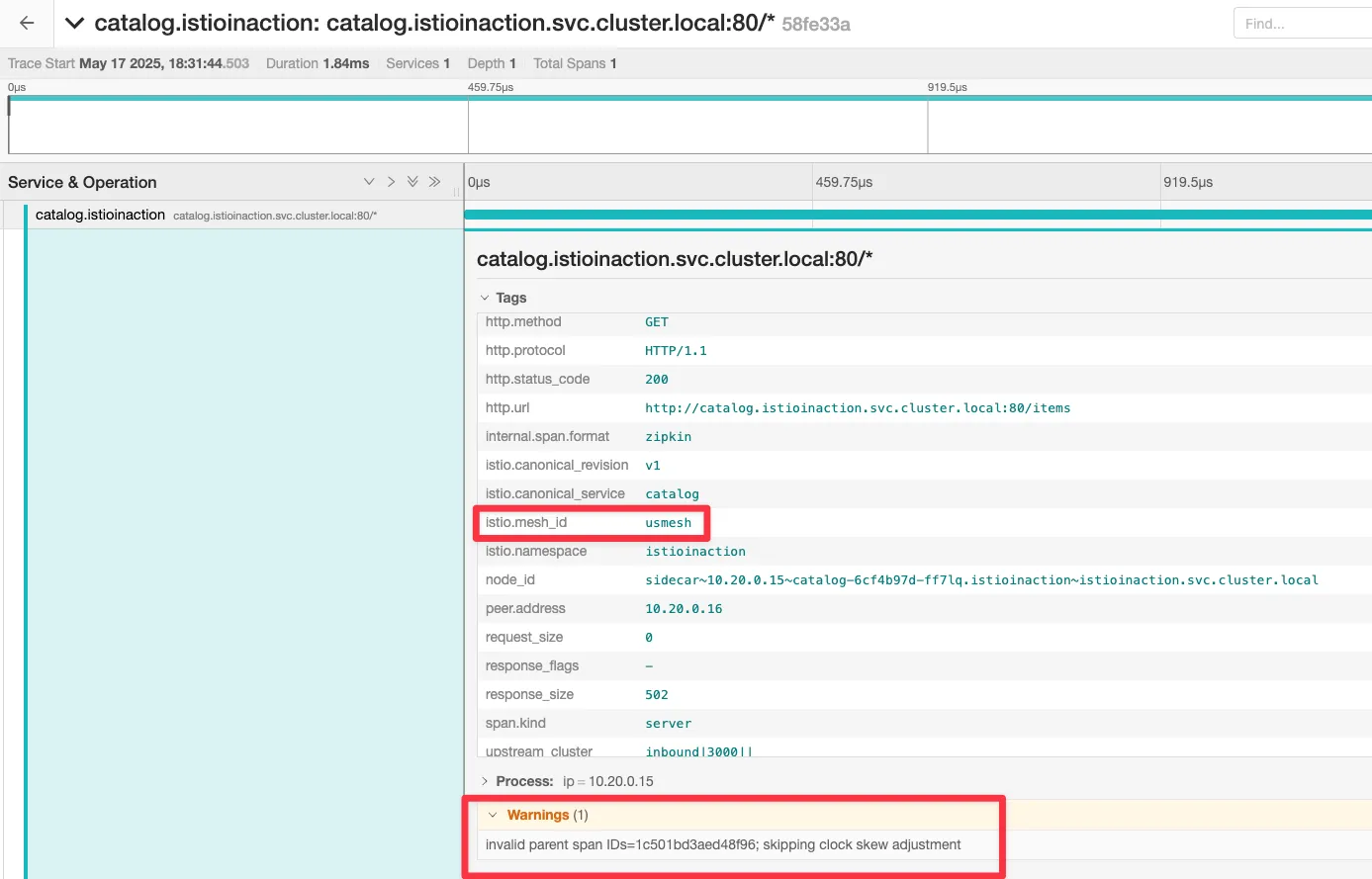
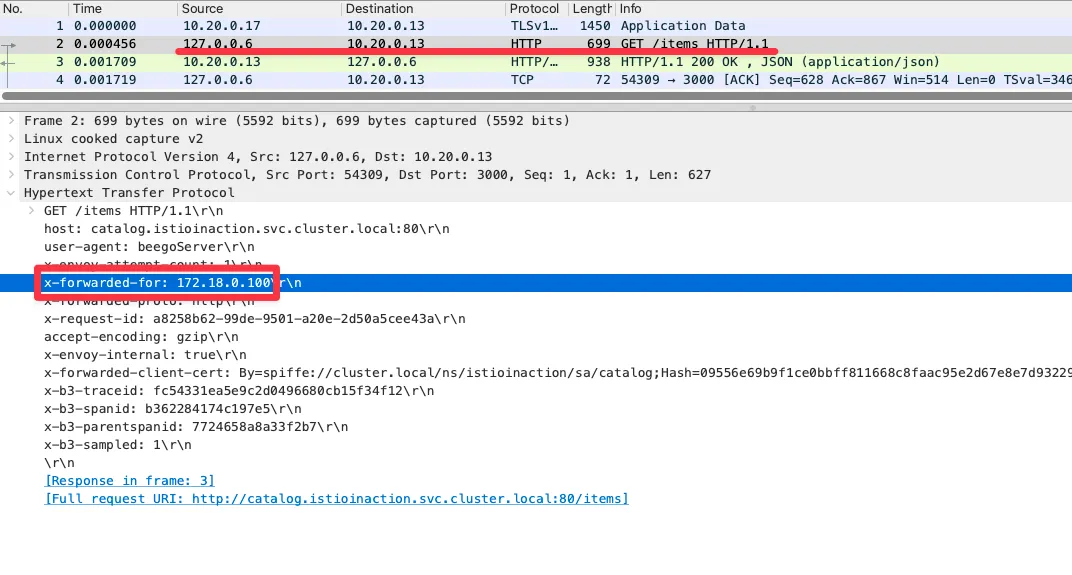
# istio-proxy 에 tcp port 3000 에서 패킷 덤프에 출력 결과를 파일로 저장
keast exec -it -n istioinaction deploy/catalog -c istio-proxy -- sudo tcpdump -i any tcp port 3000 -w /var/lib/istio/data/dump.pcap
keast exec -it -n istioinaction deploy/catalog -c istio-proxy -- ls -l /var/lib/istio/data/

# 출력 결과 파일을 로컬로 다운로드
keast get pod -n istioinaction -l app=catalog -oname
pod/catalog-6cf4b97d-ff7lq

keast cp -n istioinaction -c istio-proxy catalog-6cf4b97d-ff7lq:var/lib/istio/data/dump.pcap ./dump.pcap

# 로컬로 다운 받은 파일을 wireshark 로 불러오기 : XFF 로 요청 Client IP 확인
wireshark dump.pcap
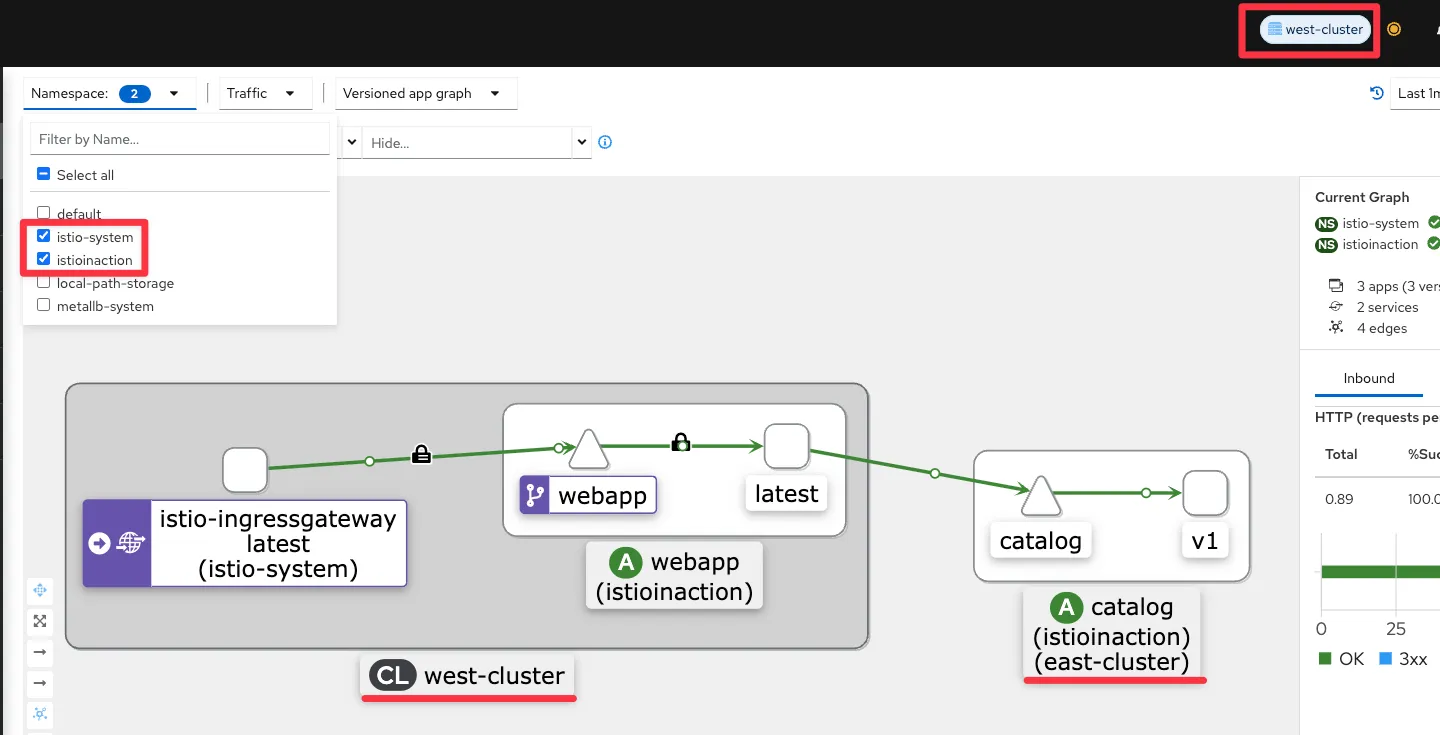
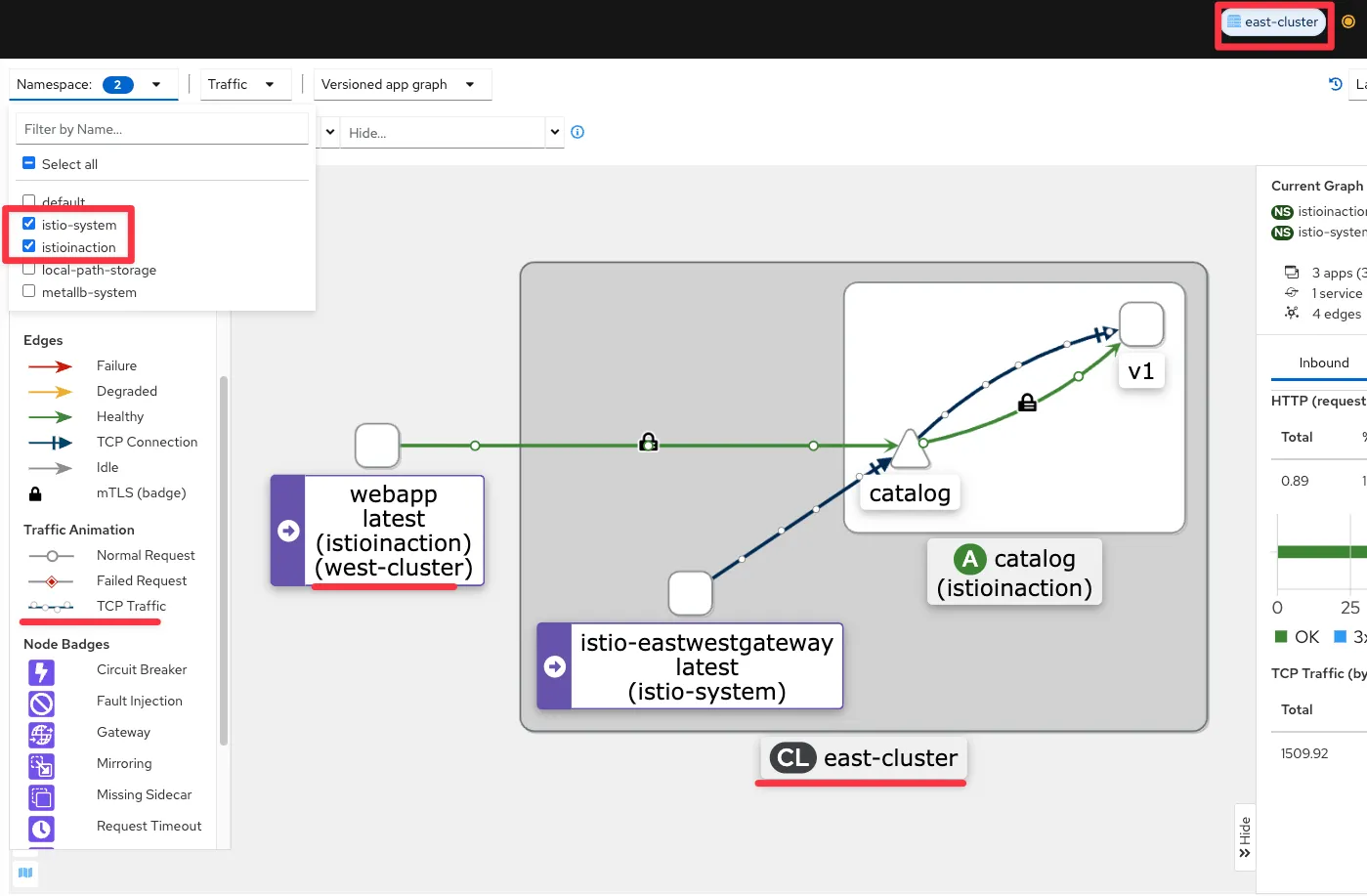
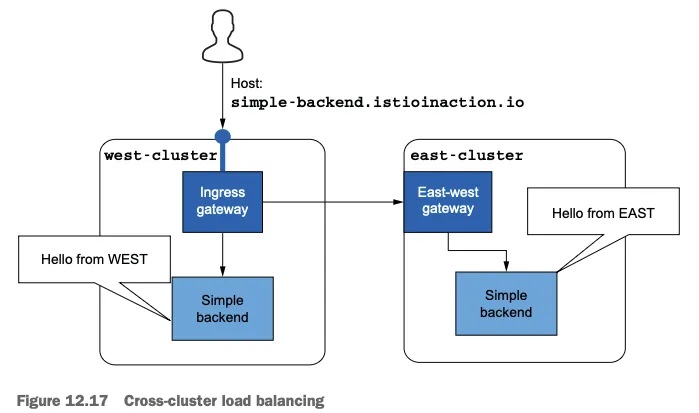
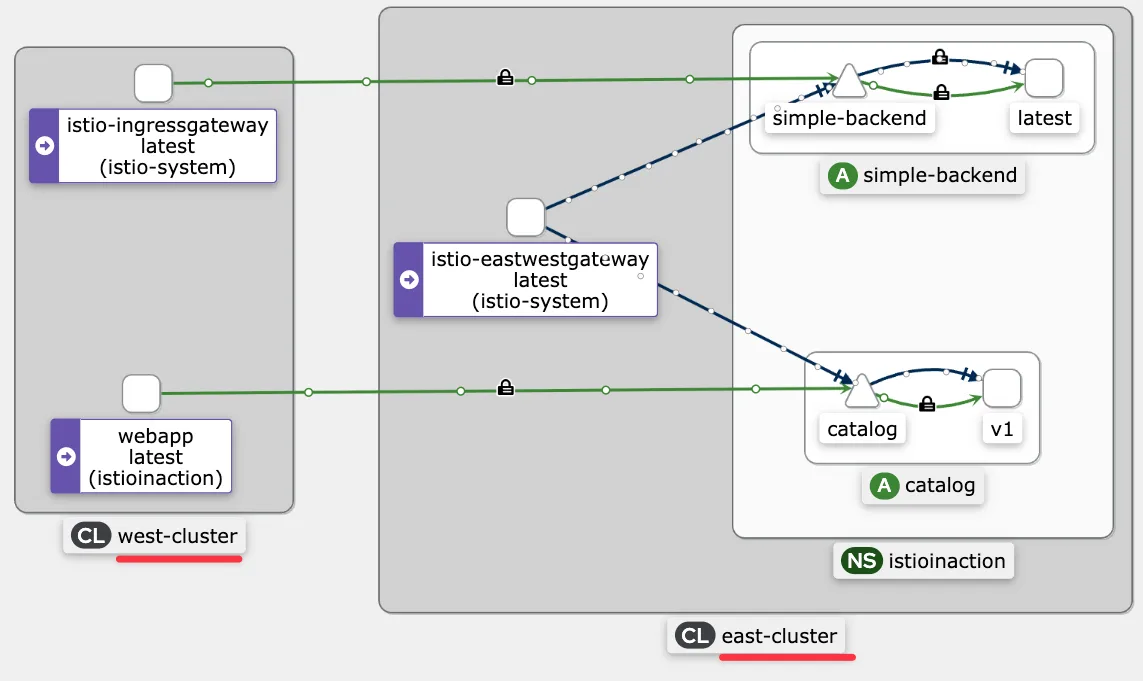
west의 인그레스 게이트웨이에 요청을 트리거하면 요청이 west-cluster 의 webapp 으로 라우팅됨을 알 수 있다.
그런 다음, 요청을 처리하는 east-cluster 의 catalog 워크로드로 해석된다.
이로써 다중 클러스터, 다중 네트워크, 다중 컨트롤 플레인 서비스 메시가 설정됐고 두 클러스터가 서로의 워크로드를 찾을 수 있음을 확인했다.
워크로드들은 east-west 게이트웨이를 통과 지점으로 사용해 상호 인증 커넥션을 시작한다.
※ 다중 클러스터 서비스 메시를 설정하는데 필요한 것 요약
클러스터 간 워크로드 디스커버리 Cross-cluster workload discovery
서비스 어카운트 토큰과 인증서가 포함된 kubeconfig 를 사용해 각 컨트롤 플레인에 동료 클러스터에 대한 접근 권한을 제공함으로써 구현한다.
이 과정은 istioctl 을 사용해 쉽게 진행했고, east-cluster 에만 적용했다.
클러스터 간 워크로드 연결 Cross-cluster workload connectivity
다른 클러스터의 워크로드(다른 네트워크에 위치) 간에 트래픽을 라우팅하도록 east-west 게이트웨이를 설정하고, 이스티오가 워크로드가 위치한 네트워크를 알 수 있도록 각 클러스터에 네트워크 정보 레이블을 지정해 구현한다.
클러스터 간 신뢰 설정 Configuring trust between clusters
상대 클러스터와 동일한 루트 신뢰로 중간 인증서를 발급함으로써 설정한다.
겨우 몇 단계 정도이며, 대부분 자동화돼 다중 클러스터 서비스 메시를 설정한다.
다음 절에서는 클러스터 간의 서비스 메시 동작을 몇 가지 확인해본다.
12.3.7 클러스터 간 로드 밸런싱
☞ 클러스터 간 로드 밸런싱
6장에서는 클러스터 지역 인식 로드 밸런싱을 살펴보겠다고 약속했다.
그리고 이제 다중 클러스터 서비스 메시가 있으니 그럴 준비가 됐다. 이를 시연하기 위해 2개의 샘플 서비스를 배포할 것이다.
이 서비스들은 워크로드가 실행 중인 클러스터의 이름을 반환하도록 설정돼 있다. 그러므로 요청을 처리하는 워크로드의 위치를 쉽게 확인할 수 있다.
#
kwest run netshoot -n istioinaction --rm -it --image=nicolaka/netshoot -- zsh
-----------------------------------
#
curl -s webapp.istioinaction/api/catalog

# 직접 요청하면 실패!
curl -s simple-backend.istioinaction.svc.cluster.local
RBAC: access denied

# istio-ingressgateway 로 요청하면 성공!
curl -s -H "Host: simple-backend.istioinaction.io" http://istio-ingressgateway.istio-system
...

# kiali 등 확인을 위해 반복 접속 실행
watch curl -s simple-backend.istioinaction.svc.cluster.local
watch 'curl -s -H "Host: simple-backend.istioinaction.io" http://istio-ingressgateway.istio-system'

exit
-----------------------------------
정책이 인그레스 게이트웨이에서 들어온 트래픽을 허용한 것을 볼 수 있다.
이는 워크로드가 클러스터 간에 상호 인증해서 정책이 ID 인증서에 인코딩된 인증 데이터를 접근 제어에 사용할 수 있음을 보여준다.
로드 밸런싱, 지역 인식 라우팅, 클러스터 간 장애 극복, 상호 인증 트래픽, 접근 제어에 대한 우리의 모든 예제는 다중 클러스터 서비스 메시에서의 워크로드가 실행 중인 클러스터가 어디든 상관없이 이스티오의 모든 기능을 사용할 수 있음을 보여준다. 그리고 설정을 따로 더 하지 않아도 그럴 수 있다.
바라건데, 이번 장이 이스티오가 조직 내에서 어떻게 확장하는지, 어떻게 여러 클러스터를 단일 메시로 통합하는지, 여러 조직에게 그것이 왜 중요한지를 충분히 보여줬길 바란다.
다름장에서는 가상머신을 서비스 메시로 통합해본다. 이는 레거시 워크로드를 운영해야 하는 성숙한 기업에게 아주 가치 있는 기능이다.
Summary
이스티오는 단일 컨트롤 플레인(기본-원격), 복제된 컨트롤 플레인(기본-기본), 외부 컨트롤 플레인이라는 세 가지 다중 서비스 메시 배포 모델을 지원한다.
istio-system 네임스페이스에 중간 인증서를 설치해 플러그인 CA 인증서를 사용하면 클러스터 간에 공통 신뢰를 구축할 수 있다.
복제된 컨트롤 플레인 배포 모델에서 클러스터 간 워크로드를 찾는 방법은 원격 클러스터의 서비스 어카운트를 ID로 사용하고 시크릿으로 서비스 어카운트 토큰을 상대편 클러스터에서 사용할 수 있게 하는 것이다.
east-west 게이트웨이를 사용해 다중 네트워크 서비스 메시의 네트워크를 연결할 수 있다. sni-dnat 라우터 모드는 클러스터 간 트래픽을 세밀한 방식으로 라우팅하도록 SNI 클러스터를 설정한다.
east-west 게이트웨이는 트래픽을 자동으로 통과시키고 자동으로 설정된 SNI 클러스터를 바탕으로 라우팅하도록 설정할 수 있다.
이스티오의 기능은 클러스터 간에도 단일 클러스터일 때와 같은 방식으로 동작한다.
실습 후 kind 삭제 : kind delete cluster --name west && kind delete cluster --name east && docker rm -f mypc