# admin-lb
ip -c route
default via 10.0.2.2 dev enp0s8 proto dhcp src 10.0.2.15 metric 100
10.0.2.0/24 dev enp0s8 proto kernel scope link src 10.0.2.15 metric 100
192.168.10.0/24 dev enp0s9 proto kernel scope link src 192.168.10.10 metric 101

# enp0s8
cat /etc/NetworkManager/system-connections/enp0s8.nmconnection
[connection]
id=enp0s8
uuid=7f94e839-e070-4bfe-9330-07090381d89f
type=ethernet
interface-name=enp0s8

[ethernet]

[ipv4]
method=auto                  # DHCP 서버로부터 IP 주소, 서브넷 마스크, 게이트웨이 정보를 자동으로 할당받습니다.
...

# enp0s9
cat /etc/NetworkManager/system-connections/enp0s9.nmconnection
[connection]
id=enp0s9
uuid=74ceb4c4-b514-4afd-bc84-7bdc7767b649
type=ethernet
autoconnect-priority=-100    # 자동 연결 우선순위가 낮게 설정되어 있습니다.
autoconnect-retries=1        # 실패 시 1회만 재시도
interface-name=enp0s9
timestamp=1769701094

[ethernet]
mac-address=08:00:27:86:00:C2

[ipv4]
address1=192.168.10.10/24
method=manual
never-default=true           # 절대 Default Route 생성 안 함
...

# NetworkManager.service : 실제 네트워크 장치를 관리하고 IP를 할당하는 핵심 데몬입니다. D-Bus를 통해 시스템과 통신합니다.
systemctl status NetworkManager.service --no-pager
cat /usr/lib/systemd/system/NetworkManager.service
[Unit]
Description=Network Manager
Documentation=man:NetworkManager(8)
Wants=network.target
After=network-pre.target dbus.service   # DBus 준비 후 NetworkManager 시작
Before=network.target                   # network.target 이전에 네트워크 구성 완료
BindsTo=dbus.service

[Service]
Type=dbus
BusName=org.freedesktop.NetworkManager
ExecReload=/usr/bin/busctl call org.freedesktop.NetworkManager /org/freedesktop/NetworkManager org.freedesktop.NetworkManager Reload u 0
ExecStart=/usr/sbin/NetworkManager --no-daemon
Restart=on-failure
KillMode=process
TimeoutStartSec=600
CapabilityBoundingSet=CAP_NET_ADMIN CAP_DAC_OVERRIDE CAP_NET_RAW CAP_NET_BIND_SERVICE CAP_SETGID CAP_SETUID CAP_SYS_MODULE CAP_AUDIT_WRITE CAP_KILL CAP_SYS_CHROOT
ProtectSystem=true
ProtectHome=read-only
LimitNOFILE=65536

[Install]
WantedBy=multi-user.target
Also=NetworkManager-dispatcher.service
Also=NetworkManager-wait-online.service

# NetworkManager-wait-online.service : 시스템 부팅 시 네트워크가 완전히 연결될 때까지 다른 서비스들의 시작을 잠시 대기시키는 역할을 합니다. (oneshot 타입)
systemctl status NetworkManager-wait-online.service --no-pager
cat /usr/lib/systemd/system/NetworkManager-wait-online.service
[Unit]
Description=Network Manager Wait Online
Documentation=man:NetworkManager-wait-online.service(8)
Requires=NetworkManager.service
After=NetworkManager.service
Before=network-online.target

[Service]
Type=oneshot
ExecStart=/usr/bin/nm-online -s -q
RemainAfterExit=yes
Environment=NM_ONLINE_TIMEOUT=60

[Install]
WantedBy=network-online.target

# NetworkManager-dispatcher.service : 인터페이스가 UP(활성화)되거나 DOWN(비활성화)될 때, /etc/NetworkManager/dispatcher.d/에 있는 사용자 정의 스크립트를 자동으로 실행.
## 발동 조건 : 인터페이스 up/down, IP 변경, DHCP 갱신
systemctl status NetworkManager-dispatcher.service --no-pager
cat /usr/lib/systemd/system/NetworkManager-dispatcher.service
[Unit]
Description=Network Manager Script Dispatcher Service
Documentation=man:NetworkManager-dispatcher.service(8)

[Service]
Type=dbus
BusName=org.freedesktop.nm_dispatcher
ExecStart=/usr/libexec/nm-dispatcher
NotifyAccess=main
KillMode=process

[Install]
Alias=dbus-org.freedesktop.nm-dispatcher.service

# 디렉터리 내에 파일 없는 상태
tree /etc/NetworkManager/dispatcher.d/
/etc/NetworkManager/dispatcher.d/
├── no-wait.d
├── pre-down.d
└── pre-up.d
4 directories, 0 files
kubespary offline 설치 소개
kubespray는 오프라인 환경에서 k8s를 배포를 위한 편의성을 지원
다운로드될 파일 목록과 컨테이너 이미지 목록을 파일별로 생성
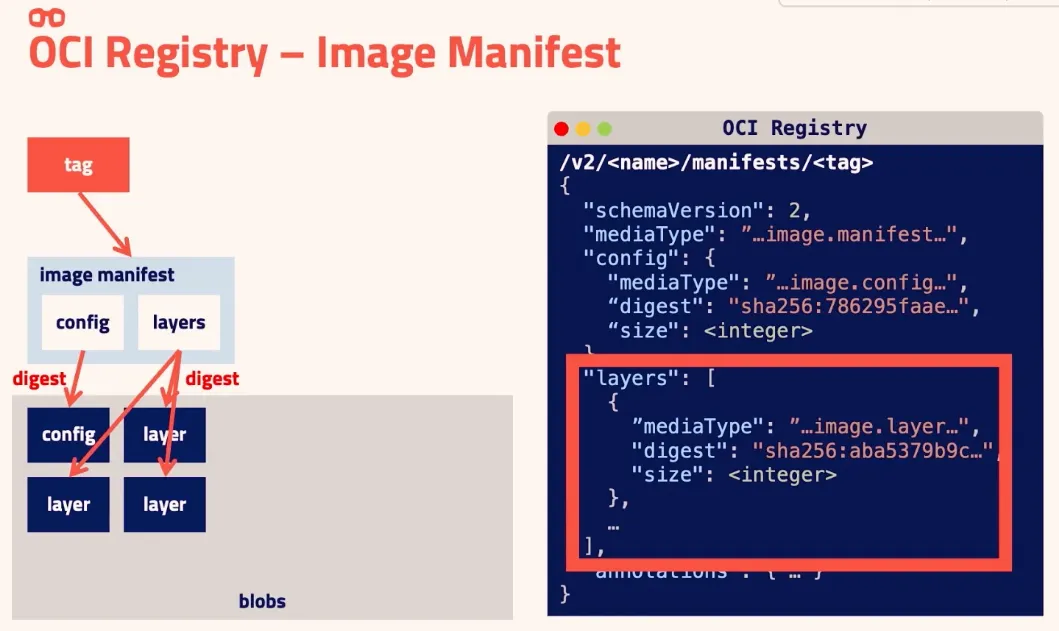
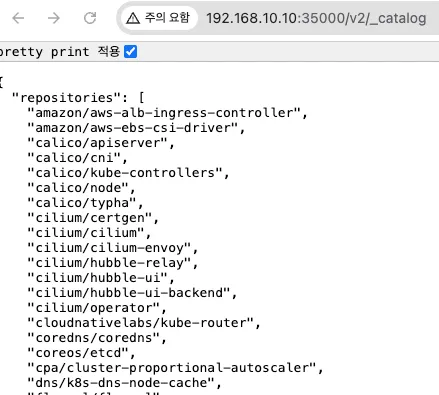
오프라인 배포를 위한 컨테이너 이미지 다운로드 및 이미지 레지스트리(저장소)에 등록(업로드)
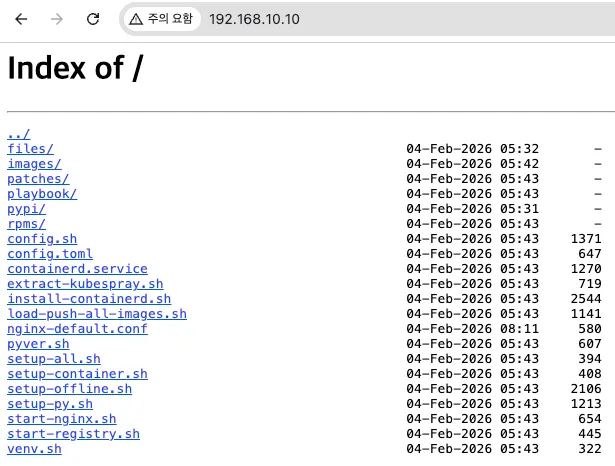
파일(목록)을 다운로드 하고 Nginx 컨테이너를 실행하여, 파일 다운로드 기능 제공
kubespary-offline 설치 실습
기본환경준비
☞ git clone 후 download-all.sh 로 설치에 필요한 파일들 다운로드 수행 (3.3GB 정도) 17분 소요
- download-all.sh : 아래 후속 실행되는 스크립트들 확인
#!/bin/bash

run() {
    echo "=> Running: $*"
    $* || {
        echo "Failed in : $*"
        exit 1
    }
}

source ./config.sh

#run ./install-docker.sh
#run ./install-nerdctl.sh
run ./precheck.sh
run ./prepare-pkgs.sh || exit 1
run ./prepare-py.sh
run ./get-kubespray.sh
if $ansible_in_container; then
    run ./build-ansible-container.sh
else
    run ./pypi-mirror.sh
fi
run ./download-kubespray-files.sh
run ./download-additional-containers.sh
run ./create-repo.sh
run ./copy-target-scripts.sh

echo "Done."
config.sh → target-scripts/config.sh : 설치되는 버전 정보 변수 설정 : 버전 변경 시에는 이 단계에서 수정 필요!, 버전 변수에 파일 다운로드 됨
#!/bin/bash

source ./target-scripts/config.sh

# container runtime for preparation node
docker=${docker:-podman}
#docker=${docker:-docker}
#docker=${docker:-/usr/local/bin/nerdctl}

# Run ansible in container?
ansible_in_container=${ansible_in_container:-false}
cat ./target-scripts/config.sh

#!/bin/bash
# Kubespray version to download. Use "master" for latest master branch.
KUBESPRAY_VERSION=${KUBESPRAY_VERSION:-2.30.0}
#KUBESPRAY_VERSION=${KUBESPRAY_VERSION:-master}

# Versions of containerd related binaries used in `install-containerd.sh`
# These version must be same as kubespray.
# Refer `roles/kubespray_defaults/vars/main/checksums.yml` of kubespray.
RUNC_VERSION=1.3.4
CONTAINERD_VERSION=2.2.1
NERDCTL_VERSION=2.2.1
CNI_VERSION=1.8.0

# Some container versions, must be same as ../imagelists/images.txt
NGINX_VERSION=1.29.4
REGISTRY_VERSION=3.0.0

# container registry port
REGISTRY_PORT=${REGISTRY_PORT:-35000}

# Additional container registry hosts
ADDITIONAL_CONTAINER_REGISTRY_LIST=${ADDITIONAL_CONTAINER_REGISTRY_LIST:-"myregistry.io"}

# Architecture of binary files
# Detect OS type and get architecture accordingly
map_arch() {
    case "$1" in
        x86_64)
            echo "amd64"
            ;;
        aarch64)
            echo "arm64"
            ;;
        *)
            echo "$1"
            ;;
    esac
}

if [ -e /etc/redhat-release ]; then
    # RHEL/AlmaLinux/Rocky Linux
    ARCH=$(uname -m)
    IMAGE_ARCH=$(map_arch "$ARCH")
elif command -v dpkg >/dev/null 2>&1; then
    # Ubuntu/Debian
    IMAGE_ARCH=$(dpkg --print-architecture)
else
    # Fallback: use uname -m
    ARCH=$(uname -m)
    IMAGE_ARCH=$(map_arch "$ARCH")
fi
#!/bin/bash

source /etc/os-release
source ./config.sh

if [ "$docker" != "podman" ]; then
    if ! command -v $docker >/dev/null 2>&1; then
        echo "No $docker installed"
        exit 1
    fi
fi

if [ -e /etc/redhat-release ] && [[ "$VERSION_ID" =~ ^7.* ]]; then
    if [ "$(getenforce)" == "Enforcing" ]; then
        echo "You must disable SELinux for RHEL7/CentOS7"
        exit 1
    fi
fi
#!/bin/bash

source ./config.sh
source scripts/common.sh
source scripts/images.sh

if [ "$SKIP_DOWNLOAD_IMAGES" = "true" ]; then
    exit 0
fi

if [ ! -e "${IMAGES_DIR}/images.list" ]; then
    echo "${IMAGES_DIR}/images.list does not exist. Run download-kubespray-files.sh first."
    exit 1
fi

# download images
images=$(cat ${IMAGES_DIR}/images.list)
for i in $images; do
    get_image $i
done
download-additional-containers.sh : 추가 (컨테이너) 이미지 다운로드 실행 - nginx, registry
# setup-offline.sh
# 스크립트 실행 전 기본 정보 확인
dnf repolist
repo id                                              repo name
appstream                                            Rocky Linux 10 - AppStream
baseos                                               Rocky Linux 10 - BaseOS
extras                                               Rocky Linux 10 - Extras
...

cat /etc/redhat-release
Rocky Linux release 10.0 (Red Quartz)


# 스크립트 실행 : Setup yum/deb repo config and PyPI mirror config to use local nginx server.
./setup-offline.sh
===> Disable all yumrepositories
===> Setup local yum repository
===> Setup PyPI mirror

# 기존 repo 이름이 .original로 변경되고, offline.repo 추가 확인
tree /etc/yum.repos.d/
/etc/yum.repos.d/
├── offline.repo
├── rocky-addons.repo.original
├── rocky-devel.repo.original
├── rocky-extras.repo.original
└── rocky.repo.original

# offline.repo 파일 확인
cat /etc/yum.repos.d/offline.repo
[offline-repo]
name=Offline repo
baseurl=http://localhost/rpms/local/
enabled=1
gpgcheck=0

# offline repo 확인
dnf clean all
dnf repolist
repo id                                                      repo name
offline-repo                                                 Offline repo

# pip 전역 설정 : pypi mirror 설정 확인
cat ~/.config/pip/pip.conf
[global]
index = http://localhost/pypi/
index-url = http://localhost/pypi/
trusted-host = localhost
# 스크립트 실행 전 기본 정보 확인
dnf repolist
repo id                                              repo name
appstream                                            Rocky Linux 10 - AppStream
baseos                                               Rocky Linux 10 - BaseOS
extras                                               Rocky Linux 10 - Extras
...

cat /etc/redhat-release
Rocky Linux release 10.0 (Red Quartz)


# 스크립트 실행 : Setup yum/deb repo config and PyPI mirror config to use local nginx server.
./setup-offline.sh
===> Disable all yumrepositories
===> Setup local yum repository
===> Setup PyPI mirror

# 기존 repo 이름이 .original로 변경되고, offline.repo 추가 확인
tree /etc/yum.repos.d/
/etc/yum.repos.d/
├── offline.repo
├── rocky-addons.repo.original
├── rocky-devel.repo.original
├── rocky-extras.repo.original
└── rocky.repo.original

# offline.repo 파일 확인
cat /etc/yum.repos.d/offline.repo
[offline-repo]
name=Offline repo
baseurl=http://localhost/rpms/local/
enabled=1
gpgcheck=0

# offline repo 확인
dnf clean all
dnf repolist
repo id                                                      repo name
offline-repo                                                 Offline repo

# pip 전역 설정 : pypi mirror 설정 확인
cat ~/.config/pip/pip.conf
[global]
index = http://localhost/pypi/
index-url = http://localhost/pypi/
trusted-host = localhost
[4] setup-py.sh 실행 : offline repo 로 부터 python${PY} 설치 시도 → offline repo 동작 여부 확인
# Install python3 and venv from local repo.
## sudo dnf install -y --disablerepo=* --enablerepo=offline-repo python${PY}
./setup-py.sh
===> Install python, venv, etc
Last metadata expiration check: 0:06:40 ago on Wed 04 Feb 2026 12:23:11 AM KST.
Package python3-3.12.12-3.el10_1.aarch64 is already installed.
Dependencies resolved.
Nothing to do.
Complete!

# 변수 확인
source pyver.sh
echo -e "python_version $python${PY}"
python_version 3.12

# offline-repo 에 패키지 파일 확인
dnf info python3
tree rpms/local/ | grep -i python
├── libcap-ng-python3-0.8.4-6.el10.aarch64.rpm
├── python3-3.12.12-3.el10_1.aarch64.rpm
...
# Install python3 and venv from local repo.
## sudo dnf install -y --disablerepo=* --enablerepo=offline-repo python${PY}
./setup-py.sh
===> Install python, venv, etc
Last metadata expiration check: 0:06:40 ago on Wed 04 Feb 2026 12:23:11 AM KST.
Package python3-3.12.12-3.el10_1.aarch64 is already installed.
Dependencies resolved.
Nothing to do.
Complete!

# 변수 확인
source pyver.sh
echo -e "python_version $python${PY}"
python_version 3.12

# offline-repo 에 패키지 파일 확인
dnf info python3
tree rpms/local/ | grep -i python
├── libcap-ng-python3-0.8.4-6.el10.aarch64.rpm
├── python3-3.12.12-3.el10_1.aarch64.rpm
...
[5] start-registry.sh 실행 : (컨테이너) 이미지 저장소 컨테이너로 기동
# Start docker private registry container.
./start-registry.sh
===> Start registry
# (옵션) 실행 명령 참고
echo "===> Start registry"
sudo /usr/local/bin/nerdctl run -d \
    --network host \
    -e REGISTRY_HTTP_ADDR=0.0.0.0:${REGISTRY_PORT} \
    --restart always \
    --name registry \
    -v $REGISTRY_DIR:/var/lib/registry \
    $REGISTRY_IMAGE || exit 1

# 관련 변수 확인
source config.sh
echo -e "registry_port: $REGISTRY_PORT"
registry_port: 35000

# 확인
nerdctl ps
CONTAINER ID    IMAGE                               COMMAND                   CREATED               STATUS    PORTS    NAMES
778cd497fcaf    docker.io/library/registry:3.0.0    "/entrypoint.sh /etc…"    About a minute ago    Up                 registry
0b71e6989724    docker.io/library/nginx:1.29.4      "/docker-entrypoint.…"    30 minutes ago        Up                 nginx

ss -tnlp | grep registry
LISTEN 0      4096               *:35000            *:*    users:(("registry",pid=20021,fd=7))
LISTEN 0      4096               *:5001             *:*    users:(("registry",pid=20021,fd=3))

# 현재는 registry 서버 내부에 저장된 (컨테이너) 이미지 없는 상태 : (참고) REGISTRY_DIR=${REGISTRY_DIR:-/var/lib/registry}
tree /var/lib/registry/
/var/lib/registry/

# tcp 5001 port : debug, metrics
curl 192.168.10.10:5001/metrics
curl 192.168.10.10:5001/debug/pprof/
# Start docker private registry container.
./start-registry.sh
===> Start registry
# (옵션) 실행 명령 참고
echo "===> Start registry"
sudo /usr/local/bin/nerdctl run -d \
    --network host \
    -e REGISTRY_HTTP_ADDR=0.0.0.0:${REGISTRY_PORT} \
    --restart always \
    --name registry \
    -v $REGISTRY_DIR:/var/lib/registry \
    $REGISTRY_IMAGE || exit 1

# 관련 변수 확인
source config.sh
echo -e "registry_port: $REGISTRY_PORT"
registry_port: 35000

# 확인
nerdctl ps
CONTAINER ID    IMAGE                               COMMAND                   CREATED               STATUS    PORTS    NAMES
778cd497fcaf    docker.io/library/registry:3.0.0    "/entrypoint.sh /etc…"    About a minute ago    Up                 registry
0b71e6989724    docker.io/library/nginx:1.29.4      "/docker-entrypoint.…"    30 minutes ago        Up                 nginx

ss -tnlp | grep registry
LISTEN 0      4096               *:35000            *:*    users:(("registry",pid=20021,fd=7))
LISTEN 0      4096               *:5001             *:*    users:(("registry",pid=20021,fd=3))

# 현재는 registry 서버 내부에 저장된 (컨테이너) 이미지 없는 상태 : (참고) REGISTRY_DIR=${REGISTRY_DIR:-/var/lib/registry}
tree /var/lib/registry/
/var/lib/registry/

# tcp 5001 port : debug, metrics
curl 192.168.10.10:5001/metrics
curl 192.168.10.10:5001/debug/pprof/
[6] load-push-images.sh 실행 : (컨테이너) 이미지 저장소에 이미지 push
#!/bin/bash

cd $(dirname $0)
CURRENT_DIR=$(pwd)
source ./config.sh

KUBESPRAY_TARBALL=files/kubespray-${KUBESPRAY_VERSION}.tar.gz
DIR=kubespray-${KUBESPRAY_VERSION}

if [ -d $DIR ]; then
    echo "${DIR} already exists."
    exit 0
fi

if [ ! -e $KUBESPRAY_TARBALL ]; then
    echo "$KUBESPRAY_TARBALL does not exist."
    exit 1
fi

tar xvzf $KUBESPRAY_TARBALL || exit 1

# apply patches
sleep 1 # avoid annoying patch error in shared folders.
if [ -d $CURRENT_DIR/patches/${KUBESPRAY_VERSION} ]; then
    for patch in $CURRENT_DIR/patches/${KUBESPRAY_VERSION}/*.patch; do
        if [[ -f "${patch}" ]]; then
          echo "===> Apply patch: $patch"
          (cd $DIR && patch -p1 < $patch)
        fi
    done
fi
# (TS) k8s-node 에 디폴트 라우팅 추가 필요
# -----------------------------------------------
# Flannel 파드가 정상 기동 시, kube-flannel 컨테이너가 호스트에 /run/flannel/subnet.env 파일 생성함
# Flannel은 기본적으로 노드의 Default Route가 설정된 인터페이스를 찾아서 그 IP를 노드 간 통신(VxLAN 등)의 엔드포인트로 사용하려 합니다.
# 기본 라우팅이 없으면 Flannel이 어떤 인터페이스를 통해 다른 노드와 통신해야 할지 결정하지 못해 실행이 중단됨. 결국 파드가 정상 기동 실패됨.
# 파드 기동 실패가 되면, 호스트에 /run/flannel/subnet.env 파일 생성이 안됨. 결국 해당 Task 에서 실패하게 됨!
TASK [network_plugin/flannel : Flannel | Wait for flannel subnet.env file presence] **************************************
fatal: [k8s-node1]: FAILED! => {"changed": false, "elapsed": 600, "msg": "Timeout when waiting for file /run/flannel/subnet.env"}
#ansible-playbook -i inventory/mycluster/inventory.ini -v reset.yml -e kube_version="1.34.3"
[k8s-nodes]
nmcli connection modify enp0s9 +ipv4.routes "0.0.0.0/0 192.168.10.10 200"
nmcli connection up enp0s9
ip route

[admin-lb]
# NAT 설정 제거하여, 실제적으로 k8s-node 가 외부 인터넷이 안되는 상황을 만들고 실습 진행해보자
iptables -t nat -D POSTROUTING -o enp0s8 -j MASQUERADE
iptables -t nat -S
# -----------------------------------------------
다운로드 파일, 이미지 목록 작성* : generate_list.sh → generate_list.yml
> generate_list.sh
# generate_list.sh
#!/bin/bash
set -eo pipefail

CURRENT_DIR=$(cd $(dirname $0); pwd)
TEMP_DIR="${CURRENT_DIR}/temp"
REPO_ROOT_DIR="${CURRENT_DIR%/contrib/offline}"

: ${DOWNLOAD_YML:="roles/kubespray_defaults/defaults/main/download.yml"}

mkdir -p ${TEMP_DIR}

# generate all download files url template
grep 'download_url:' ${REPO_ROOT_DIR}/${DOWNLOAD_YML} \
    | sed 's/^.*_url: //g;s/\"//g' > ${TEMP_DIR}/files.list.template

# generate all images list template
sed -n '/^downloads:/,/download_defaults:/p' ${REPO_ROOT_DIR}/${DOWNLOAD_YML} \
    | sed -n "s/repo: //p;s/tag: //p" | tr -d ' ' \
    | sed 'N;s#\n# #g' | tr ' ' ':' | sed 's/\"//g' > ${TEMP_DIR}/images.list.template

# add kube-* images to images list template
# Those container images are downloaded by kubeadm, then roles/kubespray_defaults/defaults/main/download.yml
# doesn't contain those images. That is reason why here needs to put those images into the
# list separately.
KUBE_IMAGES="kube-apiserver kube-controller-manager kube-scheduler kube-proxy"
for i in $KUBE_IMAGES; do
    echo "{{ kube_image_repo }}/$i:v{{ kube_version }}" >> ${TEMP_DIR}/images.list.template
done

# run ansible to expand templates
/bin/cp ${CURRENT_DIR}/generate_list.yml ${REPO_ROOT_DIR}

(cd ${REPO_ROOT_DIR} && ansible-playbook $* generate_list.yml && /bin/rm generate_list.yml) || exit 1
#!/usr/bin/env bash

OPTION=$1
CURRENT_DIR=$(cd $(dirname $0); pwd)
TEMP_DIR="${CURRENT_DIR}/temp"

IMAGE_TAR_FILE="${CURRENT_DIR}/container-images.tar.gz"
IMAGE_DIR="${CURRENT_DIR}/container-images"
IMAGE_LIST="${IMAGE_DIR}/container-images.txt"
RETRY_COUNT=5

function create_container_image_tar() {
	set -e

	if [ -z "${IMAGES_FROM_FILE}" ]; then
		echo "Getting images from current \"$(kubectl config current-context)\""

		IMAGES=$(mktemp --suffix=-images)
		trap 'rm -f "${IMAGES}"' EXIT

		kubectl describe cronjobs,jobs,pods --all-namespaces | grep " Image:" | awk '{print $2}' | sort | uniq > "${IMAGES}"
		# NOTE: etcd and pause cannot be seen as pods.
		kubectl cluster-info dump | grep -E "quay.io/coreos/etcd:|registry.k8s.io/pause:" | sed s@\"@@g >> "${IMAGES}"
	else
		echo "Getting images from file \"${IMAGES_FROM_FILE}\""
		if [ ! -f "${IMAGES_FROM_FILE}" ]; then
			echo "${IMAGES_FROM_FILE} is not a file"
			exit 1
		fi
		IMAGES=$(realpath $IMAGES_FROM_FILE)
	fi

	rm -f  ${IMAGE_TAR_FILE}
	rm -rf ${IMAGE_DIR}
	mkdir  ${IMAGE_DIR}
	cd     ${IMAGE_DIR}

	sudo --preserve-env=http_proxy,https_proxy,no_proxy ${runtime} pull registry:latest
	sudo ${runtime} save -o registry-latest.tar registry:latest

	while read -r image
	do
		FILE_NAME="$(echo ${image} | sed s@"/"@"-"@g | sed s/":"/"-"/g | sed -E 's/\@.*//g')".tar
		set +e
		for step in $(seq 1 ${RETRY_COUNT})
		do
			sudo --preserve-env=http_proxy,https_proxy,no_proxy ${runtime} pull ${image}
			if [ $? -eq 0 ]; then
				break
			fi
			echo "Failed to pull ${image} at step ${step}"
			if [ ${step} -eq ${RETRY_COUNT} ]; then
				exit 1
			fi
		done
		set -e
		sudo ${runtime} save -o ${FILE_NAME}  ${image}

		# NOTE: Here removes the following repo parts from each image
		# so that these parts will be replaced with Kubespray.
		# - kube_image_repo: "registry.k8s.io"
		# - gcr_image_repo: "gcr.io"
		# - ghcr_image_repo: "ghcr.io"
		# - docker_image_repo: "docker.io"
		# - quay_image_repo: "quay.io"
		FIRST_PART=$(echo ${image} | awk -F"/" '{print $1}')
		if [ "${FIRST_PART}" = "registry.k8s.io" ] ||
		   [ "${FIRST_PART}" = "gcr.io" ] ||
		   [ "${FIRST_PART}" = "ghcr.io" ] ||
		   [ "${FIRST_PART}" = "docker.io" ] ||
		   [ "${FIRST_PART}" = "quay.io" ] ||
		   [ "${FIRST_PART}" = "${PRIVATE_REGISTRY}" ]; then
			image=$(echo ${image} | sed s@"${FIRST_PART}/"@@ | sed -E 's/\@.*/\n/g')
		fi
		echo "${FILE_NAME}  ${image}" >> ${IMAGE_LIST}
	done < "${IMAGES}"

	cd ..
	sudo chown ${USER} ${IMAGE_DIR}/*
	tar -zcvf ${IMAGE_TAR_FILE}  ./container-images
	rm -rf ${IMAGE_DIR}

	echo ""
	echo "${IMAGE_TAR_FILE} is created to contain your container images."
	echo "Please keep this file and bring it to your offline environment."
}

function register_container_images() {
	create_registry=false
	REGISTRY_PORT=${REGISTRY_PORT:-"5000"}

	if [ -z "${DESTINATION_REGISTRY}" ]; then
		echo "DESTINATION_REGISTRY not set, will create local registry"
		create_registry=true
		DESTINATION_REGISTRY="$(hostname):${REGISTRY_PORT}"
	fi
	echo "Images will be pushed to ${DESTINATION_REGISTRY}"

	if [ ! -f ${IMAGE_TAR_FILE} ]; then
		echo "${IMAGE_TAR_FILE} should exist."
		exit 1
	fi
	if [ ! -d ${TEMP_DIR} ]; then
		mkdir ${TEMP_DIR}
	fi

	# To avoid "http: server gave http response to https client" error.
	if [ -d /etc/docker/ ]; then
		set -e
		# Ubuntu18.04, RHEL7/CentOS7
		cp ${CURRENT_DIR}/docker-daemon.json      ${TEMP_DIR}/docker-daemon.json
		sed -i s@"HOSTNAME"@"$(hostname)"@  ${TEMP_DIR}/docker-daemon.json
		sudo cp ${TEMP_DIR}/docker-daemon.json           /etc/docker/daemon.json
	elif [ -d /etc/containers/ ]; then
		set -e
		# RHEL8/CentOS8
		cp ${CURRENT_DIR}/registries.conf         ${TEMP_DIR}/registries.conf
		sed -i s@"HOSTNAME"@"$(hostname)"@  ${TEMP_DIR}/registries.conf
		sudo cp ${TEMP_DIR}/registries.conf   /etc/containers/registries.conf
  elif [ "$(uname)" == "Darwin" ]; then
    echo "This is a Mac, no configuration changes are required"
	else
		echo "runtime package(docker-ce, podman, nerctl, etc.) should be installed"
		exit 1
	fi

	tar -zxvf ${IMAGE_TAR_FILE}

	if ${create_registry}; then
		sudo ${runtime} load -i ${IMAGE_DIR}/registry-latest.tar
		set +e

		sudo ${runtime} container inspect registry >/dev/null 2>&1
		if [ $? -ne 0 ]; then
			sudo ${runtime} run --restart=always -d -p "${REGISTRY_PORT}":"${REGISTRY_PORT}" --name registry registry:latest
		fi
		set -e
	fi

	while read -r line; do
		file_name=$(echo ${line} | awk '{print $1}')
		raw_image=$(echo ${line} | awk '{print $2}')
		new_image="${DESTINATION_REGISTRY}/${raw_image}"
		load_image=$(sudo ${runtime} load -i ${IMAGE_DIR}/${file_name} | head -n1)
		org_image=$(echo "${load_image}"  | awk '{print $3}')
		# special case for tags containing the digest when using docker or podman as the container runtime
		if [ "${org_image}" == "ID:" ]; then
		  org_image=$(echo "${load_image}"  | awk '{print $4}')
		fi
		image_id=$(sudo ${runtime} image inspect --format "{{.Id}}" "${org_image}")
		if [ -z "${file_name}" ]; then
			echo "Failed to get file_name for line ${line}"
			exit 1
		fi
		if [ -z "${raw_image}" ]; then
			echo "Failed to get raw_image for line ${line}"
			exit 1
		fi
		if [ -z "${org_image}" ]; then
			echo "Failed to get org_image for line ${line}"
			exit 1
		fi
		if [ -z "${image_id}" ]; then
			echo "Failed to get image_id for file ${file_name}"
			exit 1
		fi
		sudo ${runtime} load -i ${IMAGE_DIR}/${file_name}
		sudo ${runtime} tag  ${image_id} ${new_image}
		sudo ${runtime} push ${new_image}
	done <<< "$(cat ${IMAGE_LIST})"

	echo "Succeeded to register container images to local registry."
	echo "Please specify \"${DESTINATION_REGISTRY}\" for the following options in your inventry:"
	echo "- kube_image_repo"
	echo "- gcr_image_repo"
	echo "- docker_image_repo"
	echo "- quay_image_repo"
}

# get runtime command
if command -v nerdctl 1>/dev/null 2>&1; then
    runtime="nerdctl"
elif command -v podman 1>/dev/null 2>&1; then
    runtime="podman"
elif command -v docker 1>/dev/null 2>&1; then
    runtime="docker"
else
    echo "No supported container runtime found"
    exit 1
fi

if [ "${OPTION}" == "create" ]; then
	create_container_image_tar
elif [ "${OPTION}" == "register" ]; then
	register_container_images
else
	echo "This script has two features:"
	echo "(1) Get container images from an environment which is deployed online, or set IMAGES_FROM_FILE"
	echo "    environment variable to get images from a file (e.g. temp/images.list after running the"
	echo "    ./generate_list.sh script)."
	echo "(2) Deploy local container registry and register the container images to the registry."
	echo ""
	echo "Step(1) should be done online site as a preparation, then we bring"
	echo "the gotten images to the target offline environment. if images are from"
	echo "a private registry, you need to set PRIVATE_REGISTRY environment variable."
	echo "Then we will run step(2) for registering the images to local registry, or to an existing"
	echo "registry set by the DESTINATION_REGISTRY environment variable. By default, the local registry"
	echo "will run on port 5000. This can be changed with the REGISTRY_PORT environment variable"
	echo ""
	echo "${IMAGE_TAR_FILE} is created to contain your container images."
	echo "Please keep this file and bring it to your offline environment."
	echo ""
	echo "Step(1) can be operated with:"
	echo " $ ./manage-offline-container-images.sh   create"
	echo ""
	echo "Step(2) can be operated with:"
	echo " $ ./manage-offline-container-images.sh   register"
	echo ""
	echo "Please specify 'create' or 'register'."
	echo ""
	exit 1
fi
manage-offline-files.sh : 지정된 모든 파일을 다운로드하고, Nginx 컨테이너를 실행하여 파일 다운로드 기능 제공
#!/usr/bin/env python3
"""This is a helper script to manage-offline-files.sh.

After running manage-offline-files.sh, you can run upload2artifactory.py
to recursively upload each file to a generic repository in Artifactory.

This script recurses the current working directory and is intended to
be started from 'kubespray/contrib/offline/offline-files'

Environment Variables:
    USERNAME -- At least permissions'Deploy/Cache' and 'Delete/Overwrite'.
    TOKEN -- Generate this with 'Set Me Up' in your user.
    BASE_URL -- The URL including the repository name.

"""
import os
import urllib.request
import base64


def upload_file(file_path, destination_url, username, token):
    """Helper function to upload a single file"""
    try:
        with open(file_path, 'rb') as f:
            file_data = f.read()

        request = urllib.request.Request(destination_url, data=file_data, method='PUT') # NOQA
        auth_header = base64.b64encode(f"{username}:{token}".encode()).decode()
        request.add_header("Authorization", f"Basic {auth_header}")

        with urllib.request.urlopen(request) as response:
            if response.status in [200, 201]:
                print(f"Success: Uploaded {file_path}")
            else:
                print(f"Failed: {response.status} {response.read().decode('utf-8')}") # NOQA
    except urllib.error.HTTPError as e:
        print(f"HTTPError: {e.code} {e.reason} for {file_path}")
    except urllib.error.URLError as e:
        print(f"URLError: {e.reason} for {file_path}")
    except OSError as e:
        print(f"OSError: {e.strerror} for {file_path}")


def upload_files(base_url, username, token):
    """ Recurse current dir and upload each file using urllib.request """
    for root, _, files in os.walk(os.getcwd()):
        for file in files:
            file_path = os.path.join(root, file)
            relative_path = os.path.relpath(file_path, os.getcwd())
            destination_url = f"{base_url}/{relative_path}"

            print(f"Uploading {file_path} to {destination_url}")
            upload_file(file_path, destination_url, username, token)


if __name__ == "__main__":
    a_user = os.getenv("USERNAME")
    a_token = os.getenv("TOKEN")
    a_url = os.getenv("BASE_URL")
    if not a_user or not a_token or not a_url:
        print(
            "Error: Environment variables USERNAME, TOKEN, and BASE_URL must be set." # NOQA
        )
        exit()
    upload_files(a_url, a_user, a_token)
kubespary-offline 에 kube_version 변경 적용하여 관련 파일 다운로드
# 디렉터리 이동 후 기존 정보 백업
cd /root/kubespray-offline
tree cache/kubespray-2.30.0/contrib/offline/temp/
├── files.list
├── files.list.template
├── images.list
└── images.list.template
mv cache/kubespray-2.30.0/contrib/offline/temp/files.list cache/kubespray-2.30.0/contrib/offline/temp/files-2.list
mv cache/kubespray-2.30.0/contrib/offline/temp/images.list cache/kubespray-2.30.0/contrib/offline/temp/images-2.list

# (옵션) 다운로드 스크립트에 실제 다운로드 실행하는 부분 제거 시
# -----------------------------------------------
cat download-kubespray-files.sh
cp download-kubespray-files.sh download-kubespray-files.bak
sed -i '/generate_list$/,$ { /generate_list/!d }' download-kubespray-files.sh
diff download-kubespray-files.sh download-kubespray-files.bak

# 다운로드 목록 작성 스크립트(ansible-playbook 후속 실행)에 kube_version=1.33.7 추가
sed -i 's|offline/generate_list.sh|offline/generate_list.sh -e kube_version=1.33.7|g' download-kubespray-files.sh
cat download-kubespray-files.sh | grep kube_version
    LANG=C /bin/bash ${KUBESPRAY_DIR}/contrib/offline/generate_list.sh -e kube_version=1.33.7 || exit 1
# -----------------------------------------------


# 스크립트 실행 후 확인
./download-kubespray-files.sh
cd cache/kubespray-2.30.0/contrib/offline/temp

# 최초 설치 버전과 비교 확인
diff files-2.list files.list
vi -d files-2.list files.list

diff images-2.list images.list
vi -d images-2.list images.list


# (옵션) kube_version 1.33.7 관련 버전을 적용하여 파일과 이미지 다운로드 실행 시
cp download-kubespray-files.bak download-kubespray-files.sh
sed -i 's|offline/generate_list.sh|offline/generate_list.sh -e kube_version=1.33.7|g' download-kubespray-files.sh
./download-kubespray-files.sh
# 현재 파드 상태
kubectl get pod
NAME                    READY   STATUS             RESTARTS   AGE
nginx-54fc99c8d-m6fl5   0/1     ImagePullBackOff   0          16m

# 이미지 정보
kubectl get deploy -owide
NAME    READY   UP-TO-DATE   AVAILABLE   AGE   CONTAINERS   IMAGES         SELECTOR
nginx   0/1     1            0           17m   nginx        nginx:alpine   app=nginx

# 디플로이먼트에 이미지 정보 업데이트
kubectl set image deployment/nginx nginx=192.168.10.10:35000/library/nginx:alpine
kubectl get deploy -owide
NAME    READY   UP-TO-DATE   AVAILABLE   AGE   CONTAINERS   IMAGES                                     SELECTOR
nginx   1/1     1            1           19m   nginx        192.168.10.10:35000/library/nginx:alpine   app=nginx

# 현재 파드 상태
kubectl get pod
NAME                    READY   STATUS    RESTARTS   AGE
nginx-5ff7dd7b8-t6b2n   1/1     Running   0          22s
# 삭제 후 다시 디플로이먼트 배포
kubectl delete deployments.apps nginx

cat << EOF | kubectl apply -f -
apiVersion: apps/v1
kind: Deployment
metadata:
  name: nginx
  labels:
    app: nginx
spec:
  replicas: 1
  selector:
    matchLabels:
      app: nginx
  template:
    metadata:
      labels:
        app: nginx
    spec:
      containers:
        - name: nginx
          image: nginx:alpine   # docker.io/library/nginx:alpine
          ports:
            - containerPort: 80
EOF

# 현재 파드 상태
kubectl get pod


[k8s-node1, k8s-node2]
# docker.io 대신 내부 이미지 레지스트리 주소 설정
mkdir -p /etc/containerd/certs.d/docker.io
cat <<EOF > /etc/containerd/certs.d/docker.io/hosts.toml
server = "https://docker.io"         # [HTTPS] 원본 registry 주소 , docker.io 를 대상으로 할 때 이 설정을 참조한다는 의미

[host."http://192.168.10.10:35000"]  # [HTTP] 내부 레지스트리를 미러로 지정 , docker.io 대신 실제 이미지를 가져올 내부 레지스트리 주소
  capabilities = ["pull", "resolve"] # "pull": 이미지 다운로드 허용 , "resolve": 태그 → 다이제스트 해석
  skip_verify = true                 # HTTPS 인증서 검증 스킵 (HTTP라서 사실상 의미 없는지 테스트 해보자)
EOF
systemctl restart containerd

# 이미지 가져오기 실행 후 확인 : k8s-nodes는 현재 외부 통신 불능 상태인데, 아래 처럼 docker.io 미러 설정되어서 가져오는 것을 확인!
nerdctl pull docker.io/library/nginx:alpine
crictl images | grep nginx
192.168.10.10:35000/library/nginx                   alpine              aea88c29b151e       25.7MB
docker.io/library/nginx                             alpine              aea88c29b151e       25.7MB


# 현재 파드 상태
kubectl get pod
NAME                    READY   STATUS    RESTARTS   AGE
nginx-54fc99c8d-8jpqt   1/1     Running   0          12m
> kubespary 에 containerd_registries_mirrors values 설정 후 적용 --tags containerd