Jupyterhub 인프라 구축 및 설치
설치환경
인프라 : Kind 쿠버네티스
설치툴 : 헬름
호스트 : 우분투 22.04 LTS
# KIND : k8s(1.23.7) 배포

git clone https://github.com/AcornPublishing/istio-in-action
cd istio-in-action/book-source-code-master
pwd # 각자 자신의 pwd 경로
code .

# 아래 extramounts 생략 시, myk8s-control-plane 컨테이너 sh/bash 진입 후 직접 git clone 가능
kind create cluster --name myk8s --image kindest/node:v1.23.17 --config - <<EOF
kind: Cluster
apiVersion: kind.x-k8s.io/v1alpha4
nodes:
- role: control-plane
  extraPortMappings:
  - containerPort: 30000 # Sample Application (istio-ingrssgateway) HTTP
    hostPort: 30000
  - containerPort: 30001 # Prometheus
    hostPort: 30001
  - containerPort: 30002 # Grafana
    hostPort: 30002
  - containerPort: 30003 # Kiali
    hostPort: 30003
  - containerPort: 30004 # Tracing
    hostPort: 30004
  - containerPort: 30005 # Sample Application (istio-ingrssgateway) HTTPS
    hostPort: 30005
  - containerPort: 30006 # TCP Route
    hostPort: 30006
  - containerPort: 30007 # kube-ops-view
    hostPort: 30007
  extraMounts: # 해당 부분 생략 가능
  - hostPath: /hoem/ubuntu/istio-in-action/book-source-code-master # 각자 자신의 pwd 경로로 설정
    containerPath: /istiobook
networking:
  podSubnet: 10.10.0.0/16
  serviceSubnet: 10.200.0.0/22
EOF

# 설치 확인
docker ps

# 노드에 기본 툴 설치
docker exec -it myk8s-control-plane sh -c 'apt update && apt install tree psmisc lsof wget bridge-utils net-tools dnsutils tcpdump ngrep iputils-ping git vim -y'

# (옵션) kube-ops-view
helm repo add geek-cookbook https://geek-cookbook.github.io/charts/
helm install kube-ops-view geek-cookbook/kube-ops-view --version 1.2.2 --set service.main.type=NodePort,service.main.ports.http.nodePort=30007 --set env.TZ="Asia/Seoul" --namespace kube-system
kubectl get deploy,pod,svc,ep -n kube-system -l app.kubernetes.io/instance=kube-ops-view

## kube-ops-view 접속 URL 확인
open "http://localhost:30007/#scale=1.5"
open "http://localhost:30007/#scale=1.3"

# (옵션) metrics-server
helm repo add metrics-server https://kubernetes-sigs.github.io/metrics-server/
helm install metrics-server metrics-server/metrics-server --set 'args[0]=--kubelet-insecure-tls' -n kube-system
kubectl get all -n kube-system -l app.kubernetes.io/instance=metrics-server
 KIND 쿠버네티스 클러스터
Helm 저장소 추가
helm repo add jupyterhub https://hub.jupyter.org/helm-chart/
helm repo update
values.yaml 생성
mkdir -p /home/ubuntu/jupyter/config
cat > /home/ubuntu/jupyter/config/values.yaml <<'EOF'
proxy:
  service:
    type: NodePort
    nodePorts:
      http: 30006     # ← 반드시 이 값
  https:
    enabled: false  # HTTP만 사용 (Kind 테스트용)

hub:
  extraEnv:
    JUPYTERHUB_ADMIN_USERS: "admin"   # ← 여기서 관리자 지정 (콤마로 여러 명 가능)

  config:
    JupyterHub:
      authenticator_class: dummy
    DummyAuthenticator:
      password: "jupyter123!"         # ← 모든 유저가 이 비밀번호로 로그인

singleuser:
  storage:
    dynamic:
      storageClass: null
    capacity: 10Gi
  memory:
    guarantee: 1G
    limit: 2G
  cpu:
    guarantee: 0.5
    limit: 1.0

# (선택) 프로필 예시
singleuser:
  profileList:
    - display_name: "Minimal Notebook"
      default: true
      kubespawner_override:
        image: jupyter/minimal-notebook:latest
    - display_name: "Data Science Full"
      kubespawner_override:
        image: jupyter/datascience-notebook:latest
EOF
Jupyter chart 설치
# namespace 생성
kubectl create ns jupyterhub

# helm 설치
helm upgrade --install jupyterhub jupyterhub/jupyterhub \
  --namespace jupyterhub \
  --version 3.3.5 \
  --values /home/ubuntu/jupyter/config/values.yaml \
  --timeout 10m \
  --wait --cleanup-on-fail
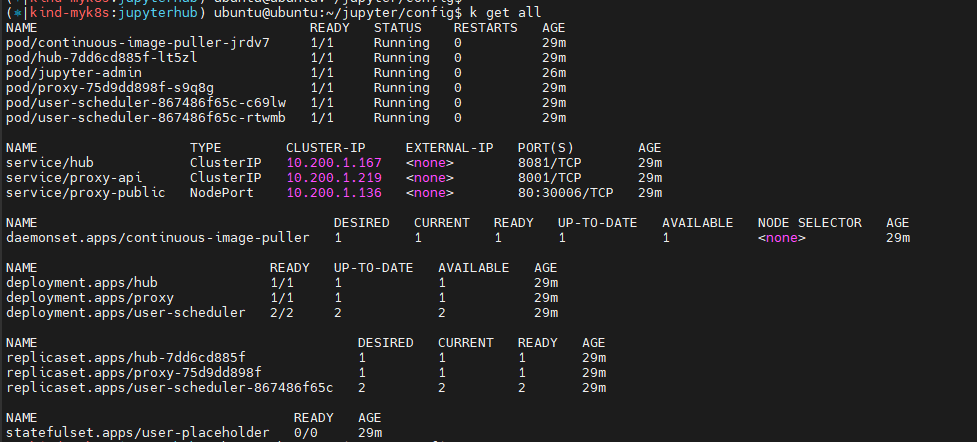 쿠버네티스 배포 상태
Jupyter 확인 및 접속
# 서비스 확인
kubectl get svc -n jupyterhub proxy-public
# → 80:30006/TCP 확인

# 브라우저 접속
http://192.168.9.248:30006
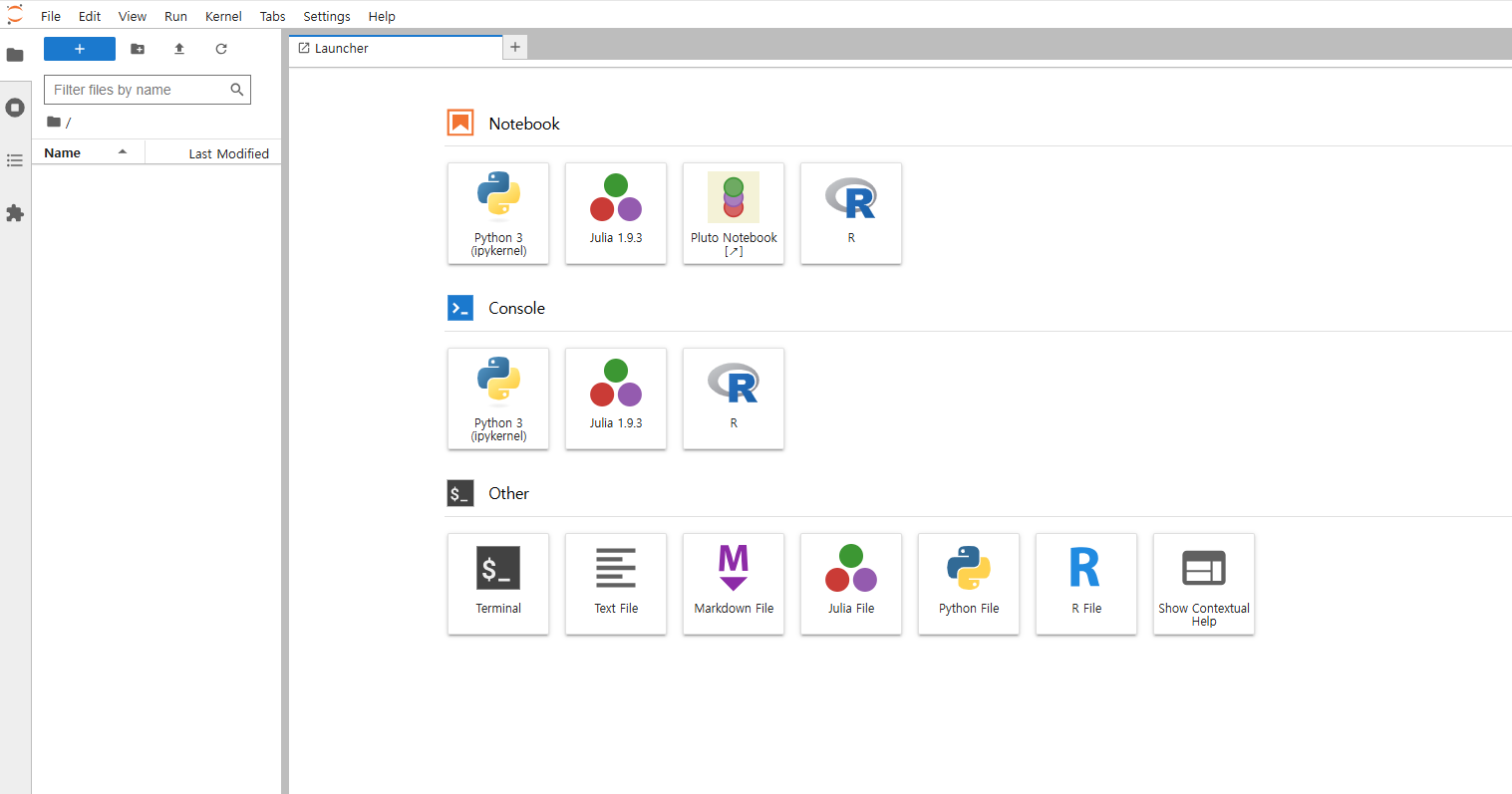 http://192.168.9.248:30006 (admdin / jupyter123!)
초기화 및 삭제
helm delete jupyterhub -n jupyterhub
kubectl delete ns jupyterhub
kind delete cluster --name myk8s